

Halo Filmes
Halo Filmes is an Android streaming app focused on Portuguese-language movies and TV series. It brings recent films, popular shows, and kids content together in one simple interface.
With Halo Filmes you can stream in HD when you are online or download selected titles to watch later without an internet connection. The app is designed especially for Portuguese speakers who want entertainment in their own language.
You can download the official Halo Filmes APK file directly from our website and install it on compatible Android phones and tablets running Android 5.0 or higher.
Rate this app
App details
- App name
- Halo Filmes
- Category
- Entertainment
- Version
- v7.0.1
- Size
- 22.29 MB
- Requirements
- 5.0 and Above
- Package name
- com.tecmpvbr9.v2
- Publisher
- Daniel S Souza
- Price
- Free
- Mod
- No
- Downloads
- 57,201
- Rating
- 4.6 / 5
- Rating count
- 23,184
- Play Store
- No
- Requires root
- No
- Offline support
- Yes
- Contains ads
- Yes
- In-app purchases
- No
- Updated
- May 13, 2026
- Age rating
- Rated for 3+
Table of contents
What is Halo Filmes APK?
Halo Filmes APK is an Android application that lets you watch movies, TV series, and animated content in Portuguese on your mobile device. It focuses on offering a wide catalog of titles dubbed or available in Portuguese so that native speakers can follow the content comfortably.
The app organizes content into sections such as movies, series, and a dedicated area for kids. Users can choose to stream videos online in multiple quality options, including HD, or download them for offline viewing.
Halo Filmes is developed for Android devices with version 5.0 and above, and it works on both smartphones and tablets. The APK is not on Google Play, so users install it manually using the installation file provided on our website.
There might be many viewers who would have issues understanding the Portuguese language. If that’s the case, you can try alternative apps such as Movie Witcher and King Red.
Why download Halo Filmes for Android?
Halo Filmes is particularly attractive for Portuguese-speaking users who want a simple streaming solution focused on their language. Instead of browsing through mixed-language catalogs, you get movies and series that are primarily available in Portuguese, including dubs and subtitles.
The app also suits viewers who like to watch content on the go or in areas with unstable internet. You can download your chosen movies or episodes to the device and watch them later without buffering issues.
Another reason to download Halo Filmes is its straightforward interface. Categories are easy to browse, navigation is simple, and search options help you quickly find movies, web series, or kids animations that match your mood.
How is Halo Filmes useful?
For everyday entertainment in Portuguese, Halo Filmes can become a central app on your Android device. It reduces the time you spend searching across different platforms by collecting assorted movies, shows, and kids content in one place.
The offline download feature is useful if you commute, travel, or have a limited data plan. You can connect to Wi-Fi, download your favorite titles in advance, and watch them later without extra data charges.
Parents can benefit from the dedicated kids section, which focuses on animated and family-friendly titles. This makes it easier to hand a device to children with content that is more suitable for them, while adults still have access to regular movies and series in separate sections.
How to download and install Halo Filmes APK
You can get the official Halo Filmes APK file directly from our website. Follow the steps below to download and install it on your Android device.
Step-by-step installation guide:
Scroll to the download area on this page and tap the Halo Filmes APK download button.
Wait for the APK file to finish downloading to your device.
Open your phone’s settings and enable installation from unknown sources or allow your browser/file manager to install apps.
Locate the downloaded APK in your Downloads folder or file manager.
Tap the APK file and choose Install when prompted.
After the installation completes, open Halo Filmes from your app drawer and grant the necessary permissions.
Once installed, you can browse the catalog, start streaming immediately, or download selected titles for offline viewing.
Features
Portuguese-focused catalog
Most movies and series are available in Portuguese audio, making it ideal for native speakers and learners.
Multiple content sections
Separate sections for movies, TV series, and kids animations help you find the type of content you want quickly.
HD streaming support
Videos can be played in high-definition quality where available, offering a sharper and more immersive viewing experience.
Offline download option
Users can download selected movies and episodes to their device and watch them later without an internet connection.
Subtitles availability
Many titles include subtitle support, helping with comprehension and language learning.
Simple user interface
The layout is straightforward and easy to navigate, so new users can quickly learn how to browse and play content.
Server-based streaming
Content is served from remote servers designed to provide relatively smooth playback when the network is stable.
Free to use with ads
The app is free to install and watch, and it keeps access open by displaying advertisements during use.
Screenshots
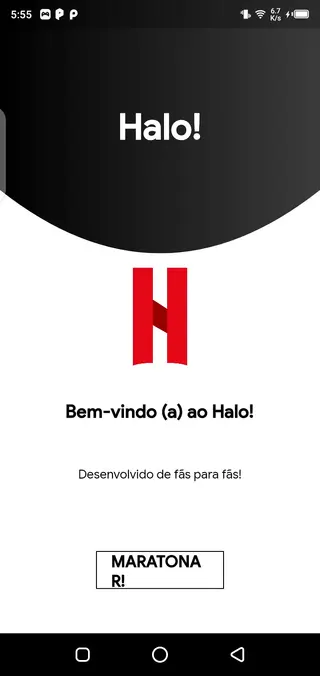
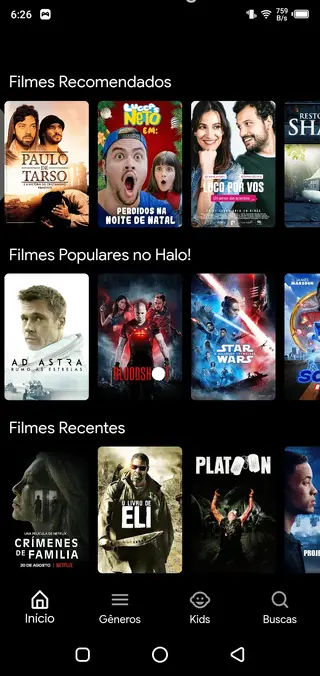

Streaming quality and performance
Halo Filmes focuses on delivering watchable streaming quality for different connection speeds. When your internet is stable, the app can play many titles in HD, offering clear visuals and better detail. On slower connections, you can often select lower quality to reduce buffering.
Performance may vary depending on your device hardware and network conditions. For the best experience, use a modern Android phone or tablet with a reliable Wi-Fi connection when streaming and use the download feature when you expect weaker coverage.
Language options and accessibility
The main attraction of Halo Filmes is its emphasis on Portuguese content. Movies and series are typically dubbed in Portuguese or include Portuguese subtitles, which makes the app especially useful for viewers in Brazil and other Portuguese-speaking regions.
Subtitles can support viewers who are hard of hearing or those learning Portuguese as a second language. By watching with both audio and text, users can reinforce vocabulary and listening skills while enjoying entertainment.
Tips for better offline viewing
If you plan to rely on offline viewing, it is helpful to prepare your content in advance. Connect your device to Wi-Fi and download the movies or episodes you want before traveling or going to areas with weak networks.
Keep an eye on your device storage, as downloaded videos can occupy significant space. After you finish watching certain titles, remove them from the app or your device to free up memory for new downloads.
FAQs
Pros
- Focused on Portuguese-language movies and TV series
- Includes a dedicated kids section with animated content
- Supports HD streaming for better picture quality
- Allows downloading videos for offline watching
- Simple, easy-to-navigate interface
- Completely free to install and use
Cons
- Contains pop-up ads that can interrupt usage
- Not available on the Google Play Store
- Content availability may change over time
- Requires manual APK updates when a new version releases
Conclusion
Halo Filmes is a practical choice for Portuguese-speaking Android users who want free access to movies, series, and kids animations in one app. With HD playback, offline downloads, and a language-focused catalog, it can serve as a lightweight streaming option if you are comfortable installing apps via APK and watching with occasional ads.




Comments
No approved comments yet.