
Among Us Lockscreen
Among Us Lockscreen is a fan-made Android personalization app that turns your lock screen into an Among Us inspired control panel with themed animations, sounds, and wallpapers.
The app offers a customizable lock system, HD game-style backgrounds, and sound effects so you can give your phone the look and feel of the popular social deduction game.
You can download the Among Us Lockscreen APK directly from our website and start customizing your phone with a few simple steps.
Rate this app
App details
- App name
- Among Us Lockscreen
- Category
- Personalization
- Version
- v2.3.4
- Size
- 11.43 MB
- Requirements
- 4.1 and Above
- Package name
- amonguslock.amonguslockscreen.amonglock
- Publisher
- Oleander
- Price
- Free
- Mod
- No
- Downloads
- 1,788,955
- Rating
- 4.6 / 5
- Rating count
- 5,160
- Play Store
- Yes
- Requires root
- No
- Offline support
- No
- Contains ads
- Yes
- In-app purchases
- Yes
- Updated
- May 20, 2026
- Age rating
- Rated for 3+
Table of contents
What is Among Us Lockscreen?
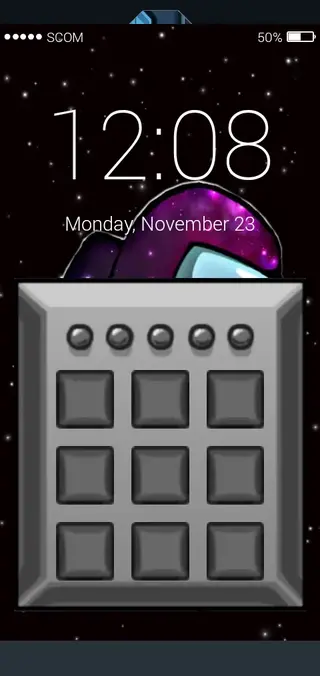
Among Us Lockscreen is a personalization app for Android devices designed for fans of the hit game Among Us. It replaces your standard lock screen with an impostor-themed interface, complete with game-inspired visuals, animations, and sound effects.
The app lets you set up a secure five-digit passcode and apply animated effects or short videos when someone enters the wrong password. You can also enable game-like sounds for locking, unlocking, and typing, which makes each interaction with your device feel closer to the game’s atmosphere.
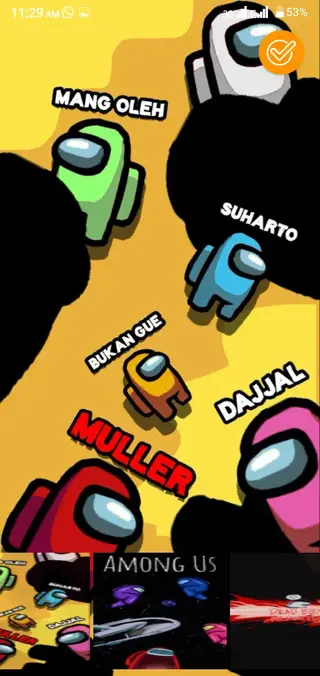
Besides the lock screen itself, Among Us Lockscreen includes a collection of HD wallpapers featuring crewmates, impostors, and space-themed scenes. You can combine wallpapers, lock styles, and sounds to build a consistent Among Us style across your home and lock screens.
This is an unofficial, fan-based customization tool. It does not contain the original Among Us game, but focuses only on visual and sound personalization for your Android phone or tablet.
Similarly, people are getting die-heart fans of games. So, people want to buy different items and applications, which shows the interest of individuals in the game and also let other people know that they are fans of the game. So, we are here with these alternative applications NU Display and X Icon Changer Pro for a unique look and display.
Why download Among Us Lockscreen APK from our site
Downloading the Among Us Lockscreen APK from our website lets you get the latest available version of the app in one place without searching multiple pages. The installation file for the current Android release is provided directly on this page.
With the APK, you can install the app even if it is not visible or easily accessible on Google Play in your region. You still get the same core experience: themed lock screens, HD wallpapers, video effects for wrong passwords, and Among Us style sounds.
Our download section is kept focused on the official file details shared above, so you can quickly see the version, Android requirement, and other essential information before installing it on your device.
How Among Us Lockscreen is useful
Among Us Lockscreen is useful for players who want their phone to reflect their favorite game without complex setups or launchers. You gain an all-in-one customization tool that focuses on the lock screen, wallpapers, and sound feedback.
The configurable five-digit passcode adds a layer of security while still keeping the interface playful. Wrong-password video effects and animations can surprise anyone trying to access your phone without permission, while also giving you a more entertaining unlock experience.
The built-in wallpaper library means you do not have to search separately for game-themed backgrounds. You can switch designs quickly depending on your mood and keep your device looking fresh with minimal effort.
How to download and install Among Us Lockscreen APK
You can get the Among Us Lockscreen APK directly from our website. Follow these steps to download and install it on your Android device:
Scroll to the download section on this page.
Tap the available APK download button for Among Us Lockscreen.
Wait for the APK file to finish downloading to your device.
Open your phone settings and enable installation from unknown sources if it is not already allowed.
Locate the downloaded APK file in your downloads folder.
Tap the file, review the requested permissions, and start the installation.
Once installed, open the app and configure your lock screen, wallpapers, and sounds.
After setup, lock your device to test the new Among Us themed lock screen and adjust any options from within the app.
Features
Among Us themed lock screen
Transform the standard Android lock screen into an Among Us inspired interface with game-style graphics and layout.
Secure five digit passcode
Protect your phone using a customizable five digit password instead of the default lock, adding a layer of security.
Wrong password video effects
Set video or animated effects to play when someone enters an incorrect code, creating a playful deterrent for intruders.
Game style sound effects
Enable sounds similar to those heard in Among Us, such as opening doors or typing, for locking and unlocking actions.
HD Among Us wallpapers
Browse and apply a collection of high definition wallpapers featuring crewmates, impostors, and space scenes.
Optional lock system toggle
Use the visual customization and wallpapers while turning the lock feature on or off according to your preference.
Fan made customization
Enjoy a fan-created experience dedicated to Among Us visuals without modifying the original game itself.
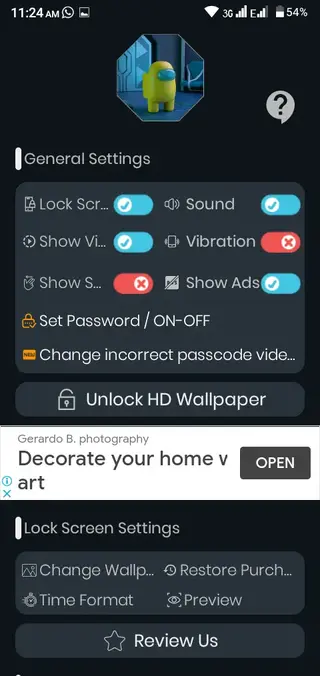
Simple user interface
Configure wallpapers, lock settings, and sounds through a straightforward and beginner friendly interface.
Screenshots
App compatibility and requirements
Among Us Lockscreen is built for Android devices running Android 4.1 and above, which covers a wide range of phones and tablets. Performance can vary based on your device’s hardware, especially when using video effects or high resolution wallpapers on older models.
To get the best experience, keep enough free storage space for the app and its media content, and ensure your device can handle animated effects smoothly. You can always disable heavier visual options from the settings if you notice slowdowns.
Tips for using Among Us Lockscreen safely
When you set a new passcode in Among Us Lockscreen, choose a combination that is not easy to guess and avoid sharing it with others. Make sure you remember the code, as it will be required to unlock your device after applying the new lock screen.
If you ever decide to switch back to the default Android lock screen, you can disable the custom lock inside the app settings or uninstall the app. Check your device’s security settings after major changes to confirm that the lock configuration matches your preference.
FAQs
Pros
- Strong Among Us themed visuals and sounds for fans
- Includes secure five digit passcode with wrong code effects
- Built in HD wallpaper collection related to the game
- Lock system can be enabled or disabled based on user preference
- Easy to configure with a simple, user friendly interface
- Available as an APK download from our website
Cons
- Requires internet connection for some features and content updates
- Contains ads during usage
- Premium options or ad removal may require in app purchases
- Fan made app, not an official release from the Among Us game developers
Conclusion
Among Us Lockscreen is a focused personalization app for fans who want their Android device to mirror the style of Among Us. With themed lock screens, wallpapers, sounds, and secure passcode options, it offers a playful yet practical way to customize your phone. You can download the latest APK directly from our website and set up your new lock screen in a few minutes.




Comments
No approved comments yet.