
3x VPN
3x VPN is a simple Android VPN app that helps you hide your IP address, bypass regional blocks, and access restricted apps and websites with a single tap. It is built for everyday users who want quick connections without complicated settings.
With worldwide servers, dedicated routes for popular online games, and data encryption, the app focuses on stable connections and privacy on public or home networks. You can download the official 3x VPN APK directly from our website and start using it in minutes.
The app includes a free tier supported by ads and optional premium upgrades for a faster, cleaner experience. Whether you want smoother gaming, streaming access, or extra privacy, 3x VPN offers an easy way to get online through a virtual location.
Rate this app
App details
- App name
- 3x VPN
- Category
- Tools
- Version
- v5.6.395
- Size
- 53.3 MB
- Requirements
- 7.0 and Above
- Package name
- com.free.unlimited.lemon.vpn
- Publisher
- Fruit Security Studio
- Price
- Free
- Mod
- No
- Downloads
- 100,294
- Rating
- 4.6 / 5
- Rating count
- 60,021
- Play Store
- Yes
- Requires root
- No
- Offline support
- No
- Contains ads
- Yes
- In-app purchases
- Yes
- Updated
- May 9, 2026
- Age rating
- Rated for 12+
Table of contents
What is 3x VPN for Android
3x VPN is an Android Virtual Private Network application developed by Fruit Security Studio. It routes your internet traffic through remote servers so that websites and apps see the server’s IP address instead of your real one. This helps you bypass geo-restrictions, access blocked services, and add an extra layer of privacy to your connection.
It is an Android application, which offers the best services of Virtual Privet Network and works like Argo VPN and Shoora VPN. It provides a large collection of different servers all over the world, which users can easily access. The most amazing feature of this app is increasing internet speed. It will provide three times faster than your original connection.
The app offers a catalog of servers across multiple regions. You can connect with a single tap, and 3x VPN automatically builds a tunnel between your device and its remote server. Once connected, your traffic is encrypted, helping to keep your browsing and in-app activity away from local trackers on public Wi-Fi and other shared networks.
3x VPN is especially popular among mobile gamers and streamers. It provides optimized routes for some well-known titles and services that may lag or be restricted in certain regions. The free version includes basic servers and ad-supported usage, while the premium subscription unlocks more locations, higher speeds, and an ad-free interface.
Why download 3x VPN APK from our website
Installing the 3x VPN APK directly from our website gives you the flexibility to get the current Android version without waiting for staged rollouts. You can keep a backup of the installer, share it with your other devices, and reinstall it whenever you need.
Our download page provides the official package name and version details, so you know exactly which build you are installing. Once you download the APK from our website, you can install it manually and immediately start using the VPN to reach blocked content, connect to game-optimized servers, or secure your browsing on open networks.
If Google Play is not available on your device or you prefer manual updates, using the APK from our website is a straightforward way to stay up to date with the latest 3x VPN features and improvements.
How 3x VPN is useful for everyday users
3x VPN focuses on making private and unrestricted browsing as simple as possible. You do not need to configure custom servers or add complex scripts. Instead, you open the app, select a location, and tap connect. This helps new users benefit from VPN protection without technical knowledge.
For gamers, 3x VPN offers special routes designed for popular online titles that may suffer from lag or regional blocks. Connecting through these servers can help you reach game servers that are not normally available in your area, which is useful when a title is limited to specific countries.
For streaming and general browsing, the app can help unlock region-locked videos and websites as long as the service allows VPN usage. At the same time, the encrypted tunnel protects your data from simple snooping on open Wi-Fi in places like cafes, airports, or hotels. This mix of access, simplicity, and extra privacy makes 3x VPN a practical tool for many Android users.
How to download and install 3x VPN APK
You can download the official 3x VPN APK directly from our website and install it on any compatible Android phone or tablet. Follow these steps to get started:
Scroll to the download section on this page.
Tap the download button for the latest 3x VPN APK version.
Wait for the APK file to finish downloading to your device.
On your Android device, open Settings and enable installation from unknown sources if it is not already allowed for your browser or file manager.
Locate the downloaded APK in your Downloads folder or notification panel.
Tap the file and follow the on-screen prompts to complete the installation.
Open 3x VPN, grant the required VPN permissions, choose a server, and tap connect.
After installation, you can revisit our website whenever you want to download newer versions of the 3x VPN APK and update the app manually.
Features
One-tap VPN connection
Connect to a VPN server with a single tap, without manual configuration or advanced settings.
Global server locations
Choose from multiple country servers so you can appear online from different regions and bypass geo-blocks.
Optimized gaming routes
Use dedicated routes tailored for popular online games to help reach servers that may be blocked or limited.
Access blocked sites and apps
Reach websites and Android apps that may be restricted in your country or on your local network.
Encrypted VPN tunnel
Protect your traffic with VPN encryption to reduce the risk of local tracking on public and shared Wi-Fi.
Free tier with basic servers
Start with free servers and locations so you can try the service without an upfront payment.
Premium upgrade options
Unlock faster servers, more locations, and an ad-free experience through in-app purchases.
Simple user interface
Navigate a clean and straightforward UI that makes it easy to switch servers, connect, or disconnect in seconds.
Screenshots
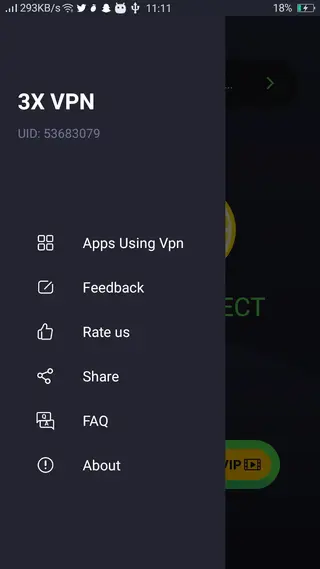
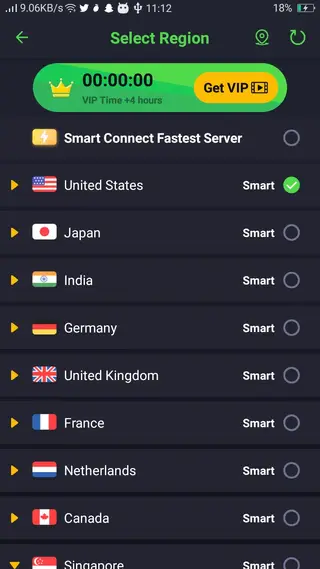
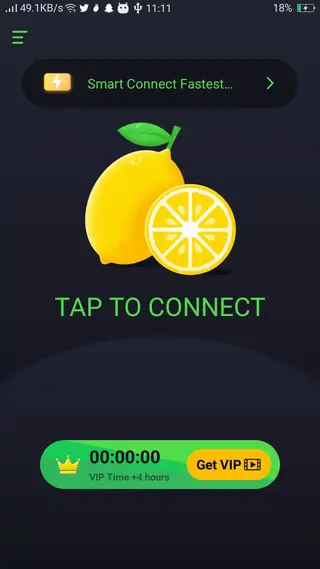
Compatibility and system requirements
3x VPN is designed for Android smartphones and tablets. The version listed on this page requires Android 5.0 or higher, which covers most modern devices. Because it uses the system VPN framework, it works with both Wi-Fi and mobile data connections.
For the best experience, use the app on a device with a stable internet connection and keep enough free storage for updates. Battery optimization settings can sometimes interrupt VPN connections, so you may want to exclude 3x VPN from aggressive power-saving modes if your device allows it.
Tips for better performance with 3x VPN
VPN performance can vary based on your location, network quality, and server load. A few simple habits can help you get more stable results with 3x VPN:
Choose a server geographically closer to you when you need higher speeds rather than distant regions.
Switch between a few nearby servers if you experience slow speeds or frequent disconnections.
Use a strong and stable Wi-Fi or 4G/5G connection for online gaming or streaming.
Close heavy background apps that might consume bandwidth while you are connected through the VPN.
By adjusting your server choice and network conditions, you can improve how smooth 3x VPN feels in daily use.
FAQs
Pros
- Easy one-tap connection with a simple interface
- Multiple global servers to bypass regional restrictions
- Special routes aimed at popular online games
- Free tier available with basic VPN access
- Supports encryption for added privacy on public networks
- Offers premium upgrades for faster and ad-free usage
Cons
- Free version contains ads during usage
- Speeds and stability can vary by server and network conditions
- Some streaming platforms may still block VPN connections
- Requires an active internet connection to work
Conclusion
3x VPN is a straightforward Android VPN app that blends one-tap connections, worldwide servers, and game-focused routes in a clean package. If you want an easy way to access restricted content and add a layer of privacy on mobile, you can download the latest 3x VPN APK directly from our website and start using it in a few minutes.




Comments
No approved comments yet.