

Aruppi
Aruppi is a Spanish-focused anime, manga, and light novel app that brings Japanese visual stories together in one clean interface. You can stream shows, read chapters, and follow new releases from your Android phone or tablet.
The app focuses on Spanish subtitles and dubs, so Spanish-speaking fans can follow stories comfortably without switching between different platforms. Content is organized by sections and filters, making it easier to discover series that match your tastes.
You can download the official Aruppi APK directly from our website and install it on compatible Android devices to start exploring its anime and manga catalog in a few simple steps.
Rate this app
App details
- App name
- Aruppi
- Category
- Comics
- Version
- v3.0.0.beta13
- Size
- 35.79 MB
- Requirements
- 5.1 and Above
- Package name
- com.jeluchu.aruppi
- Publisher
- JELUCHU
- Price
- Free
- Mod
- No
- Downloads
- 81,747
- Rating
- 4.5 / 5
- Rating count
- 27,481
- Play Store
- Yes
- Requires root
- No
- Offline support
- No
- Contains ads
- Yes
- In-app purchases
- No
- Updated
- Jun 2, 2026
- Age rating
- Rated for 3+
Table of contents
What is Aruppi App
Aruppi is an Android entertainment app created by JELUCHU for fans of Japanese culture, especially anime and manga, who prefer Spanish language content. It combines streaming anime episodes with access to manga and light novels, so you can enjoy different formats without jumping between multiple apps.
The app focuses on visual entertainment and offers Spanish subtitles and Spanish-dubbed audio for many titles. You can also choose original Japanese audio when available. Libraries are split into sections for anime, manga, and novels to keep browsing simple and intuitive.
But there are also some limitations available, which we want to share. The application is specially developed for Spanish users, which means all the app only support the Spanish language. So, if you are not a Spanish speaker, then you should try Oploverz or Mangaku.pro.
Aruppi targets Spanish-speaking users, so its interface, descriptions, and most of the content are in Spanish. If you are comfortable with Spanish and enjoy Japanese series, it works as a hub where you can explore, follow, and watch your favorite stories from one place.
Why Download Aruppi APK from Our Site
Downloading the Aruppi APK from our website lets you get the official Android installer file quickly and install it on any compatible device, even if the Play Store version is not available in your region or on your device.
Our download page lists the current version information, package name, and basic technical details, so you know exactly what you are installing. Once the APK is on your phone or tablet, you can install it like any other app and start browsing anime, manga, and novels in Spanish.
Keeping a local APK copy also makes it easier to reinstall the app later or share it across your own devices without repeating the download process every time.
How Aruppi is Useful for Anime and Manga Fans
Aruppi is useful for Spanish-speaking anime and manga fans who want a central place to follow their favorite series. Instead of juggling separate apps for anime streaming, manga reading, and light novels, you can use one interface that focuses on Spanish localization.
The app offers Spanish subtitles and dubbed content, which helps users who prefer or only understand Spanish. Filter-based search and well-structured categories reduce the time spent looking for the next episode or chapter. High-quality playback options also help you match video quality to your internet connection.
Fans of specific niches, such as yaoi or romance, can explore dedicated sections and long-running series, while general viewers can browse trending titles and recent updates. This makes Aruppi a practical daily companion for people who follow ongoing anime seasons and manga releases in Spanish.
How to Download and Install Aruppi APK
You can download the official Aruppi APK file directly from our website and install it manually on your Android phone or tablet. Follow these basic steps to get started.
Scroll to the download section on this page and tap the Aruppi APK download button.
Wait until the APK file finishes downloading to your device.
Open your device settings and enable installation from unknown sources for your browser or file manager if needed.
Locate the downloaded APK in your Downloads folder and tap it to start the installer.
Review the permissions and confirm the installation.
Once installed, open Aruppi from your app drawer, set your preferences, and start browsing anime, manga, and novels.
Features
Combined anime, manga, and novel library
Access anime episodes, manga chapters, and light novels in one Android app instead of using multiple services.
Spanish subtitles and dubs
Watch many titles with Spanish subtitles and dubbed audio, with the option to switch to original audio when available.
Spanish-focused interface
Use an interface, menus, and descriptions designed primarily for Spanish-speaking users.
Organized categories and sections
Browse content through clearly defined sections and categories for easier discovery of new series.
Filter-based search
Search with filters to narrow down results by genre, type, or other criteria and find relevant titles faster.
Adjustable video quality
Change display and streaming quality according to your device capabilities and internet connection speed.
Responsive streaming servers
Enjoy a viewing experience designed to minimize lag and buffering on supported connections.
User-friendly layout
Navigate the app with a simple, clean design that is approachable for new and experienced users.
Screenshots
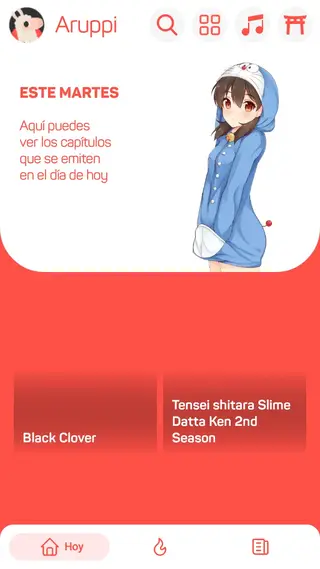


Interface and User Experience
Aruppi keeps the interface straightforward, with bottom or side navigation leading to anime, manga, and novels. Each section uses cover images and clear titles so you can recognize series at a glance. Spanish labels and descriptions make it easier for native speakers to skim summaries, check genres, and jump into the next episode or chapter.
The app layout focuses on readability, using contrasting colors and large touch targets. This helps when browsing on smaller screens and makes long reading or watching sessions more comfortable.
Language and Localization Focus
The main strength of Aruppi is its focus on Spanish-language content. Subtitles are written in accessible Spanish, and dubbed tracks cover popular titles where available. Menus, settings, and help texts are also localized, which reduces friction for users who do not want to navigate English or Japanese interfaces.
This localization approach is particularly helpful for younger viewers and people who are new to anime and manga and prefer to stay within the Spanish language ecosystem.
Tips for Getting Started
After installing Aruppi, start by exploring the main sections and checking the latest or highlighted series to see what the app offers. Use filters to narrow content by genre, length, or type. If you follow a specific title, mark it as a favorite when the option is available, so you can return to it quickly.
Experiment with video quality settings to find a balance between smooth playback and visual clarity based on your connection. If you mainly read manga or novels, adjust orientation and brightness from your device settings to make longer reading sessions more comfortable.
FAQs
Pros
- Combines anime, manga, and novels in one Android app
- Spanish subtitles and dubbed content for many titles
- Interface and descriptions tailored to Spanish-speaking users
- Filter-based search and organized sections for easier discovery
- Adjustable streaming quality to suit different connections
Cons
- Primarily supports Spanish, which may limit non-Spanish users
- Content availability can vary over time and by title
- Requires a stable internet connection for most features
Conclusion
Aruppi is a focused anime, manga, and light novel app for Spanish-speaking fans who want everything in one place. If you enjoy Japanese series in Spanish and prefer a simple, category-based interface, downloading the Aruppi APK from our website is a practical way to keep your favorite stories close on your Android device.




Comments
No approved comments yet.