

BevQ
BevQ is the official virtual token app introduced for liquor purchases in Kerala. It helps users book time-based slots so they can visit outlets without waiting in long physical queues.
With BevQ, you register your mobile number, select your preferred beverage type, and get a QR-based token that shows outlet details and a specific visit time. This keeps store visits more organized and supports crowd control.
You can download the BevQ APK directly from our website and install it on compatible Android phones and tablets to start booking your queue slots in just a few steps.
Rate this app
App details
- App name
- BevQ
- Category
- Food & Drink
- Version
- v8.0
- Size
- 21.74 MB
- Requirements
- 4.1 and Up
- Package name
- com.ksbcvirtualq
- Publisher
- Faircode Tech
- Price
- Free
- Mod
- No
- Downloads
- 53,000
- Rating
- 4.6 / 5
- Rating count
- 21,000
- Play Store
- No
- Requires root
- No
- Offline support
- No
- Contains ads
- No
- In-app purchases
- No
- Updated
- May 11, 2026
- Age rating
- Rated for 16+
Table of contents
What is BevQ App for Android
BevQ is a queue management and virtual token application created for liquor outlets in Kerala. Initiated by the Kerala State Beverages Corporation and developed by Faircode Tech, the app assigns digital tokens so customers can visit stores at a fixed time instead of standing in long lines.
The app supports English and Malayalam and is designed for users who meet the legal age requirement for alcohol purchase in Kerala. After a short registration using your name, mobile number, and PIN code, BevQ generates a time slot and a QR code that you can show at the selected outlet.
This digital token system was originally introduced to support social distancing during the COVID-19 period, but the concept remains useful wherever crowd control and orderly liquor store visits are required.
Why download the BevQ APK from our website
Downloading the BevQ APK from our website lets you install the official file directly on your Android device without waiting for store availability changes. You can keep a backup of the installer and reinstall it whenever needed.
Once installed, BevQ helps you avoid standing in crowded lines outside liquor shops. You can book a slot from home, receive outlet details and a QR-based token, and then visit the store only at your allotted time. This offers a more predictable and organized purchase experience.
Our download page provides the latest available version information, including version name and Android requirement, so you know exactly what you are installing on your device.
How BevQ is useful for Kerala liquor buyers
BevQ is useful because it turns an unstructured queue into a digital, time-bound system. Instead of waiting outside shops for hours, users can secure a slot in advance and arrive only when their turn is near.
The QR token includes outlet name, outlet ID, and address, which reduces confusion at the store. Since each token is tied to a specific time window and location, it helps staff manage footfall more smoothly and maintain better discipline at the counter.
The simple interface and minimal registration steps make the app accessible even for users with limited technical experience. Support for Malayalam and English further improves usability across different user groups in Kerala.
How to download and install BevQ APK
You can get the BevQ APK directly from our website. Make sure your device meets the minimum Android version requirement before starting the download.
Follow these steps to download and install:
Tap the download button on our BevQ APK page and wait for the APK file to finish downloading.
Open your phone settings and enable installation from unknown sources if it is not already allowed.
Use your file manager to locate the downloaded BevQ APK file in the Downloads folder.
Tap the APK file to launch the installation wizard and read any on-screen prompts.
Press Install and wait until the process completes, then tap Open to launch BevQ.
After installation, you can register with your mobile number, book your slot, and show the generated QR token at the selected outlet.
Features
Official virtual queue system
Provides a government-backed virtual token system for liquor stores in Kerala so users can avoid physical queues.
Time-based slot booking
Assigns a specific time slot to each user, reducing crowding and making store visits more predictable.
QR code token
Generates a QR code token that includes outlet name, ID, and address, which you present at the store.
Simple registration flow
Uses a straightforward sign-up with name, mobile number, PIN code, and a one-time 6-digit verification code.
Beverage type selection
Allows users to choose between categories like liquor and beer or wine before booking a slot.
Bilingual interface
Supports both English and Malayalam, making it easier for a wide range of users in Kerala to navigate the app.
Lightweight and focused design
Offers a clean interface focused on token booking without unnecessary extra modules or distractions.
Age-gated usage
Targets users who meet the legal age requirement for alcohol purchases in Kerala, supporting responsible use.
Screenshots
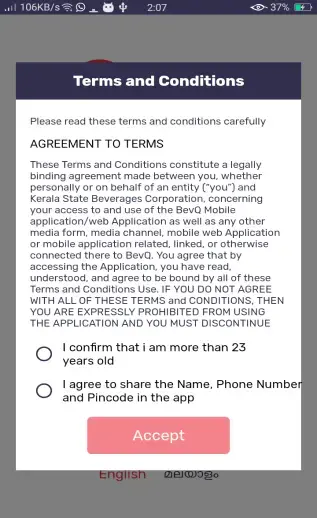
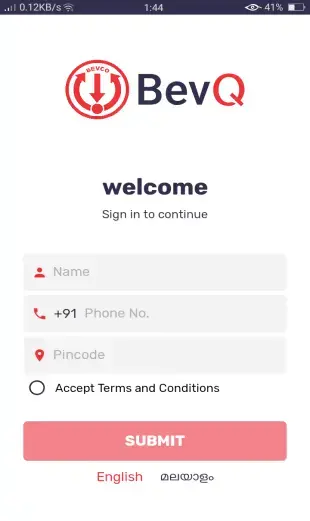
Registration and verification process
The BevQ registration flow is designed to be quick so that first-time users can start booking with minimal effort. After launching the app, you provide your name, mobile number, and PIN code. The system sends a six-digit one-time password to your registered number for verification.
Once you enter this code correctly and accept the terms and conditions, your account is activated. After that, you can select the beverage category, confirm your area via PIN code, and request a token. The app then issues a QR token containing your allotted time slot and outlet details.
Supported devices and requirements
The BevQ APK version listed on our website targets Android 4.1 and above, which covers many older and newer smartphones. For the smoothest experience, it is better to run the app on a device with stable mobile data or Wi-Fi and enough free storage for installation.
Because the app relies on real-time communication with backend services, you should keep mobile data enabled while requesting and displaying your token. Location services are not strictly required for basic use, since the system primarily relies on PIN code and outlet selection.
Responsible usage and limitations
BevQ is designed to support controlled and safer access to liquor outlets, but it does not change local laws or eligibility rules. Users must still comply with Kerala’s legal drinking age and any purchase limits set by authorities.
Token availability, outlet participation, and operating hours can vary based on policy changes and local demand. If the system shows no slots available, you may need to check again later or on a different day. Always verify current rules and timings at the outlet before planning your visit.
FAQs
Pros
- Officially introduced for Kerala liquor queue management
- Helps avoid long physical queues at liquor outlets
- Simple registration using mobile number and PIN code
- Supports both English and Malayalam languages
- Provides QR code token with outlet details and time slot
- Focused interface without complex extra features
Cons
- Works only for supported outlets in Kerala
- Requires an active internet connection to function
- Service availability can depend on local policy decisions
- Token availability and timings may be limited during peak demand
Conclusion
BevQ offers a practical way for eligible users in Kerala to manage liquor purchases through virtual tokens and time-based slots. Install this amazing app and avoid the long lines. Stay safe and keep everyone around you safe. If you want more of such apps then do visit our Apkoll.




Comments
No approved comments yet.