
Gacha Star
Gacha Star is a popular fan-made mod of Gacha Club that focuses on deep character customization, anime-style scenes, and creative storytelling. It keeps the core casual gameplay of the original while adding a large number of new cosmetic items.
With extra outfits, hairstyles, poses, foregrounds, and backgrounds, you can design your own characters and create full scenes or mini animations directly on your Android phone. The APK file is available on our website, so you can download the latest version and start creating right away.
Whether you want to build original characters, recreate your favorite anime cast, or design social media edits, Gacha Star gives you flexible tools in an easy, 2D casual game format.
Rate this app
App details
- App name
- Gacha Star
- Category
- Casual
- Version
- v3.2
- Size
- 210.77 MB
- Requirements
- 5.0 and Above
- Package name
- air.com.gacha.gachastar
- Publisher
- Space Tea & Ezrins
- Price
- Free
- Mod
- No
- Downloads
- 419,261
- Rating
- 4.3 / 5
- Rating count
- 81,421
- Play Store
- No
- Requires root
- No
- Offline support
- Yes
- Contains ads
- No
- In-app purchases
- No
- Updated
- May 30, 2026
- Age rating
- Rated for 16+
Table of contents
What is Gacha Star APK?
Gacha Star APK is an unofficial, fan-developed modification of the original Gacha Club game designed for Android devices. It keeps the familiar gacha-style casual gameplay and studio mode but expands the content with new characters, outfits, pets, and visual assets.
The app focuses strongly on anime-style character creation. You can customize body types, facial features, hairstyles, clothing, accessories, and more, then place your characters into 2D scenes with different poses and expressions. Many extra items and color variations are exclusive to this mod and are not available in the standard game.
If you want to get more similar Gacha Mods, then we have some of the best suggestions here for you. You guys can try Gacha Cute and Gacha Club Edition, both of these are quite popular casual games. So, explore more Gacha games on this website.
Gacha Star does not come from Google Play and is not an official Lunime release. Instead, it is a community project created by fans such as Space Tea and Ezrins and distributed as an APK. You can download the current Android version directly from our website and install it manually on devices running Android 5.0 and above.
Why download Gacha Star for Android?
Players download Gacha Star because it offers more creative freedom than the base game. If you enjoy character design, edits, or short visual stories, the additional content in this mod lets you experiment with new looks and scene ideas without complex tools.
The extra presets, foregrounds, backgrounds, and poses help you build full scenes for screenshots, mini comics, thumbnails, or social posts. You still get the familiar feel of Gacha Club, but with more cosmetic options and a refreshed visual style tailored to anime fans.
Because the APK is available directly on our website, you can quickly get the latest version, explore the new content, and keep it installed alongside other casual games on your phone or tablet.
How is Gacha Star useful for players?
Gacha Star is useful for anyone who wants a simple way to create anime-style characters and scenes without learning advanced art or animation software. Everything happens inside a friendly mobile interface, so you can design and share ideas on the go.
The studio tools help you stage multiple characters, adjust poses and facial expressions, and combine backgrounds and foregrounds to match the mood you want. This makes it a handy companion for content creators, role-players, or fans who like to visualize stories and original characters.
Because most features work offline after installation, you can use Gacha Star during travel, breaks, or free time, turning short sessions into chances to experiment with designs and layouts.
How to download and install Gacha Star APK?
You can download the official Gacha Star APK file for Android directly from our website. Follow these steps to get the latest version on your device:
Scroll to the download section on this page and tap the Gacha Star APK download button.
Wait for the APK file to finish downloading to your Android phone or tablet.
Open your device Settings, go to security or apps, and allow installation of apps from unknown sources if it is not already enabled.
Locate the downloaded APK in your notifications or file manager and tap it to start installation.
Confirm the prompts on screen and wait until the installation completes.
Launch Gacha Star from your app drawer and start customizing your characters and scenes.
Once installed, most features can be used offline, so you can enjoy the game even without an active internet connection.
Features
Expanded character customization
Design detailed anime-style characters with more hairstyles, outfits, colors, and accessories than the original base game.
Additional Gacha Star characters
Access extra preset characters and star-themed designs that are not included in the standard Gacha Club release.
Rich studio mode
Create scenes by placing multiple characters, adjusting poses, expressions, and positions, and arranging them on layered stages.
Extra backgrounds and foregrounds
Use new background and foreground images to match different themes, moods, and story settings in your scenes.
Pets and decorative items
Attach added pets and decorative props to your characters to personalize their look and environment.
Multiple game modes
Enjoy casual game modes and mini-games inspired by the original Gacha Club structure alongside the creative tools.
Simple animation-style scenes
Combine poses and expressions to build simple animation-like sequences or story panels for screenshots.
User-friendly interface
Navigate clear menus and categorized options that keep customization straightforward for new and experienced players.
Screenshots

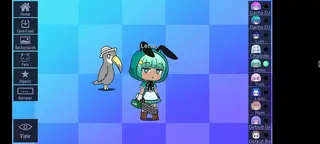
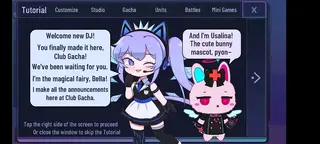
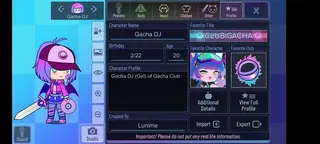
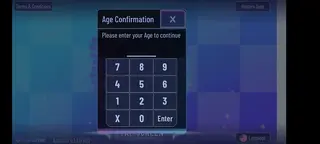
Gameplay and customization experience
Gacha Star follows the familiar formula of Gacha Club: you start by creating or editing characters, then use them in different modes and scenes. The main difference is the amount of visual content available. Extra hairstyles, eye styles, clothing parts, and accessories allow you to refine every detail of your characters.
Once your characters are ready, you can move to the studio to place them into scenes. You can control their poses, expressions, and positions, add props or pets, and combine layered foregrounds and backgrounds. Players often capture these scenes as screenshots for edits, role-play visuals, or simple stories shared on social platforms.
Tips for getting started in Gacha Star
If you are new to Gacha-style games, start by exploring the presets and saving a few character slots with different themes such as school, fantasy, or casual. This helps you learn how the sliders and options work before you design complex original characters.
Next, open the studio and experiment with two or three characters in one scene. Adjust poses and expressions to match a simple idea, such as a conversation or action moment. Try several backgrounds and foregrounds to see how they change the mood. Over time you can build more advanced layouts and reuse your favorite characters in multiple stories.
Safety and usage considerations
Because Gacha Star is a community-developed mod and not an official store release, it is important to understand what you are installing. Only use the APK hosted on our website so you know exactly which file you are getting.
As with any unofficial mod, features and stability can change between versions, and some content may differ from the original base game. If you are installing the app for younger players, you may want to supervise their use and review any content they create or share.
FAQs
Pros
- Deep character customization with many extra cosmetic items
- Studio mode for building scenes with multiple characters
- Anime-style visuals that appeal to Gacha and anime fans
- Most core features work offline after installation
- APK is available directly from our website for Android 5.0 and above
Cons
- Unofficial fan-made mod and not on Google Play
- Content and updates depend on community developers
- May not run smoothly on very low-end devices
- Online features and competitive modes are limited compared to some mainstream games
Conclusion
Gacha Star is a creative, fan-made mod of Gacha Club that focuses on character customization, scene creation, and anime-style storytelling. If you enjoy designing original characters and building visual stories on your phone, you can download the latest Gacha Star APK from our website and start exploring its expanded cosmetic library and studio tools on your Android device.




Comments
Алиса котик
Игра запускается только в левом верхнем углу, мало того, она застревает на заставке "Луниме". Если бы игра была доступна в ней макете, я бы е поставила одну звезду, если нельзя меньше!