

Game Booster 4x Faster Pro
Game Booster 4x Faster Pro is an Android optimization tool designed to reduce lag, free system resources, and tune graphics settings so your games run more smoothly on compatible devices.
With one-tap boosting, GFX controls, FPS options, and temperature monitoring, it focuses your phone’s power on gaming by closing background tasks and cleaning temporary junk before you launch a title.
You can download the latest Game Booster 4x Faster Pro APK directly from our website and install it on your smartphone or tablet to get a more stable and responsive gaming experience.
So, here experts introduced amazing tools like Legit Game Booster and Game Booster VIP GFX Lag Fix, through which you can play different high-graphic games without lagging. There are different amazing features available in these tools, through which users can have the best experience. We are going to share all about Games Booster App. You can stay with us and get more information about this tool.
Rate this app
App details
- App name
- Game Booster 4x Faster Pro
- Category
- Tools
- Version
- v2.1.5
- Size
- 23.77 MB
- Requirements
- 6.0 and Above
- Package name
- com.g19mobile.gamebooster
- Publisher
- G19 Mobile
- Price
- Free
- Mod
- No
- Downloads
- 65,221
- Rating
- 4.6 / 5
- Rating count
- 20,197
- Play Store
- Yes
- Requires root
- No
- Offline support
- Yes
- Contains ads
- No
- In-app purchases
- Yes
- Updated
- May 8, 2026
- Age rating
- Rated for 12+
Table of contents
What is Game Booster 4x Faster Pro?
Game Booster 4x Faster Pro is a performance and graphics tuning app for Android. It focuses on improving gaming stability by freeing RAM, clearing cache, and optimizing CPU and GPU usage before and during gameplay.
The app scans your installed games and lets you launch them through a dedicated booster environment. When you start a game from inside the booster, it can close selected background apps, reduce unnecessary processes, and prioritize resources for your chosen title.
It also works as a simple GFX tool for many popular games, giving you options such as adjusting resolution, graphics quality, and frames per second. This lets you trade visual detail for smoother performance on low-end hardware, or unlock higher visuals on capable devices within the boundaries of what your hardware and game allow.
According to the information provided, this is the Pro and modded build, so premium features are unlocked inside the APK shared on our website.
Why download Game Booster 4x Faster Pro APK from our website
Downloading Game Booster 4x Faster Pro APK from our website lets you get the Pro functionality in a single installation package without going through extra configuration steps.
The file available on our site is prepared for direct installation on compatible Android devices. You can keep a backup of the APK, reinstall it whenever you reset your phone, and share it between your own devices without downloading it again.
Our download page focuses on mobile users, so the button, version details, Android requirements, and basic instructions are all presented clearly. This makes it easier to know what you are installing and whether it suits your device before you proceed.
How Game Booster 4x Faster Pro is useful
Game Booster 4x Faster Pro is useful for players who experience lag, stuttering, or overheating during longer gaming sessions. By freeing memory and trimming background activity, it can help games load faster and stay more stable on many devices.
The integrated GFX options are especially helpful if you use a mid-range or older phone. Lowering resolution or graphics settings inside supported games often leads to a noticeable improvement in frame rate and input responsiveness.
The temperature and storage details make it easier to see when your device is getting too hot or close to full. This information can help you decide when to take a break, close extra apps, or clear space so your games run more smoothly.
Because the Pro build removes ads and unlocks extra tools, you can manage your gaming environment without distraction and focus on consistent performance tweaks instead of manual cleanup every time.
How to download and install Game Booster 4x Faster Pro APK
You can download the official Game Booster 4x Faster Pro APK file directly from our website by following these steps:
Scroll to the download section on this page.
Tap the download button for Game Booster 4x Faster Pro APK.
Wait for the APK file to finish downloading to your Android device.
Open your phone’s settings and enable installation from unknown sources if it is disabled.
Locate the downloaded APK in your notifications or file manager and tap it.
Review the permissions shown on screen, then tap Install to start the setup.
Once installation completes, open Game Booster 4x Faster Pro and add your games to begin boosting.
If you update to a newer version later, download the latest APK from our website again and install it over the existing app where supported.
Features
One-tap game boosting
Quickly free RAM, close selected background apps, and prepare the system for gaming with a single tap before launching your favorite title.
Automatic game detection and launcher
Scan installed apps to find games and add them into a dedicated launcher area so you can start them with optimization already applied.
GFX tool controls
Adjust in-game resolution, graphics presets, and related options in supported titles to balance visual quality and frame rate.
Custom FPS options
Set different frame rate preferences where allowed by the game and device to aim for smoother motion during gameplay.
Ultra booster mode
Use a more aggressive boost profile that clears extra background tasks and temporary junk for heavy games on low-end devices.
Temperature monitoring
Check approximate device temperature while gaming so you can reduce load or pause play when your phone gets too hot.
Storage and RAM information
View available internal storage and memory usage in a simple interface to understand how much space and RAM your games can use.
Ping and network refresh tools
Trigger basic network refresh actions intended to help stabilize ping and server response in some online games.
Screenshots

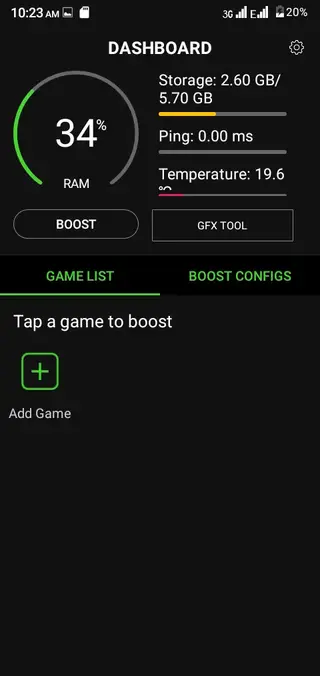

System requirements and compatibility
Game Booster 4x Faster Pro targets Android devices running version 4.1 and above. This means it can run on a wide range of phones and tablets, including many older models. However, real performance improvements always depend on your chipset, RAM capacity, storage speed, and how heavy your favorite games are.
For the best experience, ensure that your device has enough free internal storage and that you regularly clear unused apps or files. Keeping your operating system updated and not running too many services in the background will also help the booster deliver more consistent results.
Tips for getting better results with the booster
To get the most out of Game Booster 4x Faster Pro, use a few simple habits alongside the built-in tools:
Launch games only through the booster so optimization runs every time.
Lower resolution or graphics options when playing on older or low-RAM devices.
Keep your phone on a cool surface and avoid using it while charging during long sessions.
Close unnecessary social and messaging apps before starting heavy online games.
Watch the temperature readings and take short breaks if your phone heats up.
Following these tips together with the app’s features can lead to a more stable and enjoyable gaming experience.
Privacy and permissions overview
Game Booster 4x Faster Pro needs certain permissions to function properly, such as access to running apps, storage, and overlay or accessibility-related options depending on the version. These permissions help it detect games, clear temporary junk, and display real-time overlays where supported.
Always review the permission list during installation and inside Android settings. If you are not comfortable with a particular permission, disable it and continue using only the features you are satisfied with.
FAQs
Pros
- Helps reduce lag and stuttering in many Android games
- Simple one-tap boosting workflow suitable for beginners
- Includes GFX and FPS controls for additional tuning
- Pro build removes ads for a cleaner experience
- Shows temperature and storage information in one place
Cons
- Actual performance gains vary between devices and games
- Advanced settings may confuse inexperienced users
- May not support deep graphics tweaks in every game
- Aggressive boosting can occasionally close needed background apps
Conclusion
Game Booster 4x Faster Pro is a practical Android utility for players who want quicker, more stable gameplay without manual system cleanup every time. By combining boosting, GFX tuning, FPS options, and basic monitoring in one app, it offers a convenient way to prepare your device for heavy titles. You can download the latest APK directly from our website and test how well it improves gaming on your own phone or tablet.




Comments
No approved comments yet.