

HD Injector
HD Injector is an Android tool that lets Mobile Legends players inject custom skins, recall effects and other visual tweaks into the game. It targets users who want to experiment with new looks without buying in-game cosmetics.
This injector focuses on a simple interface and quick one-tap injection, so users can browse categories, select a hero, choose a skin and apply it directly.
You can download the latest HD Injector APK version for Android devices directly from our website and install it manually on your phone or tablet.
Rate this app
App details
- App name
- HD Injector
- Category
- Tools
- Version
- v19
- Size
- 13.71 MB
- Requirements
- 5.0 and Up
- Package name
- com.hd.injector
- Publisher
- HD
- Price
- Free
- Mod
- No
- Downloads
- 58,000
- Rating
- 4.6 / 5
- Rating count
- 24,000
- Play Store
- No
- Requires root
- No
- Offline support
- Yes
- Contains ads
- No
- In-app purchases
- No
- Updated
- May 12, 2026
- Age rating
- Rated for 7+
Table of contents
What is HD Injector APK
HD Injector is an unofficial Android injector app created for the Mobile Legends: Bang Bang community. It allows users to load custom cosmetic elements into the game, mainly character skins and visual effects, without going through the normal in-game purchase flow.
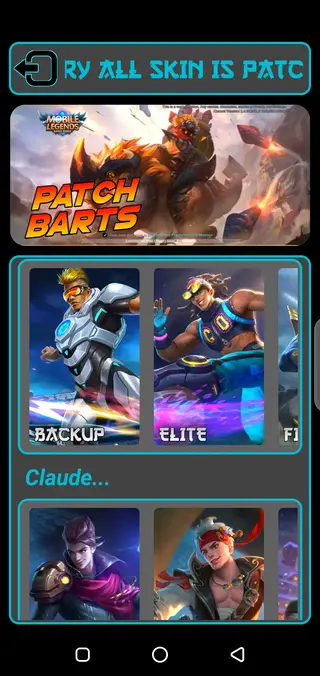
The app organizes heroes and skins into clear categories. After you open it, you can pick your favorite character, browse available skin types such as special, epic, starlight, legend or limited styles, and then apply them with a single tap. The selected item is injected into the game files so it appears when you play.
HD Injector focuses on visual customization. It does not work as a standalone game, but as a companion tool that interacts with Mobile Legends installed on the same device.
So, download this tool for ML and access all the available hacks. It also provides an easy injection process, through which the users can fast inject the items in the game. This tool might get removed permanently for unethical activity, so users should know a few alternatives like Chou Skin Injector and Kaneki ML Injector.
Why download HD Injector for Android
Players download HD Injector to experiment with different hero looks, cosmetic styles and battle visuals in Mobile Legends without going through the usual in-game shop process every time. The app brings multiple cosmetic options into one place, which makes switching skins faster and more convenient.
Another reason is the straightforward design. The categories, hero lists and skin options are arranged in a simple layout, so users who are new to injector tools can still navigate the interface without confusion.
The HD Injector APK is available to download directly from our website, so Android users can get the current version and install it manually whenever they need it.
How HD Injector can be useful
For Mobile Legends fans who enjoy visual customization, HD Injector can save time by collecting many skins and effects in one dashboard. Instead of searching different sources or swapping configuration files manually, users choose what they want and tap to inject.
The tool also helps players test how different cosmetics look in real matches. Trying a variety of skins or recall animations can make gameplay feel fresher, especially for users who mainly play a small pool of heroes.
Because the app works on most modern Android devices and does not require root access, many players can install and use it as a separate companion utility alongside the game.
How to download and install HD Injector APK
You can get the latest HD Injector APK directly from our website and install it manually on your Android phone or tablet. Follow these basic steps to complete the process.
Scroll to the download area on this page and tap the HD Injector APK download button.
Wait for the APK file to finish downloading to your device.
On your phone, open Settings and enable installation from unknown sources for your browser or file manager if needed.
Open your file manager, go to the Downloads folder and tap the HD Injector APK file.
Confirm the installation prompt and wait until the setup completes.
Launch HD Injector, grant the requested basic permissions and then connect it with your Mobile Legends installation.
After installation, you can open the app whenever you want to browse skins, choose effects and apply them before starting a match.
Features
Skin collection for multiple heroes
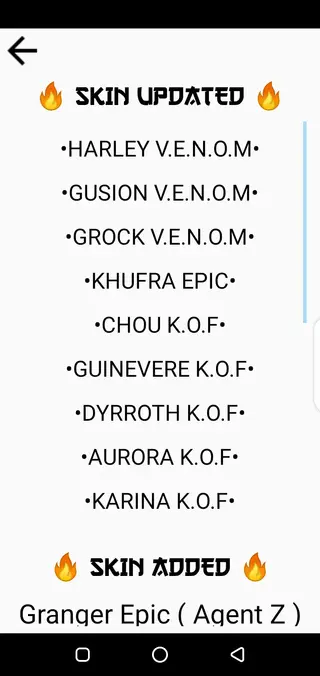
Browse and inject a wide range of hero skins for Mobile Legends characters organized by hero name and skin type.
Skin rarity categories
Access skins grouped by types such as special, epic, starlight, legend, limited and other cosmetic tiers.
Recall effects support
Inject different recall animations to change how your hero returns to base during matches.
Battle emotes under development
Includes options for battle emotes that are still being refined and expanded in newer builds.
Fast one tap injection
Apply selected skins or effects with a quick one tap injection process without complex configuration.
Simple user interface
Navigate clear menus and categories designed for users who may be new to injector tools.
Organized hero lists
Find heroes and their available cosmetics through well defined lists and sections for easier selection.
No root requirement
Use the app on most standard Android devices without enabling root access.
Screenshots
Compatibility and system requirements
HD Injector is built for Android devices running at least Android 5.0 or higher. It works alongside a compatible version of Mobile Legends installed on the same device.
For smoother operation, it is recommended to have enough internal storage for both the game and injected resources, along with stable performance hardware so the game can load customized visuals properly.
Basic usage guide
After installing HD Injector and ensuring Mobile Legends is already on your device, you can start by opening the injector and reviewing the main menu. The layout usually includes hero sections, skin lists and effect options.
Open HD Injector and allow any basic permissions requested by the app.
Select the hero you want to customize from the list or relevant category.
Browse through the available skins or effects associated with that hero.
Tap the item you want and start the injection process.
Once injection completes, open Mobile Legends and check the selected hero in your lobby or loadout.
You can repeat the process whenever you want to switch to another skin or visual effect.
Safety and fair play considerations
HD Injector is not an official Mobile Legends product, and using third party tools around competitive games can involve risks. Game developers generally prefer players to use only official clients and content.
Before using any injector, it is important to understand the potential impact on account status and fair play. Use the app at your own discretion, stay informed about the rules of the game you play and consider keeping your primary accounts separate from experimentation.
FAQs
Pros
- Offers a large selection of Mobile Legends hero skins in one app
- Provides quick one tap injection for skins and visual effects
- Works without root access on most modern Android devices
- Has a straightforward and easy to understand interface
- Groups heroes and skins into clear categories for faster navigation
Cons
- Unofficial tool that may conflict with the game developer’s terms of service
- Updates may lag behind new game patches and features
- Battle emotes and some options are still in development and may not be stable
- Functionality can stop working if the game receives major updates
- Online competitive use of injector tools may pose account related risks
Conclusion
HD Injector is a cosmetic focused injector for Mobile Legends that gathers skins, recall effects and other visuals into a simple Android app. If you want a quick way to test and apply different looks for your heroes, you can download the latest HD Injector APK directly from our website and install it on your device for manual use alongside the game.




Comments
No approved comments yet.