

Hotspot Shield Free VPN Proxy
Hotspot Shield Free VPN Proxy is a popular Android VPN app that helps you encrypt your internet traffic, hide your IP address, and connect through secure servers around the world. It is designed for users who want more privacy and flexibility while browsing on mobile.
With this official APK, you can connect to virtual locations, bypass regional blocks, and reduce tracking from websites and networks. You can download the latest Android version of Hotspot Shield Free VPN Proxy directly from our website and install it on compatible phones and tablets.
The app offers a free VPN mode with basic locations, along with optional premium upgrades that unlock faster servers and more global regions. It aims to keep setup simple so that even first-time VPN users can get protected in just a few taps.
Rate this app
App details
- App name
- Hotspot Shield Free VPN Proxy
- Category
- Tools
- Version
- v11.13.0
- Size
- 45.71 MB
- Requirements
- 5.0 and Up
- Package name
- hotspotshield.android.vpn
- Publisher
- Pango GmbH
- Price
- Free
- Mod
- No
- Downloads
- 56,001
- Rating
- 4.8 / 5
- Rating count
- 20,000
- Play Store
- Yes
- Requires root
- No
- Offline support
- No
- Contains ads
- Yes
- In-app purchases
- Yes
- Updated
- May 12, 2026
- Age rating
- Rated for 7+
Table of contents
What is Hotspot Shield Free VPN Proxy for Android
Hotspot Shield Free VPN Proxy is an Android VPN application from Pango GmbH that creates an encrypted tunnel between your device and the internet. When you connect to one of its VPN servers, your real IP address is hidden and your data traffic is routed through a secure connection.
The app helps you browse with more privacy on public Wi‑Fi, mobile networks, and home connections. It can also give you access to content, websites, and apps that may be restricted or blocked in your region by connecting you through another virtual location.
On Android, Hotspot Shield offers an always-on VPN button, simple country selection, and automatic connection options. The free tier gives limited server access, while the premium subscription adds more locations, higher speeds, and extra security features supported by the developer.
For all these problems, VPNs is the solution such as 3x VPN and Shoora VPN You just need to install this app on your devices and you will have a VPN (Virtual Private Network) technology. It will create a virtual identity for your devices and no one will be able to locate your original location.
Why download Hotspot Shield Free VPN Proxy APK
Downloading the Hotspot Shield Free VPN Proxy APK from our website lets you get the official Android installer directly, without waiting for staged rollouts or regional delays. You can keep a backup of the file, share it across your own devices, and install it even when Google Play is not available on your phone.
The app is useful if you frequently connect to public Wi‑Fi networks, travel to regions with restricted websites, or simply prefer to keep your browsing activity more private from local networks and some online trackers. With one tap, you can establish a VPN session and route all or selected app traffic through encrypted servers.
For users who need more performance or additional regions, Hotspot Shield also offers paid plans inside the app, so you can start with the free version and upgrade later if you find it helpful.
How Hotspot Shield Free VPN Proxy is useful
Hotspot Shield Free VPN Proxy is useful in several everyday mobile scenarios. When you join an open Wi‑Fi network at a cafe, airport, or hotel, the VPN helps protect your traffic from basic snooping on that network. By encrypting your connection, it reduces the risk that others on the same Wi‑Fi can inspect your unencrypted traffic.
The app can also help you reach services that are limited to certain regions by letting you connect through different server locations. This may allow access to websites, social platforms, or apps that your local network or ISP restricts.
In addition, Hotspot Shield can make it harder for sites and services to link your activity to your real IP address. While it is not a complete anonymity solution, using a VPN like this is one practical step toward improving privacy, especially on mobile devices that frequently switch between networks.
How to download and install Hotspot Shield VPN Proxy APK
You can download the official Hotspot Shield Free VPN Proxy APK file for Android directly from our website. Make sure your device meets the minimum Android version requirement before you start.
Follow these steps to download and install the APK on your phone or tablet:
Scroll to the download section on this page and tap the download button for the latest Hotspot Shield Free VPN Proxy APK.
Confirm the download in your browser and wait for the file to finish downloading.
On your Android device, open Settings and go to the security or privacy section.
Enable the option that allows installation from unknown or external sources for your browser or file manager.
Open your file manager and navigate to the Downloads folder.
Tap the Hotspot Shield Free VPN Proxy APK file to start the installer.
Review the requested permissions and tap Install.
After installation completes, tap Open and follow the on-screen instructions to set up your VPN connection.
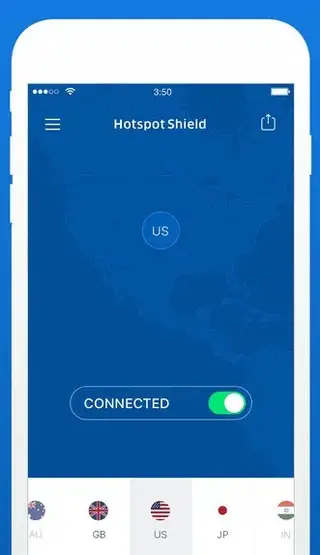
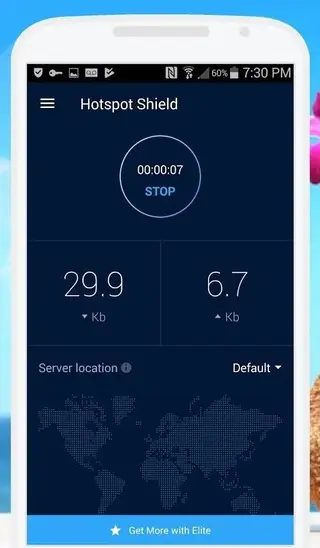
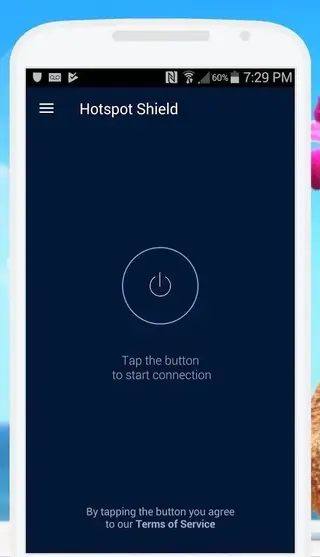
Once installed, you can launch the app from your app drawer, choose a server location, and start protecting your connection with one tap.
Features
One-tap VPN connection
Connect and disconnect with a single button, making it easy for beginners to start using a VPN on Android.
Encrypted internet traffic
Creates an encrypted tunnel between your device and Hotspot Shield servers to help protect data on Wi-Fi and mobile networks.
IP masking and virtual locations
Hides your real IP address and lets you route traffic through different server locations to appear as if you are browsing from elsewhere.
Free basic VPN access
Offers a free tier with limited servers and bandwidth so users can start using the VPN without an upfront payment.
Premium subscription options
Provides optional paid plans with more locations, higher speeds, and additional features for demanding users.
Wi-Fi protection alerts
Can notify you when you connect to unsecured Wi-Fi networks and suggest enabling VPN protection.
Automatic connection options
Allows you to configure automatic VPN connection in specific situations, such as on unsafe Wi-Fi networks.
Support for multiple apps and traffic types
Routes most Android app traffic through the VPN tunnel, helping secure browsing, messaging, and other online activity.
Screenshots
Device compatibility and requirements
Hotspot Shield Free VPN Proxy supports a wide range of Android phones and tablets. The APK information from our source indicates that you need at least Android 5.0 or higher to install the provided version. Most modern devices meet this requirement, but if you use an older phone, check your Android version in Settings before downloading.
Because it runs continuously when connected, the VPN may increase data usage and battery consumption compared to normal browsing. For the best experience, keep your device updated, maintain enough free storage, and use a stable Wi‑Fi or mobile data connection.
Tips for safer VPN use
Using Hotspot Shield Free VPN Proxy can improve your privacy, but it should be part of a broader security approach. Always keep your Android system and apps updated, avoid installing unknown software, and use strong passwords or password managers for your accounts.
Remember that a VPN does not replace antivirus tools, secure browsing habits, or legal compliance. Avoid using VPN services for activities that violate laws, platform rules, or content rights in your country.
FAQs
Pros
- Simple one-tap interface suitable for beginners
- Provides encrypted connections on public and private networks
- Helps bypass certain regional blocks and access restricted websites
- Offers a free tier so users can try the service before paying
- Available through Google Play and as an APK from our website
- Includes optional premium plans with more servers and better speeds
Cons
- Free version may include ads and limited server options
- Peak-time speeds can vary depending on server load and location
- Requires an active internet connection to function
- Some streaming or services may still detect and block VPN usage
Conclusion
Hotspot Shield Free VPN Proxy for Android offers a straightforward way to encrypt your mobile traffic, hide your IP address, and reach restricted content from one app. By downloading the APK directly from our website, you can install the latest available version on compatible devices, try the free mode, and upgrade to premium features if you need more performance or regions.




Comments
No approved comments yet.