

Mika Live Chat
Mika Live Chat is a social live-streaming and video chat app where you can join live rooms, talk to new people, and build your own audience. It focuses on real-time interaction instead of static profiles.
Creators can host live sessions, receive virtual gifts, and grow a fan base, while viewers explore streams from around the world and join chats instantly. The official APK file for Mika Live Chat is available to download directly from our website.
But usually, all those applications offer paid access, which means you have to pay to talk with them. There are other free apps like Ibiza Video Chat and MoreinLive which offer fake and auto people. So, the hard way is to find some genuine application, which offers actual content.
If you enjoy live video, karaoke-style rooms, and interactive group chats, this app offers a simple way to connect, socialize, and potentially monetize your talent on Android devices.
Rate this app
App details
- App name
- Mika Live Chat
- Category
- Social
- Version
- v3.2.1.0
- Size
- 206.78 MB
- Requirements
- 4.3 and Up
- Package name
- com.mikaapp.android
- Publisher
- Gmancal Studio
- Price
- Free
- Mod
- No
- Downloads
- 100,000
- Rating
- 4.0 / 5
- Rating count
- 19,600
- Play Store
- Yes
- Requires root
- No
- Offline support
- No
- Contains ads
- Yes
- In-app purchases
- Yes
- Updated
- May 11, 2026
- Age rating
- Rated for 3+
Table of contents
What is Mika Live Chat Android app
Mika Live Chat is an Android social networking and live-streaming application developed by Gmancal Studio. The app combines live video rooms, one-to-one chat, and community interaction so users can meet new people, follow broadcasters, and participate in interactive streams.
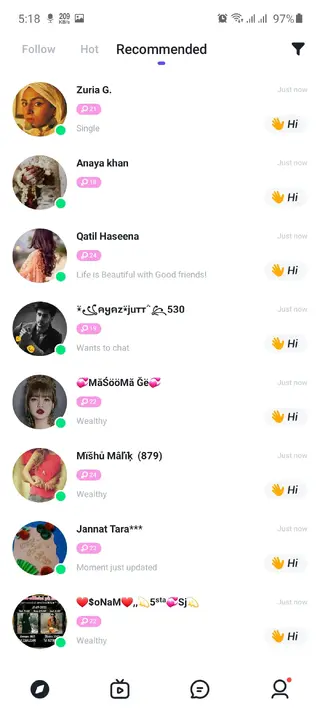
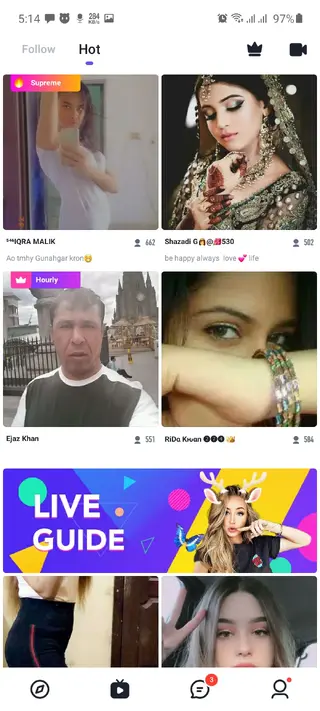
After creating a profile, you can browse a home feed of live rooms, join as a viewer, chat with the host and other participants, or start your own live session once your in-app level reaches the required threshold. Broadcasters receive coins and virtual gifts from viewers, which the platform converts into in-app rewards and, in some regions, into redeemable income.
Mika Live Chat focuses on creating a real-time community atmosphere: users can send messages, share pictures in chat, decorate their profiles with items from the in-app store, and maintain ongoing conversations with people they meet through the streams.
Why download Mika Live Chat APK from our site
Downloading the Mika Live Chat APK directly from our website lets you install the official file on your Android device without waiting for staged rollouts. You can get the version that matches the details listed on this page and start using the app right away.
Our download section provides the current release information such as version name, package name, and Android requirements. Once you download and install the APK, you can sign up, join live rooms, explore recommended broadcasters, and check whether the app fits your social and entertainment needs.
How Mika Live Chat can be useful for you
Mika Live Chat can be useful if you want more than traditional messaging or static social feeds. It offers always-on rooms where you can talk, perform, share hobbies, or simply hang out with people from different countries.
If you like hosting, you can grow a following by streaming regularly, interacting with viewers, and receiving gifts and coins during live sessions. This system can be a side income source for some users, depending on your audience and region.
For viewers, the app works as an entertainment hub with live music, casual talks, gaming chat, and friendship-focused rooms. Built-in tools like picture sharing, in-app items, and customer support make it easier to manage your profile and stay engaged with the community.
How to download and install Mika Live Chat APK
You can get the Mika Live Chat APK file directly from our website by following a few simple steps. Make sure your device meets the minimum Android requirement listed in the version details before you start.
Scroll to the download section on this page and tap the download button for Mika Live Chat.
Wait for the APK or XAPK file to finish downloading to your Android device.
Open your device settings, go to security or app installation options, and allow installs from this source if asked.
Locate the downloaded file in your downloads folder and tap it to start the installation process.
Follow the on-screen prompts to complete installation, then open Mika Live Chat and sign up or log in.
If the file is provided as XAPK, you may need an installer app that supports XAPK packages to complete the installation properly.
Features
Global live streaming rooms
Browse and join live video streams from different countries, interact with hosts, and participate in real-time conversations.
One-to-one and group chat
Add friends, move from public rooms to private chats, or join group conversations depending on your social preferences.
Earning through gifts and coins
Hosts can receive virtual gifts and coins from viewers while streaming, which may be converted into rewards or income where supported.
Level and rank system
Progress through in-app levels by staying active. Higher levels unlock more features, including hosting your own live streams.
Virtual gifts and animations
Send free and premium virtual gifts to support your favorite streamers and stand out in the live chat.
Profile customization store
Use the in-app store to buy items that decorate your profile or enhance your presence in live rooms.
Picture sharing in chat
Share images with friends in supported chat sessions to make conversations more expressive and personal.
Online customer service
Access in-app support options for account questions, reporting issues, or getting help with features and payments.
Screenshots

App version, package name and requirements
The current Android release of Mika Live Chat listed on this page uses the package name com.mikaapp.android. The version information and Android requirement are shown in the download details so you can check compatibility before installing.
According to the data provided, this build requires Android 4.3 or higher. Newer updates may raise the minimum requirement, so it is recommended to use the app on a relatively recent Android device for better performance and streaming quality.
Account setup and getting started
After installing Mika Live Chat, you create or log into an account using the sign-up options available in the app. Once inside, you can complete your profile, add a display picture, and choose basic information that helps other users recognize you.
From there, browse the home feed to see trending or nearby live rooms, tap any stream to join, and start chatting. As you interact more, you can add people as friends, receive follow requests, and gradually build a list of favorite hosts and communities.
Safety and community guidelines
Mika Live Chat includes reporting and blocking tools so you can manage your experience. If you encounter inappropriate content or behavior, use the in-app options to report or block the user and adjust your privacy settings as needed.
Because the app is based on live user-generated content, it is important to follow local regulations and the platform's community rules when streaming or chatting. Avoid sharing sensitive personal information and review the app's policies for age restrictions and content standards.
FAQs
Pros
- Live video chat with global users and communities
- Option for hosts to earn through virtual gifts and coins
- Built-in level system that rewards active participation
- Profile customization and in-app store for digital items
- Online customer support available inside the app
Cons
- Requires a stable internet connection to function properly
- Contains in-app purchases for gifts and premium items
- Live content quality and behavior vary between users
- May show ads depending on region and account status
Conclusion
Mika Live Chat offers a social live-streaming environment where you can meet new people, host interactive sessions, and support creators with virtual gifts. If you enjoy real-time video chat and community-focused rooms, downloading the official APK from our website lets you try the app on your Android device and decide whether its features match your social and earning goals.




Comments
No approved comments yet.