

Mojo
Mojo is a story maker and video editor designed for Instagram, Facebook, YouTube Shorts, TikTok, and other social platforms. It helps you turn simple photos and clips into animated stories with stylish layouts and typography.
Using ready-made templates, motion graphics, and text effects, you can create clean, professional-looking content in a few minutes on your phone. You do not need editing experience to start.
You can download the latest Mojo APK directly from our website and start creating vertical stories, reels, and posts for your social media profiles on any supported Android device.
It allows you to make your stories more attractive on social media platforms. There are more amazing features, which you can find as you explore this application. We are also going to share all about this application. If you want to know more about this application, then just stay with us and try other apps like ZeepLive & Chamet.
Rate this app
App details
- App name
- Mojo
- Category
- Photography
- Version
- v3.23.0
- Size
- 230.84 MB
- Requirements
- 8.0 and Above
- Package name
- video.mojo
- Publisher
- Archery Inc.
- Price
- Free
- Mod
- No
- Downloads
- 419,416
- Rating
- 4.4 / 5
- Rating count
- 91,314
- Play Store
- No
- Requires root
- No
- Offline support
- Yes
- Contains ads
- Yes
- In-app purchases
- Yes
- Updated
- May 30, 2026
- Age rating
- Rated for 3+
Table of contents
What is Mojo APK for Android?
Mojo is a mobile video and story editor focused on vertical content for social media. The Android app provides animated templates, typography presets, and motion design tools that help you build eye-catching stories, reels, and posts from your own photos and videos.
The free version includes a collection of templates, fonts, and simple effects that are enough for basic editing. A premium subscription unlocks more layouts, advanced effects, and extra resources for users who create content regularly.
With Mojo, you combine media from your gallery, add animated text, adjust colors and timing, then export the final story in high quality ready to share on Instagram, Snapchat, Facebook, WhatsApp Status, YouTube Shorts, and other platforms.
Why download Mojo APK from our website?
Downloading the Mojo APK from our website lets you get the latest available Android build directly, without needing to search around. You can keep the installer file, share it between your own devices, and reinstall it whenever you need.
Our page provides the version information, Android requirement, and other details in one place, so you know what you are installing before you start. Once downloaded, you can install Mojo on compatible phones and tablets and begin editing stories with no desktop tools required.
How Mojo is useful for creators and everyday users?
Mojo is useful for anyone who wants to improve the look of stories and short videos without learning complex editing software. Influencers, small businesses, and casual users can quickly design posts that look more polished than standard camera app stories.
The ready-made templates handle layout and animation, so you focus on your message and visuals. Built-in text styles and background music options help you match your content to your brand or mood. Because Mojo exports in vertical and platform-specific sizes, it also saves time when preparing content for different social networks.
How to download and install Mojo APK?
You can download the official Mojo APK file directly from our website. Follow these steps to get it on your Android device:
Scroll to the download section on this page.
Tap the download button to save the Mojo APK file to your device.
Open your phone settings and enable installation from unknown sources for your browser or file manager if it is not already allowed.
Locate the downloaded APK in your Downloads folder using a file manager.
Tap the APK file and confirm the installation prompts.
Wait for the installation to finish, then open Mojo from your app drawer and start creating stories.
After installation, you can keep the APK file as a backup or delete it to free up storage space on your device.
Features
Animated story templates
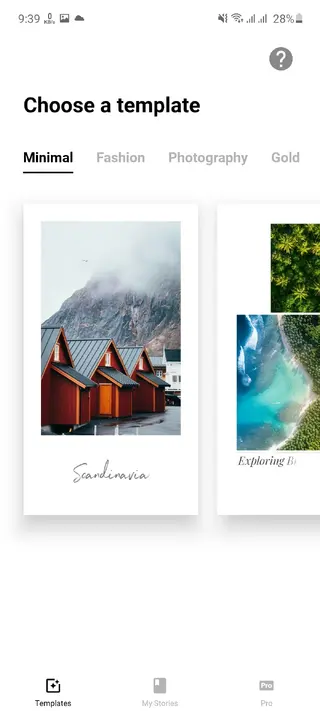
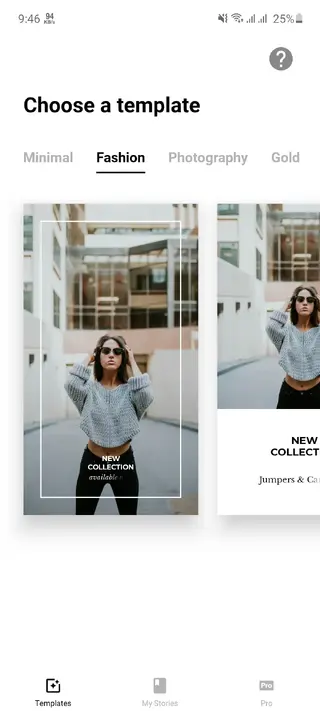
Mojo offers a large library of animated templates for photos and videos, including minimal, fashion, food, photography, film frames, glitch, and gold styles.
Rich text effects and fonts
Users can add titles and captions with multiple fonts, colors, and styles such as neon, outline, underline, repeat, hand-drawn, and more.
Full-screen social formats
The app supports popular aspect ratios and sizes tailored for Instagram Stories, Reels, Facebook posts, YouTube Shorts, and other vertical formats.
High-quality export
Mojo can render stories and videos in high quality, including full HD and higher resolutions where supported by the device and project settings.
Music and audio support
Users can add background music to their stories, sync cuts to the beat, and create more engaging short videos for social media.
Built-in visual editor
A simple editor lets you reorder scenes, trim clips, adjust duration, tweak colors, and fine-tune elements directly on your phone.
Image and video mixing
You can combine still photos and video clips inside the same template to build dynamic collages and multi-scene stories.
Simple animation tools
Mojo turns regular images and clips into animated stories by applying motion effects and transitions without manual keyframing.
Screenshots
Device compatibility and performance tips
Mojo runs on Android 8.0 and above, which covers most modern smartphones and tablets. For smoother previews and faster exports, it helps to have enough free storage and RAM and to close unused apps in the background.
If projects feel heavy, reduce clip length, lower resolution in export settings, or avoid stacking too many animated layers in a single story. These small changes can significantly improve performance on entry-level devices.
FAQs
Pros
- Easy-to-use interface suitable for beginners
- Large collection of animated templates for different niches
- Powerful text effects and typography tools
- Supports high-quality vertical video export
- Designed specifically for social media stories and reels
- Works on a wide range of modern Android devices
Cons
- Many advanced templates and effects require a paid subscription
- Exports and previews can be slow on low-end devices
- Watermarks may appear on some content in the free version
- Requires an internet connection for some assets and updates
Conclusion
Mojo is a practical story and video editor for Android users who want better-looking social media content without complex software. With ready-made templates, strong text tools, and high-quality export, it suits both casual users and creators who post regularly. You can download the latest Mojo APK from our website and start designing animated stories directly on your phone.




Comments
No approved comments yet.