
Movie Rulz VPN
Movie Rulz VPN is a simple Android VPN app that helps you change your IP address and route your traffic through secure remote servers. It focuses on quick access with a one-tap connection and an easy interface suitable for beginners.
With multiple free servers and optional VIP routes, you can mask your real location, reduce basic tracking, and reach region-restricted websites and apps. You can download the official Movie Rulz VPN APK directly from our website and start using it in a few steps.
You can find the best features and services in this amazing tool. If you want to get similar features, then you should try 3x VPN or Hot Spot Shield VPN as alternatives.
The app is designed for everyday browsing, streaming, and accessing blocked platforms on mobile data or Wi-Fi. It offers fast connection options and does not require root access, so most modern Android phones and tablets can run it without extra tweaks.
Rate this app
App details
- App name
- Movie Rulz VPN
- Category
- Tools
- Version
- v3.32
- Size
- 17.64 MB
- Requirements
- 4.1 and Up
- Package name
- com.dz4team.movierulzVpn
- Publisher
- DZ4Team
- Price
- Free
- Mod
- No
- Downloads
- 54,000
- Rating
- 4.8 / 5
- Rating count
- 19,000
- Play Store
- No
- Requires root
- No
- Offline support
- No
- Contains ads
- Yes
- In-app purchases
- Yes
- Updated
- May 12, 2026
- Age rating
- Rated for 7+
Table of contents
What is Movie Rulz VPN for Android
Movie Rulz VPN is a virtual private network application for Android devices developed by DZ4Team. It creates an encrypted tunnel between your phone and remote VPN servers so that websites and online services see the server address instead of your real IP.
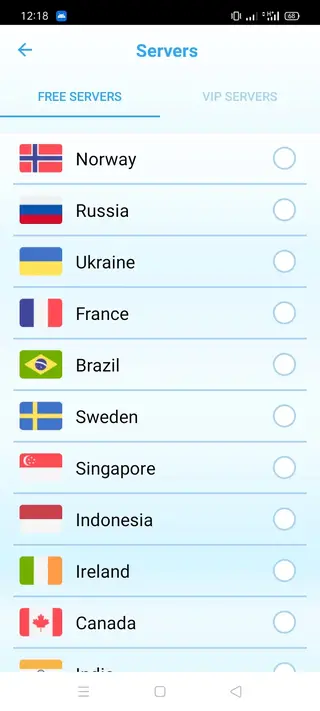
The app offers both free and VIP servers. Free servers allow new users to test the service, while VIP servers are designed to give more stable connections, less congestion, and access to additional locations. You can upgrade from inside the app if you decide you need premium routes.
Once connected, Movie Rulz VPN can help you appear as if you are browsing from another country. This can be useful for reaching geo-restricted sites, apps, or media libraries, and for adding a layer of privacy on public Wi-Fi hotspots or shared networks.
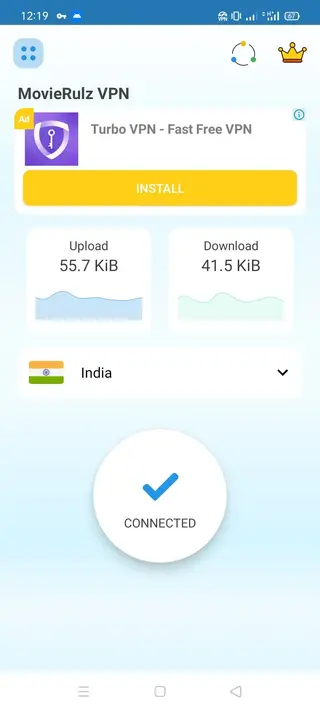
The interface focuses on one-tap control. You typically open the app, select a server location, and tap the connect button. The app then handles the VPN configuration in the background without requiring manual settings or technical knowledge.
Why download Movie Rulz VPN APK from our website
Downloading the Movie Rulz VPN APK directly from our website gives you quick access to the current release without searching through multiple sources. The package information such as version number, package name, and Android requirements is clearly listed so you know what you are installing.
By getting the installer from our download page, you can keep a copy of the APK for offline installation or for sharing across your own devices. This is helpful if you often reset your phone, switch devices, or prefer sideloading instead of relying only on app stores.
Our page also explains the core features, pros and cons, and basic usage tips, so you understand what the app does before you install it. This makes it easier to decide whether Movie Rulz VPN matches your browsing, streaming, or privacy needs.
How Movie Rulz VPN can be useful
Movie Rulz VPN can be useful if you frequently encounter blocked or region-locked websites. By routing traffic through different locations, it can help you reach services that are unavailable on your regular connection.
The app can also add a layer of privacy when you connect to public Wi-Fi in places like cafes, hotels, airports, or schools. A VPN does not replace good security practices, but it can make casual tracking and basic snooping more difficult.
For users in regions with heavy content filtering, switching servers may reduce simple forms of network-level blocking. Combined with a straightforward design, Movie Rulz VPN offers a practical tool for people who want a quick way to change IP addresses without complex configuration.
How to download and install Movie Rulz VPN APK
You can download the official Movie Rulz VPN APK file directly from our website and install it manually on your Android device. Follow these steps to get started:
Scroll to the download section on this page and tap the APK download button for Movie Rulz VPN.
Wait for the APK file to finish downloading to your phone or tablet.
If this is your first time installing an APK, open your device settings and allow installation from unknown sources for your browser or file manager.
Open your file manager and navigate to the Downloads folder, then tap the Movie Rulz VPN APK file.
Review the permissions shown on the installation screen, then tap Install to begin the setup process.
After installation completes, tap Open or find the Movie Rulz VPN icon in your app drawer to launch it.
Choose a server, tap connect, and start browsing through the VPN tunnel.
You can keep the APK file stored on your device or external storage if you want to reinstall the app later without downloading it again.
Features
Free and VIP server options
Use a set of free servers to start, and upgrade to VIP servers for more locations and potentially more stable routes if needed.
One tap connection
Connect or disconnect the VPN with a single tap, with no manual configuration or advanced technical steps required.
Multiple global locations
Choose from servers in different regions so you can appear to be browsing from another country or location.
IP address masking
Hide your real IP address behind the VPN server to make your online activity harder to link directly to your device IP.
Support for Wi-Fi and mobile data
Use the VPN over both Wi-Fi and cellular networks so you can keep the same setup wherever you go.
User friendly interface
Navigate the app easily with a clean layout, clear buttons, and simple server selection suitable for new VPN users.
No root required
Install and run the app on standard Android devices without rooting or advanced system modifications.
Lightweight Android requirements
Works on Android 4.1 and above, allowing older phones and tablets to use the VPN as well.
Screenshots
Getting started with Movie Rulz VPN
After installing Movie Rulz VPN, the first step is usually to grant the VPN permission when prompted. Android will show a confirmation dialog asking if you trust the application to create a VPN connection. Accept this request so the app can establish secure tunnels.
Next, open the server list and select a country or region that matches your needs. For general browsing, users often choose a nearby country to get better speeds. Once you tap the connect button, wait a few seconds until the status changes to connected, then start using your browser or other apps as usual.
Privacy and security considerations
Movie Rulz VPN can help obscure your IP address and make network-level tracking more difficult, especially on open Wi-Fi networks. However, a VPN is only one part of a broader privacy setup. Websites can still use cookies, accounts, and device data to recognize you.
For better overall protection, combine the VPN with strong passwords, two factor authentication where possible, and cautious behavior when downloading files or sharing personal information. Avoid assuming that any VPN alone can fully protect you from all threats.
Performance tips for smoother connections
If you experience slow speeds or frequent disconnections, try switching to another server location within the app. Nearby regions often provide better latency than distant ones, which can improve loading times and streaming stability.
It can also help to close background apps that use a lot of data, keep your device software up to date, and test both Wi-Fi and mobile data connections. These steps give the VPN a more stable network to work with and may improve overall performance.
FAQs
Pros
- Simple interface that is easy for beginners to understand and use
- Includes a range of free servers so you can test the service before paying
- Supports VIP upgrade for more server options and potentially better performance
- No root access required, so it works on most standard Android devices
- Helps mask your IP address and reach some region restricted websites
Cons
- Connection speed and stability can vary depending on server load and network conditions
- Free servers may be crowded during peak times, leading to slower performance
- As with any VPN, it cannot guarantee complete anonymity or security on its own
- May display advertising to support free usage
- VPN services might not work reliably with every streaming or gaming platform
Conclusion
Movie Rulz VPN provides a straightforward way to route your Android traffic through remote servers, mask your IP address, and reach restricted sites. If you want a light VPN app with both free and VIP options, you can download the official Movie Rulz VPN APK from our website and try it on your device to see if it fits your daily browsing needs.




Comments
No approved comments yet.