

Oppo App Store
Oppo App Store is the official marketplace from Oppo that helps you discover, manage, and update Android apps and games on Oppo devices and compatible phones. It focuses on apps that work smoothly with ColorOS and Oppo hardware.
With curated categories, local recommendations, and an integrated update system, the store makes it easy to keep your favorite tools and games in one place. You can install the latest version of the Oppo App Store APK directly from our website.
The app primarily targets Chinese users and currently focuses on the Chinese language, but it still offers a large catalog of popular Android software, utilities, and games that you can browse and download with a few taps.
Rate this app
App details
- App name
- Oppo App Store
- Category
- Tools
- Version
- v1.7.31
- Size
- 40.34 MB
- Requirements
- 5.0 and Up
- Package name
- com.oppo.market
- Publisher
- Oppo
- Price
- Free
- Mod
- No
- Downloads
- 90,011
- Rating
- 4.3 / 5
- Rating count
- 27,000
- Play Store
- No
- Requires root
- No
- Offline support
- No
- Contains ads
- No
- In-app purchases
- Yes
- Updated
- May 29, 2026
- Age rating
- Rated for 3+
Table of contents
What is Oppo App Store?
Oppo App Store is an official Android app marketplace developed by Oppo for its smartphones and other compatible Android devices. It provides a centralized place to find, download, and update apps and games that work well with ColorOS and Oppo services.
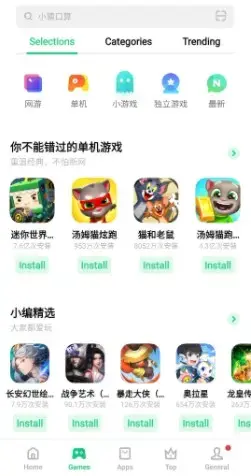
The store organizes content into clear categories, including dedicated sections for apps and video games. Users can search by name or keyword, browse curated lists, and check ratings and reviews before installing any title.
If you don’t know anything about this language, then you might find it very difficult to use. So, there isn’t any use of this App Market for you. You can get Torrent9 or Ccplay to get a free collection of applications or you can visit our website to get all the most trending collections.
This version of Oppo App Store mainly targets the Chinese market and currently supports Chinese as its primary language. Despite this limitation, it can still be useful if you are familiar with the language and want access to Oppo’s own apps along with a wide selection of third-party Android software.
Why download Oppo App Store APK from our website?
Installing the Oppo App Store APK gives you direct access to Oppo’s own software ecosystem and a large catalog of Android apps and games in one place. You can browse trending apps, discover new tools, and keep your installed apps updated without relying only on other marketplaces.
When you download the APK from our website, you get the latest version that matches the details shared on this page. You can save the installer, share it with other compatible devices, and reinstall it whenever needed without searching elsewhere.
For Oppo users, the store also helps maintain better compatibility with system features, since many apps are optimized for ColorOS and Oppo hardware. This can improve stability and overall user experience compared to installing random packages manually.
How is Oppo App Store useful?
Oppo App Store is useful for users who want a structured and familiar way to manage apps on their Oppo or compatible Android device. Instead of manually searching for APKs, you can rely on categorized lists, search filters, and editorial recommendations to find what you need faster.
The store highlights popular and trending apps, making it easier to spot new games, social platforms, tools, and multimedia apps. Built-in reviews and ratings help you make better decisions before installing anything.
Because the store is integrated with Oppo’s ecosystem, it also simplifies updates. You can check for new versions of installed apps from one place, which is especially handy for users who frequently install and test different apps or games.
How to download and install Oppo App Store APK
You can download the latest Oppo App Store APK directly from our website. Follow these steps to save and install the file on your Android device:
Scroll to the download section on this page and tap the APK download button.
Wait for the APK file to finish downloading to your device.
Open your phone’s Settings and enable app installation from unknown sources for your browser or file manager.
Open your file manager and navigate to the Downloads folder.
Tap the Oppo App Store APK file and confirm the installation prompt.
Once installed, open Oppo App Store, accept the required permissions, and start browsing apps and games.
After installation, you can return to the store at any time to download new apps or update the ones you already use.
Features
Official Oppo marketplace
Access Oppo’s own apps and a curated catalog of Android software built for Oppo and ColorOS devices.
Large catalog of apps and games
Browse a wide range of utilities, social apps, productivity tools, and video games in one store.
Clear categorization
Explore content through structured categories and sections for apps and video games.
Search and filters
Use the search bar and filters to quickly find specific apps, games, or publishers.
App ratings and reviews
Check user feedback, ratings, and basic details before installing any title.
Single-tap installation
Install apps with a single tap once you have the store set up on your device.
Trending and new apps
Discover new and popular apps highlighted in recommendation and trending lists.
Smooth download manager
Handle large downloads with a built-in manager designed to keep app and game installations stable.
Screenshots


Compatibility and system requirements
Oppo App Store is designed primarily for Oppo smartphones running ColorOS, but it can also work on other Android devices that meet the minimum system requirements. The APK version listed on this page targets Android 5.0 and above, which covers most modern phones and tablets.
For the best experience, install it on a device with stable internet access and enough free storage for both the store and the apps you plan to download. Some Oppo-specific features or integrations may not be available on non-Oppo phones, but basic app browsing and installation should still work on many compatible devices.
Tips for using Oppo App Store effectively
To get more value from Oppo App Store, start by exploring the main categories and featured lists. These sections often highlight trending apps, high-rated tools, and popular games that many users enjoy.
Use the search bar when you already know the name of the app you want. When trying something new, review user ratings and comments to understand performance, stability, and recent update quality. Finally, check the update section regularly so your installed apps stay current and more secure.
FAQs
Pros
- Official app marketplace from Oppo
- Large catalog of Android apps and games
- Simple interface with clear categories
- Built-in ratings and reviews for apps
- Single-tap installation and update process
- Optimized for Oppo and ColorOS devices
Cons
- Interface primarily available in Chinese
- Not all features may work on non-Oppo devices
- Requires internet connection for browsing and downloads
- Some apps and content may be region-limited
Conclusion
Oppo App Store is a practical choice if you use an Oppo phone or a compatible Android device and want direct access to Oppo’s own ecosystem of apps and games. You can download the latest APK from our website, install it in a few simple steps, and use it to discover, install, and update a wide range of Android apps from one place.




Comments
No approved comments yet.