

Radarbot Pro
Radarbot Pro is a dedicated speed camera and traffic alert app that helps you stay aware of speed limits, speed cameras, and road hazards while driving. It combines GPS navigation data with a live warning system so you can react in time.
With detailed alerts for fixed and mobile speed cameras, average speed zones, and potential checkpoints, the app works as an extra driving assistant on unfamiliar roads. You can download the official Radarbot Pro APK directly from our website and start using it on your Android phone or tablet.
The app focuses on clear visual indicators and voice alerts, so you can keep your eyes on the road. Customization options, themes, and detailed speed information make it easy to tune Radarbot Pro to your driving style.
So, Apkoll is here with this application, through which you can get all the information about upcoming speed meters. It provides an alert notification, through which you will know about the speed limit and your speed. So, you can easily control it.
Rate this app
App details
- App name
- Radarbot Pro
- Category
- Maps & Navigation
- Version
- v9.17.10
- Size
- 433 MB
- Requirements
- 5.0 and Above
- Package name
- com.vialsoft.radarbot_free
- Publisher
- Vial Soft
- Price
- Free
- Mod
- No
- Downloads
- 70,400
- Rating
- 4.7 / 5
- Rating count
- 29,181
- Play Store
- Yes
- Requires root
- No
- Offline support
- Yes
- Contains ads
- No
- In-app purchases
- Yes
- Updated
- May 11, 2026
- Age rating
- Rated for 12+
Table of contents
What is Radarbot Pro APK
Radarbot Pro is a maps and navigation app for Android that focuses on speed camera detection and traffic alerts. It uses GPS to track your position and shows real-time information about speed limits, nearby speed cameras, traffic flow, and your current speed.
The app is designed mainly for drivers who want clear alerts before reaching fixed cameras, possible mobile cameras, tunnels, and average speed sections. It combines community-reported data with official speed camera locations in many regions, helping you avoid sudden braking and unnecessary penalties.
On the main screen you see a live map with your route, traffic indicators, and speed information. Radarbot Pro also offers voice alerts, warning tones, and a large on-screen speedometer, so you can understand the situation at a glance without getting distracted.
Why download Radarbot Pro for Android
Drivers install Radarbot Pro to get a simple assistant that warns them about upcoming speed cameras and changing speed limits. The app reduces the chance of missing a sign or overlooking a camera in unfamiliar areas.
Radarbot Pro also helps you plan smoother journeys. With traffic information, visual color lines on the map, and real-time alerts, you can maintain a steady speed and react earlier instead of braking at the last second.
Another reason to choose the Pro edition is its focus on distraction-free driving. The interface is optimized for quick glances, offers multiple themes for day and night, and supports spoken warnings so you can keep your hands on the wheel.
How Radarbot Pro is useful on the road
Radarbot Pro is useful because it adds another layer of awareness on top of standard navigation apps. When you are driving in a city you do not know well, it is easy to miss a speed limit sign or hidden camera. This app highlights those risk points in advance.
It displays your current speed, the allowed speed, and the distance to the next camera in a clear layout. Color-coded traffic segments show where traffic is heavy or light, so you can adjust your expectations and drive more calmly.
The app can also work as a background companion while you follow directions in other navigation apps. Voice alerts and sounds inform you when you are approaching a camera or going over the limit, which can help reduce both stress and fines over time.
How to download and install Radarbot Pro APK
You can get the official Radarbot Pro APK file directly from our website. Follow these simple steps to download and install it on your Android device.
Scroll to the download section on this page.
Tap the provided Radarbot Pro APK download button.
Wait for the APK file to finish downloading to your device.
On your phone, open Settings and enable installation from unknown sources if needed.
Open the downloaded APK file from your notifications or file manager.
Tap Install and wait until the installation completes.
Launch Radarbot Pro and grant the required GPS and location permissions.
After installation, you can configure alerts, choose your preferred theme, and start receiving speed camera and traffic warnings while you drive.
Features
Speed camera alerts
Get early warnings for fixed cameras, possible mobile cameras, tunnels, and average speed sections depending on your region.
Live speedometer and limit display
See your current speed alongside the road speed limit, helping you notice when you are about to exceed it.
Traffic information on the map
View colored lines that highlight congested and free-flowing sections, so you can understand road conditions at a glance.
Real-time alert system
Receive timely voice alerts and sounds when you approach cameras, speed changes, and other monitored points.
Custom warning settings
Adjust alert distances, sounds, and sensitivity so the warnings match your usual driving environment.
Multiple visual themes
Switch between themes optimized for day, night, and different contrast levels to keep the screen readable.
Background mode support
Run Radarbot Pro alongside your preferred navigation app while still getting speed and camera alerts.
Offline speed camera database
Use stored camera locations in many areas even when you have limited or no mobile data coverage.
Screenshots
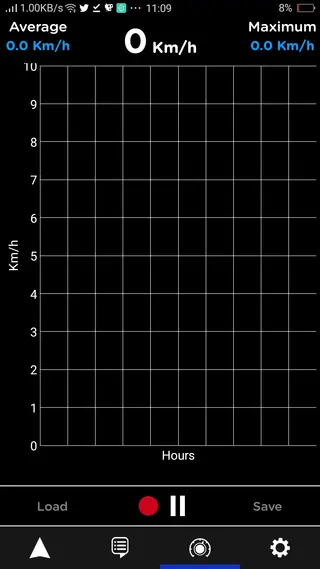
Interface and usability
Radarbot Pro focuses on a clean and readable interface designed for drivers. The home screen typically shows a large speedometer, your current speed limit, and visual warnings for upcoming cameras. Large buttons and simple layouts reduce the need to touch the screen while driving.
The map view highlights your route, traffic state, and important control icons within easy reach. Customizable color themes help you keep visibility high in bright daylight and reduce glare during night drives.
Configuration and customization
Before you start using Radarbot Pro regularly, it is worth spending a few minutes in the settings. You can fine-tune alert distances, choose the type of sounds or voice guidance you prefer, and decide which categories of alerts you want to receive.
For example, you can enable or disable warnings for average speed sections, tunnels, and potential mobile camera zones. You can also adjust speed tolerance so that alerts only trigger when you exceed the limit by a certain margin, helping to avoid unnecessary notifications.
Tips for better accuracy
To get the best results from Radarbot Pro, always keep your device GPS enabled and allow the app access to location services. When possible, keep your mobile data active so the app can update its camera database and traffic information in real time.
Many users also contribute by reporting new cameras and changes in the app, which helps improve accuracy over time. Checking for updates regularly ensures you benefit from the latest improvements and database refreshes.
FAQs
Pros
- Provides early alerts for speed cameras and speed limits
- Clear speedometer and limit display for quick glances
- Multiple themes for day and night driving
- Can work in background alongside other navigation apps
- Offline camera database helps in low-signal areas
Cons
- Coverage and camera accuracy can vary by country and region
- Continuous GPS use may increase battery consumption
- Some advanced features may require in-app purchases or subscriptions
Conclusion
Radarbot Pro is a focused driving assistant for speed cameras and traffic alerts that complements standard navigation apps. If you want clearer awareness of speed limits and potential cameras while driving, downloading the official Radarbot Pro APK from our website is a practical way to add that extra layer of safety and control to your daily journeys.




Comments
No approved comments yet.