

Spotiflyer
Spotiflyer is an Android music downloader that lets you save tracks, albums and playlists from popular streaming services as offline audio files on your phone.
With a simple link-based downloader and a clean interface, the app focuses on giving music lovers an easy way to build personal offline libraries without relying on constant internet access.
You can get the official Spotiflyer APK directly from our website, install it on compatible Android devices, and start downloading supported audio content in just a few steps.
Rate this app
App details
- App name
- Spotiflyer
- Category
- Music & Audio
- Version
- v3.6.5
- Size
- 8.05 MB
- Requirements
- 5.0 and Above
- Package name
- com.shabinder.spotiflyer
- Publisher
- SHABINDER
- Price
- Free
- Mod
- No
- Downloads
- 63,521
- Rating
- 4.6 / 5
- Rating count
- 21,546
- Play Store
- No
- Requires root
- No
- Offline support
- Yes
- Contains ads
- No
- In-app purchases
- No
- Updated
- May 14, 2026
- Age rating
- Rated for 7+
Table of contents
What is Spotiflyer APK
Spotiflyer APK is a third-party Android application designed to download audio tracks from various music and streaming platforms. Instead of streaming songs every time, you can convert supported links into downloadable audio files and store them locally on your device.
If you are a music lover, you know about the platforms that provide your favorite content like Deemix and Greenroom. Most of the platforms provide premium content for the users, which is why people are frustrated with the available services.
The app is aimed at users who listen to music regularly and want quick access to their favorite tracks without buffering, network limits, or repeated data usage. Spotiflyer usually works by taking a share URL from supported platforms and processing it into a downloadable audio file.
According to its community documentation and open-source repo, Spotiflyer is built with a lightweight interface, supports multiple services such as Spotify and YouTube-based sources (within the limits of what is technically and legally possible), and focuses on generating offline audio rather than video downloads.
Because it interacts with premium music platforms, Spotiflyer is not listed on Google Play. Instead, users typically install it via APK, which you can download directly from our website.
Why Download Spotiflyer for Android
Users download Spotiflyer mainly to simplify offline listening. Instead of paying for multiple subscriptions or repeatedly streaming the same playlists, you can turn supported links into audio files and keep them on your device.
The app is also attractive for its straightforward workflow. You copy a URL from a compatible platform, paste it into Spotiflyer, choose the tracks or playlists you want, and start the download. There is no complicated configuration or sign-up flow.
Another reason many users choose Spotiflyer is its focus on audio-only downloads. By avoiding video, the app keeps file sizes relatively small and helps you store more songs on limited storage devices.
Keep in mind that availability of features may vary over time as streaming platforms update their systems. Always use the app responsibly and respect the terms of the services you access.
How Spotiflyer Is Useful
Spotiflyer is useful for anyone who listens to music daily and wants more control over offline playback. It allows you to keep favorite playlists ready on your phone for travel, commuting, studying, or exercising without relying on a stable network.
The app helps reduce repeated data usage because once a track is downloaded, you can play it locally as many times as you like. This can be especially helpful if you have a limited data plan or often move between areas with weak connections.
Spotiflyer also centralizes your listening. Instead of switching between multiple services every time, you can consolidate selected songs into one offline collection, organized directly in your device’s storage and accessible through your preferred music player.
Because the interface is minimal, new users can learn the workflow quickly. There is no learning curve of a full streaming platform, just a focused downloader that does one main task.
How to Download and Install Spotiflyer APK
You can download the official Spotiflyer APK file directly from our website and install it manually on your Android device. Make sure your device runs Android 5.0 or above.
Follow these steps to get started:
Scroll to the download section on this page and tap the Spotiflyer APK download button.
Wait for the APK file to finish downloading to your device.
Open your phone’s settings and enable installation from unknown sources if it is not already allowed.
Locate the downloaded APK in your Downloads or file manager and tap it.
Review the permissions requested by the app, then tap Install to begin the process.
Once installed, open Spotiflyer from your app drawer and start pasting supported music links to download audio.
If you update from an older version, install the new APK over the existing one so your downloads remain on your device storage.
Features
Multi-platform audio downloads
Download audio from several supported music and streaming platforms by using share or playlist links where functionality is available.
Playlist and album support
Grab entire playlists or albums instead of adding songs one by one, making it faster to build large offline libraries.
Audio-only focus
Converts supported links into audio formats rather than video files, saving storage space and bandwidth.
Offline playback support
Once downloaded, tracks can be played offline through your preferred local music player without an internet connection.
Simple URL-based workflow
Copy a link from a supported service, paste it in Spotiflyer, select tracks, and start the download with minimal setup.
Clean and lightweight interface
The app uses a straightforward layout so users can quickly find the download field, results, and history.
No third-party ads claimed
The original description notes that the app does not show intrusive third-party advertisements inside the interface.
Free to install and use
The APK is offered free of charge, with no built-in in-app purchase system mentioned in public documentation.
Screenshots
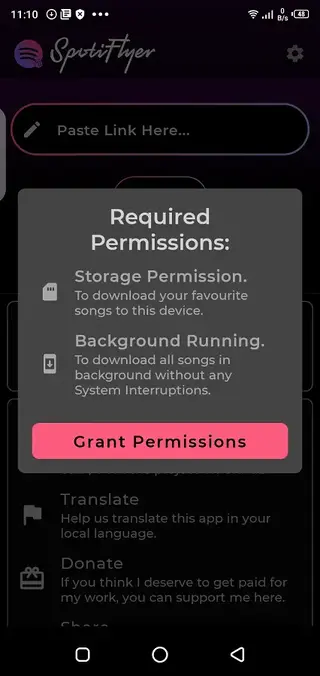

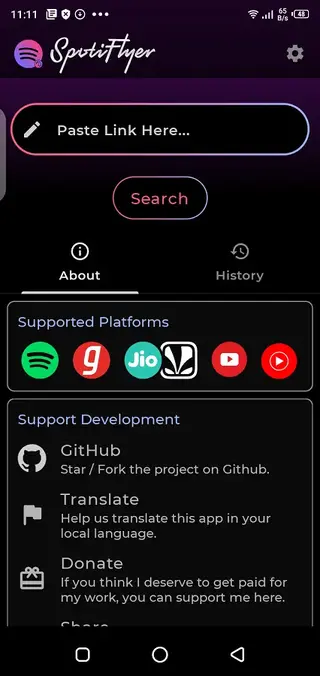
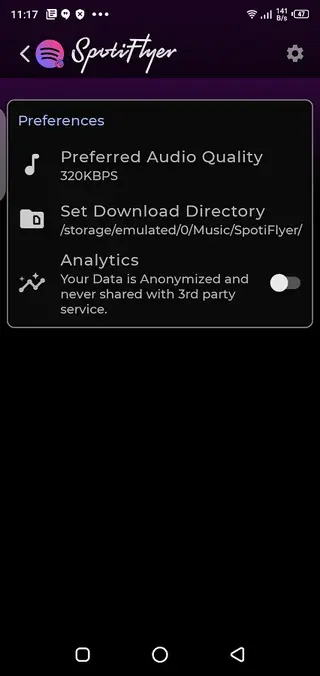

How Spotiflyer Works in Practice
Spotiflyer typically works by processing the share or playlist URL from a supported music platform. When you paste the link into the app, it queries the source, fetches track information, and generates downloadable audio options.
After the app displays the list of tracks, you can choose individual songs or entire playlists and start downloading. The files are then saved to your device storage, where they can be managed with a file manager or played through any compatible audio player.
Because Spotiflyer depends on external services, its reliability can vary. Some links may not work if the platform blocks access or changes its structure, so users often need to update the app when a new version is released.
Safety, Legality, and Responsible Use
Any app that interacts with premium music platforms raises important questions around copyright, licensing, and terms of service. While Spotiflyer is a popular tool among enthusiasts, downloading content may not always align with the official rules of certain services.
Users are responsible for understanding the laws in their country and the terms of the platforms they use. It is advisable to use Spotiflyer only for content you have the rights to download or for which offline use is clearly permitted.
From a technical standpoint, always install the APK from our website to avoid tampered packages, and keep your device updated with the latest Android security patches.
Tips for Getting Better Results with Spotiflyer
To improve your experience with Spotiflyer, start by ensuring you copy complete and correct URLs from the supported platform. Broken or truncated links often lead to failed downloads.
Use a stable internet connection when initiating downloads so the app can fetch metadata and audio files without interruption. Once the tracks are stored on your device, you can switch to offline mode.
It is also a good idea to organize downloaded files into folders, back them up when necessary, and periodically check for updated Spotiflyer versions that may improve compatibility or fix bugs.
FAQs
Pros
- Enables offline listening by turning supported music links into downloadable audio files
- Supports multiple major music and streaming platforms depending on current compatibility
- Simple interface that is easy to understand even for new users
- Focus on audio-only downloads helps save storage space and data
- Does not appear to include third-party ads in the interface
- Offered free of charge without in-app purchases mentioned
Cons
- Not available on Google Play Store, so installation requires manual APK setup
- Functionality can break when streaming platforms change their systems or policies
- May not support every region, platform, or specific track users want to download
- Works only with audio files and does not download video content
- Legal and copyright implications can vary by country and service, so responsible use is required
Conclusion
Spotiflyer gives Android users a focused way to turn supported music links into offline audio files with a simple, ad-free interface. If you want an easy tool to build a personal offline collection on your phone, you can download the official Spotiflyer APK from our website and start testing its features on your device.




Comments
No approved comments yet.