

Spotify Downloader
Spotify Downloader is an Android app that helps you save tracks and playlists from Spotify so you can listen to them later without an internet connection. It focuses on simple controls and fast downloads for everyday music listeners.
With this tool, you use your existing Spotify account to search for songs, albums, or playlists, then download the audio files directly to your device. The app is light, works on older Android versions, and aims to keep the interface clean and easy to understand.
You can get the official Spotify Downloader APK file directly from our website and install it on your phone or tablet to start building your own offline music library.
Rate this app
App details
- App name
- Spotify Downloader
- Category
- Tools
- Version
- v1.5.3
- Size
- 11.73 MB
- Requirements
- 4.1 and Above
- Package name
- com.jr10cx10.spotifydownloader
- Publisher
- JR 10 CX
- Price
- Free
- Mod
- No
- Downloads
- 56,955
- Rating
- 4.3 / 5
- Rating count
- 5,244
- Play Store
- No
- Requires root
- No
- Offline support
- Yes
- Contains ads
- No
- In-app purchases
- No
- Updated
- May 9, 2026
- Age rating
- Rated for 12+
Table of contents
What is Spotify Downloader APK
Spotify Downloader is a third-party Android application designed to work alongside your existing Spotify account. Instead of streaming the same songs again and again, this tool lets you download audio from Spotify playlists and save the files locally on your device.
The app uses your Spotify user ID to connect to your library, playlists, and search results. Once connected, you can look up any available track, album, or playlist and fetch a downloadable list. From there, you choose what you want to save, and the app handles the download process in the background.
Because the downloads are stored on your phone or tablet, you can listen to your music offline without depending on a stable internet connection. The interface stays minimal, with a focus on search, playlist links, and clear download controls, so even new users can start using it quickly.
Spotify Downloader is built for Android 4.1 and above and is available as an APK file on our website, which you can install manually on compatible smartphones and tablets.
Why Download Spotify Downloader for Android
Many Spotify listeners want to keep favorite playlists available all the time, including in places with poor or no internet coverage. Spotify Downloader solves this by turning streaming playlists into locally stored audio files you can access anytime.
The app offers a straightforward search bar and playlist link support, which makes it quick to grab entire collections instead of downloading songs one by one. You can paste a playlist link, let the app fetch all the tracks, and start downloading multiple items in one go.
Another reason to use Spotify Downloader is the cleaner listening experience. Once your tracks are stored on your device, playback does not rely on live streaming, which can help avoid buffering, connection drops, or data overuse. This is especially useful for commuters, travelers, and users with limited data plans.
Since the APK is provided directly on our website, you can download the latest available version, keep it saved, and reinstall it whenever you upgrade or change devices.
How Spotify Downloader Is Useful
Spotify Downloader is useful for anyone who relies on Spotify but cannot stay online all the time. It helps you create an offline backup of playlists you often play, so you can enjoy your music in airplanes, underground transport, remote areas, or simply when you want to save mobile data.
The app simplifies playlist handling by allowing you to search by name or paste direct playlist links. This reduces the time required to manage large music collections. High-speed download handling also lets you process multiple tracks or playlists in a single session.
Because the interface is clean and focused, you do not have to navigate through complex menus. You log in with your Spotify credentials, search or paste links, and start downloads with a few taps. This makes the tool accessible for users with basic Android skills.
For users with older or entry-level devices, Spotify Downloader is also helpful because it is lightweight. It requires a modest Android version and does not overload the device with heavy graphics or complicated background processes.
If you have any problem using the new version app, please contact us using the comment section below. There are many similar downloader tools that will allow users to download songs from other platforms as well. Interested users can download Music Junk and AIDS.
How to Download and Install Spotify Downloader APK
You can download the official Spotify Downloader APK file directly from our website and install it manually on your Android device. Follow these steps to get started.
On this page, find the download button for the latest Spotify Downloader APK and tap it to start downloading the file.
Wait until the APK file finishes downloading to your device.
Open your device settings and, if needed, allow installation from unknown or external sources for your browser or file manager.
Locate the downloaded APK in your Downloads folder and tap the file.
Review the installation prompt and tap Install to add Spotify Downloader to your device.
Once installation completes, open the app, sign in with your Spotify user ID, and start searching and downloading music.
Whenever a newer version is available, you can return to our website, download the updated APK, and install it over the existing app.
Features
Download Spotify playlists
Save entire Spotify playlists to your Android device and listen to them offline whenever you want.
Song and album search
Use the built-in search bar to find specific songs, albums, or artists linked to your Spotify account.
Playlist link support
Paste any Spotify playlist link to fetch the full list of tracks for quick batch downloading.
High speed downloads
Download multiple tracks or playlists with optimized speed to build your library faster.
Unlimited downloads
There is no fixed limit in the app interface, so you can download as many tracks as your storage allows.
Skip and manage tracks easily
Manage the download list and skip unwanted songs with simple tap controls.
Offline playback support
Listen to downloaded audio files offline without needing any active internet connection.
No in-app advertisements
The interface is designed without disruptive banner or popup ads for a cleaner user experience.
Screenshots
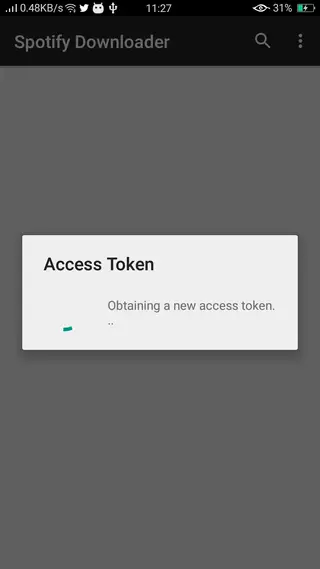
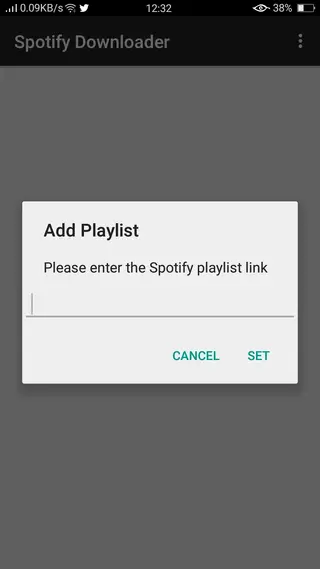
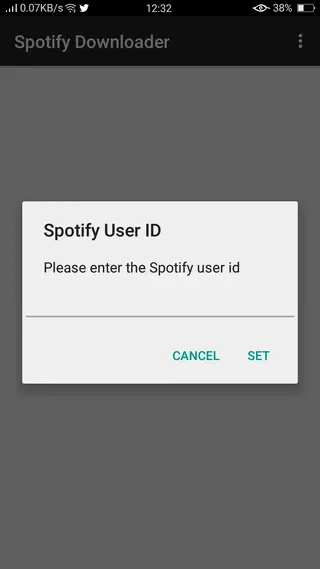
Getting Started With Your First Playlist Download
After installing Spotify Downloader and signing in with your Spotify account, you can start by downloading a single playlist to understand how the app behaves on your device.
Open the Spotify app or web player and copy the link of a playlist you want to save.
Return to Spotify Downloader and paste the playlist link into the dedicated field.
Let the app fetch the list of tracks. You can then confirm which songs to include.
Start the download and monitor progress inside the app until it completes.
Once the process is finished, open your preferred audio player and check the downloaded files. This helps you verify storage location, audio quality, and playback behavior before downloading larger collections.
Compatibility and Technical Requirements
Spotify Downloader targets Android devices running version 4.1 or higher. Because it is a small and focused utility, it generally works well on both smartphones and tablets with modest hardware.
To avoid interruptions during downloads, it is recommended to keep enough free internal or external storage and maintain a stable connection while the app communicates with Spotify. After files are saved to your device, you can switch to offline mode or disable data and still enjoy uninterrupted playback.
As with any tool that interacts with an online service, functionality can depend on ongoing changes to Spotify systems or regional availability. If you notice issues after an update, checking for a newer APK on our website is a practical first step.
FAQs
Pros
- Allows downloading of Spotify playlists and tracks for offline listening
- Simple interface with search bar and playlist link support
- Lightweight app that works on older Android versions
- Supports multiple downloads for faster library building
- No in-app advertisements shown in the interface
Cons
- Not available on the Google Play Store
- Requires manual APK installation and permission changes
- Depends on having a valid Spotify account
- Functionality may not align with Spotify terms of service
- Features and availability can change with future Spotify updates
Conclusion
Spotify Downloader is a lightweight Android tool for saving Spotify playlists and tracks as offline audio on your device. If you want an easier way to keep favorite music ready without streaming, you can download the latest Spotify Downloader APK directly from our website and manage your offline collection in a simple, focused interface.




Comments
No approved comments yet.