

Squid Game
Squid Game APK brings a simple but tense red light green light challenge to your Android phone. Run toward the finish line, stop before the doll turns around, and try to survive each round.
This 2D casual game focuses on quick reactions, smooth controls, and short matches that you can enjoy in a few minutes. It is easy to understand, yet still creates pressure with every step you take.
You can download the official Squid Game APK latest version directly from our website and start playing instantly without any registration.
Rate this app
App details
- App name
- Squid Game
- Category
- Casual
- Version
- v1.1.0
- Size
- 53.63 MB
- Requirements
- 5.0 and Above
- Package name
- com.ldgames.SquidGame
- Publisher
- HUAYIGAMES.INC
- Price
- Free
- Mod
- No
- Downloads
- 81,747
- Rating
- 4.7 / 5
- Rating count
- 29,471
- Play Store
- No
- Requires root
- No
- Offline support
- Yes
- Contains ads
- Yes
- In-app purchases
- No
- Updated
- Jun 4, 2026
- Age rating
- Rated for 3+
Table of contents
What is Squid Game APK
Squid Game APK is a casual 2D action game for Android inspired by the popular survival contest concept. You control a character on a long field and try to cross the finish line while a large doll watches every move.
The core rule is simple. When the signal is green, you run. When it turns red, you must stop completely. If the doll detects movement when the light is red, masked guards eliminate your character and the round ends.
The game focuses on quick sessions, straightforward touch controls, and clear visuals that make the action easy to read. You do not need to create an account or complete a login process. After installing the APK, you can start a match within seconds and replay as many times as you like.
Squid Game uses simple 2D graphics with bright colors and a clear camera view, which helps you track both your character and the doll at the same time. This makes it suitable for a wide range of Android devices that meet the minimum version requirement.
If you want to try more similar games on your Android, then we have more suggestions for you. You guys can try Pop Pop Marine and Super Winner, both of these are quite popular apps.
Why download Squid Game on Android
Squid Game is ideal if you want a quick, high-pressure game that you can play in short breaks. The red light green light mechanic is easy to learn, so anyone can start playing without a tutorial, but the timing challenge still keeps the experience engaging.
Because rounds are short, the game works well for casual play on the go. You can complete several attempts while traveling, during a break at work, or whenever you have a few spare minutes.
Another reason to download the APK from our website is the convenience. The official installation file is available directly here, so you can get the current version without searching through multiple pages.
How Squid Game can be useful and entertaining
Squid Game APK offers more than just quick fun. The timing-based gameplay helps you practice focus, reaction speed, and risk management. You must decide when to sprint and when to play safe, which builds a natural sense of rhythm and timing.
Because there are no complex menus or long missions, the game reduces mental load. It becomes a simple way to relax for a few minutes, reset your mind, and then return to your daily tasks.
The offline-friendly design also makes it useful when you have limited or unstable internet access. You can open the game, play several rounds, and enjoy the experience without needing a constant connection.
How to download and install Squid Game APK
You can download the official Squid Game APK file directly from our website. Follow these steps to get the latest version on your Android device:
Scroll to the download section on this page and tap the Squid Game APK download button.
Confirm the download in your browser and wait until the APK file is fully saved on your device.
Open your device settings and allow installation from unknown apps for your browser if this option is not already enabled.
Locate the downloaded APK file in your Downloads folder and tap it to start the installation process.
Press Install, wait for the setup to complete, and then tap Open to launch Squid Game.
After installation, you can start playing immediately. If a newer version is released later, you can return to our website and download the updated APK the same way.
Features
Simple red light green light gameplay
Play a straightforward survival race where you move only when the signal is green and stop instantly on red.
2D graphics and clear visuals
Enjoy a clean 2D art style that makes the doll, field, and characters easy to see on any screen size.
Fast and responsive controls
Control movement with smooth and reactive touch input to stop at the exact moment you need.
Short and repeatable rounds
Jump into quick matches that last only a few moments, perfect for short breaks throughout the day.
No registration required
Start playing right after installation without creating an account or signing in with external services.
Offline play support
Play core gameplay without relying on a permanent internet connection, ideal for travel or low-signal areas.
Lightweight casual design
Focused mechanics and minimal menus keep the game accessible for casual players of all ages.
Inspired by survival contest theme
Experience a game mode similar to the famous survival challenge with a watching doll and masked guards.
Screenshots
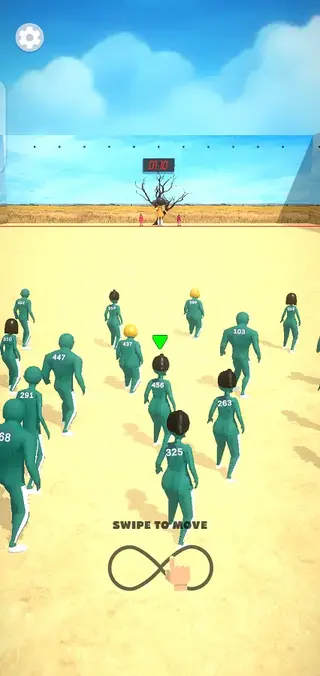

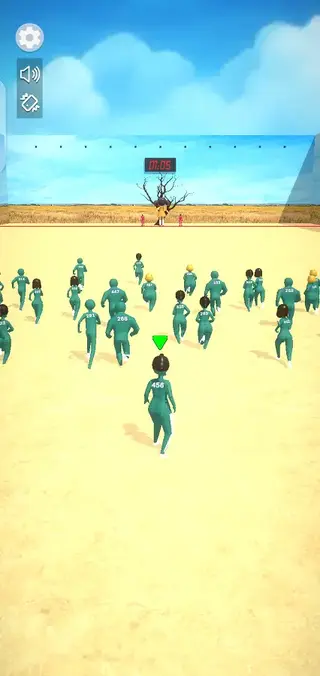

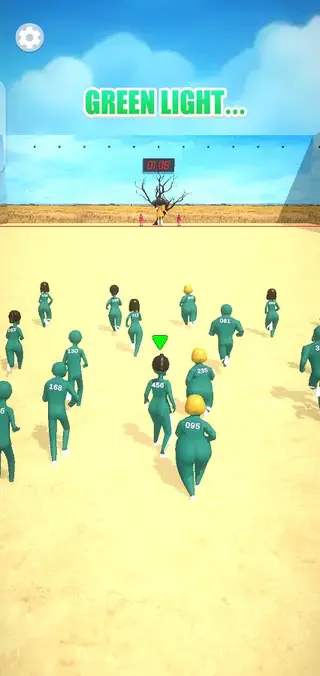
Gameplay overview and controls
The main objective in Squid Game is to cross the field before time runs out without being detected by the doll. When the green signal appears, you press and hold or tap to move forward. When the signal changes or the doll begins to turn, you must release immediately.
If your character moves while the doll is looking, masked guards remove you from the round and you must start again. This constant switch between sprinting and freezing builds tension and rewards careful timing.
Because the controls rely on simple touches, the game is comfortable to play on both phones and tablets. The design works well for one-handed play, which suits travel and casual use.
Graphics, sound, and performance
Squid Game uses 2D graphics with clear shapes and bold colors, which keeps everything easy to read even on smaller screens. The doll, players, and field are visually distinct, so you always know what is happening.
Audio cues, such as movement sounds and signal changes, support the visual signals and make it easier to time your actions. On most modern Android devices that meet the minimum version requirement, the game runs smoothly due to its relatively light visual style.
Tips for beginners
If you are new to Squid Game, start with a cautious play style. Move in short bursts instead of long sprints until you become comfortable with the doll’s timing. It is better to survive slowly than to lose progress by moving too late.
Watch the doll’s animation closely to anticipate when it will turn.
Stop slightly earlier than you think you need to while learning the rhythm.
Use the first few rounds to understand distance and timing rather than rushing to win.
As you improve, you can take more risks, run longer during green signals, and aim to cross the finish line as fast as possible.
FAQs
Pros
- Simple and easy-to-understand gameplay suitable for casual players
- Short rounds that fit well into small free time slots
- Responsive controls make timing-based stops feel precise
- No account or registration needed to start playing
- Offline-friendly design allows play without constant internet
Cons
- Gameplay can feel repetitive over longer sessions
- Limited variety in modes and objectives
- Graphics are basic compared to high-end 3D games
- Contains ads that may interrupt the experience for some users
Conclusion
Squid Game APK delivers a straightforward red light green light survival challenge that works well for quick casual sessions on Android. If you want a simple, timing-based game that you can play in short bursts, you can download the latest official APK directly from our website and start running for the finish line within minutes.




Comments
No approved comments yet.