

BGMI GFX Tool Pro
BGMI GFX Tool Pro is an Android utility that helps Battlegrounds Mobile India players fine-tune graphics, frame rate, and performance settings beyond the default options inside the game.
With this tool, you can adjust resolution, FPS, rendering quality, and device profile to balance smooth gameplay and visual clarity on both low-end and high-end phones.
You can download the original BGMI GFX Tool Pro APK directly from our website and start optimizing your BGMI experience in just a few simple steps.
We got more similar options, which also offer relative services. So, if you want to try more tools, then get Super Touch VIP and Refresh Rate Changer. Both of these are quite popular available tools for the users, which you can have on your device.
Rate this app
App details
- App name
- BGMI GFX Tool Pro
- Category
- Tools
- Version
- v3.7
- Size
- 11.69 MB
- Requirements
- 5.0 and Above
- Package name
- com.kktinfotech.gfxtoolsprobp
- Publisher
- Krunal Tanti
- Price
- Free
- Mod
- No
- Downloads
- 81,949
- Rating
- 4.7 / 5
- Rating count
- 21,948
- Play Store
- No
- Requires root
- No
- Offline support
- Yes
- Contains ads
- Yes
- In-app purchases
- No
- Updated
- Jun 1, 2026
- Age rating
- Rated for 3+
Table of contents
What is BGMI GFX Tool Pro
BGMI GFX Tool Pro is a third-party graphics optimizer designed for Battlegrounds Mobile India and other PUBG Mobile variants. It gives players more control over visual and performance options that are usually limited or locked inside the game menu.
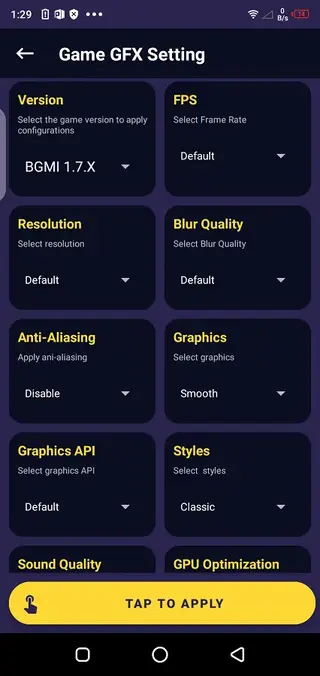
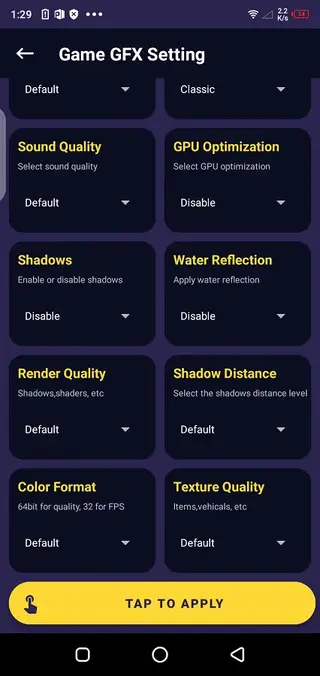
Through this tool, you can customize resolution, graphics style, shadows, anti-aliasing, and frame rate levels, including higher FPS modes on supported devices. It also offers additional tweaks such as device model presets and rendering changes to help you get smoother gameplay.
The app focuses on improving the gaming experience rather than modifying in-game resources or giving unfair advantages. It works by changing configuration parameters that BGMI reads when it starts, so you set your preferred profile in the tool first and then launch the game.
Why download BGMI GFX Tool Pro APK from our website
Downloading BGMI GFX Tool Pro APK from our website lets you get the shared version quickly without searching multiple sources. The app file is available on the download button on this page, so you can grab the latest version in one tap.
Once installed, you can open the tool, select your BGMI version, apply the graphics profile that suits your device, and then start the game directly from the app. This makes it easier to switch between performance-focused and quality-focused settings whenever you like.
If you often face lag, frame drops, or blurry visuals in BGMI, having this tool on your device can help you test different combinations of graphics and FPS until you find a setup that feels comfortable and stable.
How BGMI GFX Tool Pro is useful for players
Many Android devices struggle to keep BGMI running smoothly at stable frame rates, especially during hot drops or intense battles. BGMI GFX Tool Pro helps by letting you reduce or increase specific graphics options instead of relying only on the in-game presets.
For low-end phones, you can lower resolution, disable heavy effects, and cap FPS to a level your device can maintain. This can reduce stuttering and improve touch response. For stronger hardware, you can push for higher FPS and better visuals while still controlling temperature and performance.
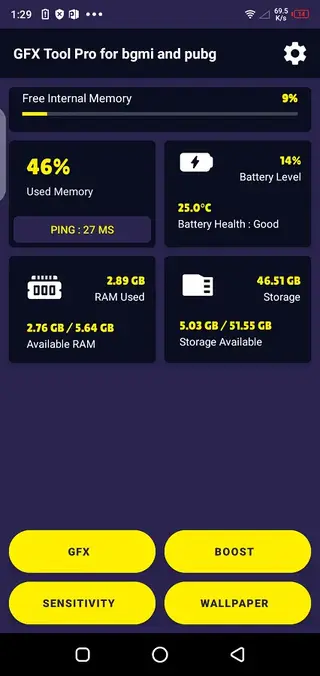
The app also includes handy extras like game boosting and overheat notification, which can help you keep background processes under control and monitor how hard your phone is working during long gaming sessions.
How to download and install BGMI GFX Tool Pro APK
You can download the BGMI GFX Tool Pro APK file directly from our website. Use the download button on this page to get the version listed in the download section.
Follow these steps to download and install the app on your Android device:
Tap the download button on this page to start downloading the BGMI GFX Tool Pro APK.
Wait for the file to finish downloading in your browser or download manager.
Open your phone settings and enable installation from unknown sources for your browser or file manager, if it is not already enabled.
Locate the downloaded APK file in your Downloads folder or notification bar.
Tap the APK file and follow the on-screen prompts to complete the installation.
Once installed, open BGMI GFX Tool Pro, choose your settings, and then launch BGMI from within the app.
After setup, you can revisit the tool anytime to adjust graphics or FPS options before starting another gaming session.
Features
Advanced BGMI graphics control
Customize resolution, graphics quality, textures, shadows, and more for Battlegrounds Mobile India and related PUBG builds.
FPS configuration options
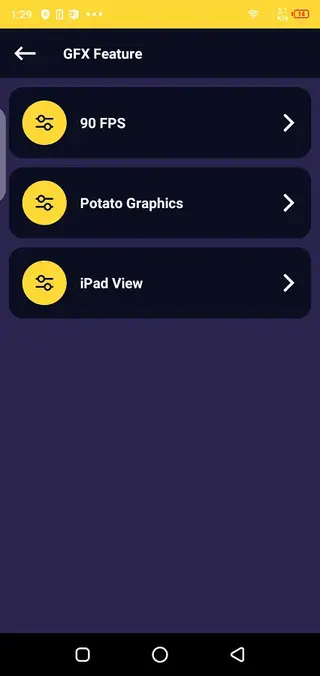
Set supported frame rate levels on your device, including higher FPS modes where available, to aim for smoother gameplay.
Game booster function
Clear unnecessary background processes and cache before running the game to free up RAM and improve responsiveness.
View and device profile tweaks
Adjust view style and choose device profiles to get a wider or clearer field of view depending on your preference.
Support for low-end devices
Optimize BGMI for budget and older phones by lowering heavy graphics elements while keeping the game playable.
Overheat notification
Receive alerts when your device temperature rises too much so you can pause gameplay and prevent potential issues.
User-friendly interface
Use a simple layout with clear options, making it easier for non-technical users to apply and save their preferred settings.
Offline configuration
Configure most settings without needing an active internet connection, then launch BGMI with your saved profile.
Screenshots
Safety and fair play considerations
Before using any external configuration tool with BGMI, it is important to understand the possible risks. Game publishers may update their rules or anti-cheat systems at any time, and using tools that alter configuration files or behavior can carry some level of account risk.
Use BGMI GFX Tool Pro only for performance and visual adjustments, avoid any unfair settings, and stay informed about the current terms of service of the games you play. Always test new configurations carefully to make sure the game runs normally on your device.
Tips for smoother BGMI performance
If you want more consistent performance in BGMI, combine BGMI GFX Tool Pro with a few simple habits to get better results:
Lower resolution and graphics presets if your device is older or gets hot quickly.
Limit background apps, downloads, and screen recording while gaming.
Play in a cool environment and avoid covering the device vents and back area.
Keep your phone charged sufficiently but avoid prolonged heavy gaming while it is overheating.
Update BGMI and your Android system when stable updates are available.
These steps, together with careful use of BGMI GFX Tool Pro, can help you find a more stable mix of clarity, responsiveness, and battery usage while playing.
FAQs
Pros
- Offers detailed graphics and FPS controls for BGMI beyond in-game presets
- Helps reduce lag and stuttering on low-end and mid-range Android devices
- Game booster and background cleanup can improve responsiveness
- Simple interface makes configuration accessible for most users
- Works without root on compatible Android versions
- Available as a direct APK download from our website
Cons
- Improper settings may cause crashes or instability in BGMI on some devices
- May not be allowed under the terms of service of some game versions
- Performance gains vary by device hardware and software version
- Contains ads inside the application interface
Conclusion
BGMI GFX Tool Pro is a practical companion app for players who want more control over BGMI graphics and performance. By downloading the APK from our website, you can quickly install the tool, test different settings, and tune the game to match your device’s capabilities and your preferred balance between visuals and smooth gameplay.




Comments
No approved comments yet.