

Bilibili
Bilibili is a popular anime and Asian entertainment app that lets you stream a wide range of shows with multilingual subtitles on your Android phone or tablet.
From trending simulcast titles to classic series, the app organizes everything into clear categories so you can quickly find what to watch next.
You can download the official Bilibili APK directly from our website and enjoy streaming or offline viewing with your personal watchlist and preferences.
Rate this app
App details
- App name
- Bilibili
- Category
- Comics
- Version
- v3.81.1
- Size
- 189.01 MB
- Requirements
- 4.2 and Above
- Package name
- com.bstar.intl
- Publisher
- bilibili
- Price
- Free
- Mod
- No
- Downloads
- 1,426,807
- Rating
- 4.6 / 5
- Rating count
- 12,547
- Play Store
- Yes
- Requires root
- No
- Offline support
- Yes
- Contains ads
- Yes
- In-app purchases
- Yes
- Updated
- May 12, 2026
- Age rating
- Rated for 3+
Table of contents
What is Bilibili Android App
Bilibili is an official video streaming platform focused mainly on anime, Asian animation, comics, and related entertainment. The Android app, identified by the package name com.bstar.intl, brings the international version of Bilibili to mobile devices so you can watch licensed shows on the go.
The app offers a large catalog of anime series, movies, and specials, many of which include English and other language subtitles. Content is organized by genre, popularity, release season, and more, making it easier to explore.
Alongside streaming, Bilibili adds community-driven elements such as comments, bullet chats, and basic social features, which help fans discuss episodes and follow their favorite series in one place.
Why Download Bilibili APK from Our Website
Installing Bilibili via APK gives you direct access to the official international app even if the Play Store listing is not easily accessible on your device or in your region. By downloading the APK from our website, you can store the installer and reuse it whenever you need to reinstall the app.
The APK version lets you:
Install the exact version you want on compatible Android devices.
Update manually when you decide, instead of waiting for staggered rollouts.
Keep a backup copy of the installer for offline use or sharing between your own devices.
Our website provides a direct download link for the Bilibili APK file listed on this page, so you can start the installation process quickly and set up your anime streaming experience without extra steps.
How Bilibili is Useful for Anime Fans
Bilibili is designed around anime and related content, which makes it especially useful if you primarily watch this type of entertainment. Instead of searching across multiple generic video platforms, you get a focused catalog with curated recommendations, seasonal lineups, and genre-based discovery.
The app supports subtitle tracks for many titles, including English, so you can follow shows that originally air in Japanese or Chinese. With adjustable video quality, you can optimize playback for both high-speed and limited mobile connections.
Offline download options help you queue episodes or movies over Wi-Fi and watch them later without a data connection. Combined with watch history, favorites, and notifications for new episodes, Bilibili becomes a practical hub for keeping up with ongoing series and exploring new ones.
Anime Fox and Animasu are also popular platforms, which offer similar services for the users. So, if you are willing to access more of these apps, then try these too. You can find more similar apps on our website, which you can also use.
How to Download and Install Bilibili APK
You can download the official Bilibili APK file directly from our website and install it on your Android device in a few simple steps.
Scroll to the download section on this page and tap the Bilibili APK download button.
Confirm the download in your browser and wait for the APK file to finish downloading.
Open your device settings and enable the option to install apps from your browser or file manager if prompted.
Locate the downloaded Bilibili APK in your Downloads folder and tap it to start installation.
Follow the on screen prompts to complete installation, then open the app.
Sign in or create an account inside the app to sync your preferences and, where available, manage subscriptions.
After installation, you can return to our website whenever you want to download the APK again or update to a newer version that we publish.
Features
Large licensed anime catalog
Access a wide range of anime series, movies, and specials from different genres and seasons in one app.
Genre based discovery
Browse by tags such as action, adventure, drama, comedy, romance, magic, mystery, horror, sci fi, yuri, and slice of life.
Advanced filters and search
Filter shows by region, type, release year, season, status, and more to quickly find specific titles.
Subtitles in multiple languages
Watch anime with subtitles, including English for many titles, to follow stories comfortably.
Adjustable video quality
Switch between different resolutions to match your network speed and save mobile data when needed.
Online streaming and offline downloads
Stream episodes instantly or download select content to watch later without an internet connection.
User accounts and sync
Sign in with supported accounts to sync watch history, favorites, and preferences across devices.
Personalized recommendations
Receive suggestions based on your viewing habits, followed series, and popular titles in the community.
Screenshots

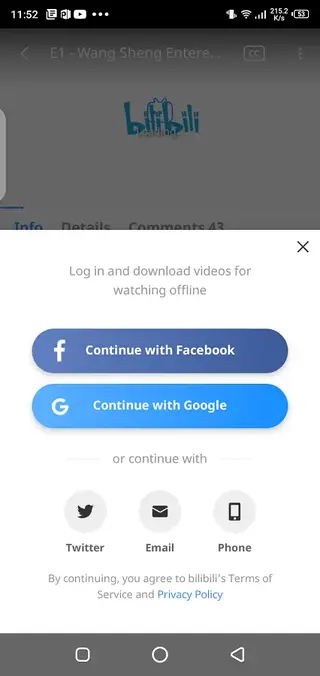
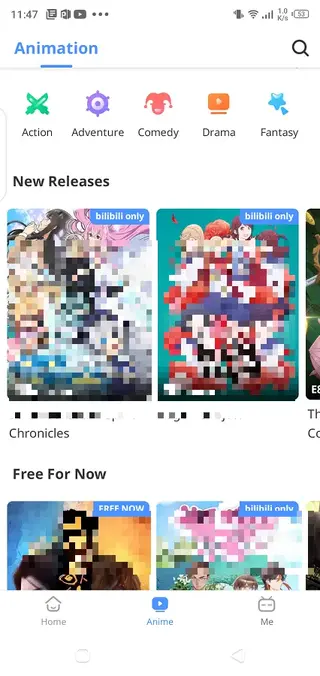
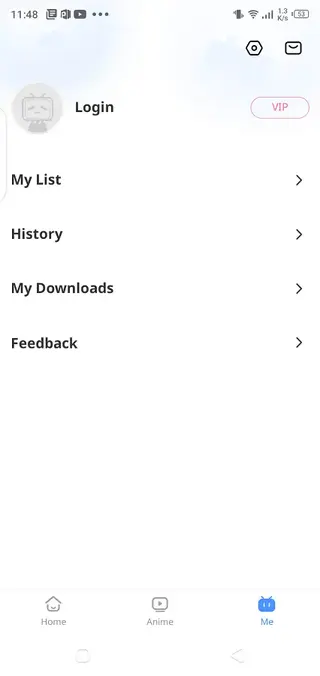

Account, Subscription, and Payments
Bilibili allows you to create a free account to sync your watch history, subscriptions, and favorite series across devices. Registration typically supports common sign in methods such as email or social logins, depending on your region.
While many shows are available to watch without payment, some content, advanced features, or earlier access to new episodes may be tied to paid membership plans. Prices, benefits, and availability of these plans vary by country and can change over time.
All subscription management and payments take place inside the app or through the official store integration. Always review the membership details on the subscription page in the Bilibili app before confirming any purchase.
Streaming Quality and Data Usage
Video playback quality in Bilibili can usually be adjusted manually, letting you choose between lower resolutions that save data and higher resolutions suited for Wi-Fi or fast mobile networks.
Lowering the resolution helps if your connection is unstable or if you want to conserve mobile data while commuting. When you are on a reliable high-speed network, you can switch to higher quality to enjoy sharper visuals and better overall viewing.
Using the offline download feature over Wi-Fi is another way to control data usage. You can pre-download episodes and watch them later without actively streaming over your mobile network.
Tips for a Better Bilibili Experience
To get more value from Bilibili, start by following a few series you already like so the app can refine its recommendations. Explore by genre and filters to discover similar titles, and add interesting shows to your watchlist.
Check the seasonal or latest update sections regularly if you enjoy simulcast episodes. Enabling notifications for specific series helps you stay updated when new episodes go live.
Finally, review the settings menu for language, subtitle, and playback options. Adjusting these early on will ensure a smoother experience tailored to your device and internet connection.
FAQs
Pros
- Focused anime and Asian entertainment catalog in one app
- Genre filters and advanced search make discovery easy
- Supports subtitles for many titles, including English
- Offline download options help save mobile data
- Video quality settings adapt to different network speeds
- Official app available directly via APK download on our site
Cons
- Not all titles may be available in every region
- Some content and features may require a paid subscription
- Contains in app purchases and may show ads
- Requires a stable connection for smooth HD streaming
- Account registration is needed to use certain features like downloads
Conclusion
Bilibili provides an accessible way to watch anime and related content on Android with subtitles, filters, and offline viewing. Download the official APK from our website to install the app, sign in, and start exploring its catalog at your own pace.




Comments
Aidil
Cara menukar di aplikasi bilibili jadi bahasa Indonesia