

CallBox
CallBox is a call recording app for Android that helps you automatically or manually record incoming and outgoing calls. It focuses on simple controls, clear recordings, and quick access to your call history.
With flexible recording rules, notifications after each call, and options to secure your files, CallBox aims to make call recording easy to manage on both phones and tablets.
You can download the official CallBox APK directly from our website and install it on compatible Android devices without any extra registration steps.
Rate this app
App details
- App name
- CallBox
- Category
- Productivity
- Version
- v5.9
- Size
- 15.13 MB
- Requirements
- 4.1 and Above
- Package name
- com.smsrobot.callbox
- Publisher
- SMSROBOT LTD
- Price
- Free
- Mod
- No
- Downloads
- 69,372
- Rating
- 4.8 / 5
- Rating count
- 20,183
- Play Store
- Yes
- Requires root
- No
- Offline support
- Yes
- Contains ads
- Yes
- In-app purchases
- Yes
- Updated
- May 16, 2026
- Age rating
- Rated for 3+
Table of contents
What is CallBox APK
CallBox is an Android productivity app by SMSROBOT LTD designed for automatic and manual call recording. It helps you capture conversations, store them on your device or in the cloud, and organize them by contact, date, or custom rules.
The app offers different recording modes, such as recording all calls, only selected contacts, or only unknown numbers. After each call, it shows a notification so you can quickly play, share, or delete the recording.
CallBox also includes basic security options like PIN protection to keep your recordings private. It is built for users who need a simple way to keep a log of important phone calls for personal or work use.
Why download CallBox APK from our website
Downloading the CallBox APK from our website lets you get the stated version directly, without having to search through multiple pages or stores. You can quickly install the app on any compatible Android device and start configuring your recording rules.
Our download section focuses on providing the version information, package name, and other technical details you need before installing. This helps you verify that you are getting the correct app from SMSROBOT LTD and that it matches your device requirements.
If you prefer to install apps using APK files instead of only relying on store installations, getting CallBox from our website gives you a straightforward way to keep and manage the installer on your own storage.
How CallBox is useful for everyday calls
CallBox can be helpful if you often need to review what was said during phone calls, such as sharing instructions, agreements, or contact details. By recording calls automatically, you do not have to remember to start a recording each time.
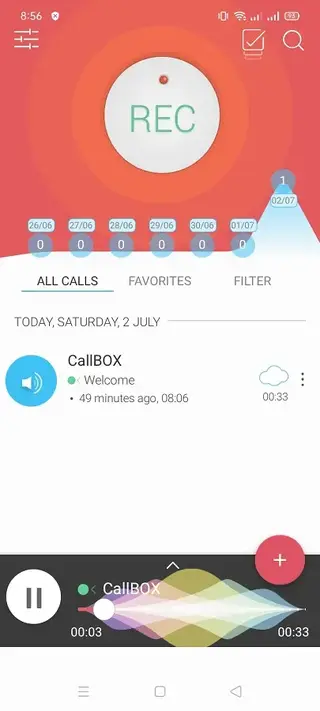
The app organizes recordings in a simple list with caller names or numbers, dates, and durations, which makes it easier to find a specific conversation later. Notifications after each call give you quick access to that recording for renaming, marking as important, or deleting.
Cloud options like email export or Google Drive backup allow you to keep important audio outside your device, which can be useful if you change phones or need to share files with colleagues. PIN protection can add a basic layer of privacy so others cannot open the app and listen to your recordings easily.
Always make sure you follow local laws about call recording and, where required, inform the other party that the call may be recorded.
How to download and install CallBox APK
You can get the CallBox APK directly from our website and install it on your Android device. Make sure your phone meets the minimum Android version requirement mentioned on this page.
Follow these steps to download and install:
Scroll to the download area on this page and tap the CallBox APK download button.
Wait for the APK file to finish downloading to your device.
Open your phone settings and allow installation from unknown sources if it is not already enabled.
Locate the downloaded APK file in your Downloads folder or notification panel and tap it.
Review the requested permissions and tap Install to start the setup.
When the installation completes, open CallBox and configure your recording preferences and PIN protection.
After setup, place a test call to confirm that recordings are being created correctly on your device.
Features
Automatic call recording
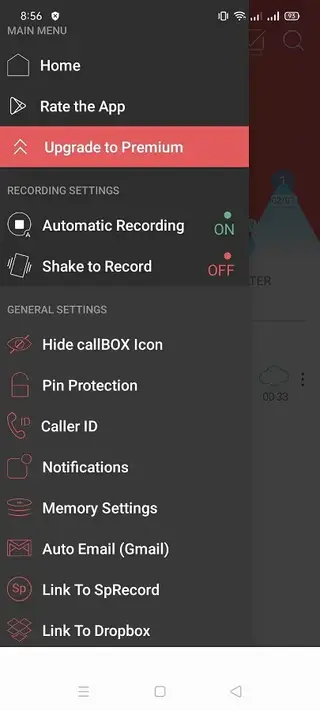
Record incoming and outgoing phone calls automatically based on rules you configure, such as all calls or selected contacts only.
Manual one-tap recording
Start or stop recording during a call with a simple control when you only need to capture specific conversations.
Smart recording controllers
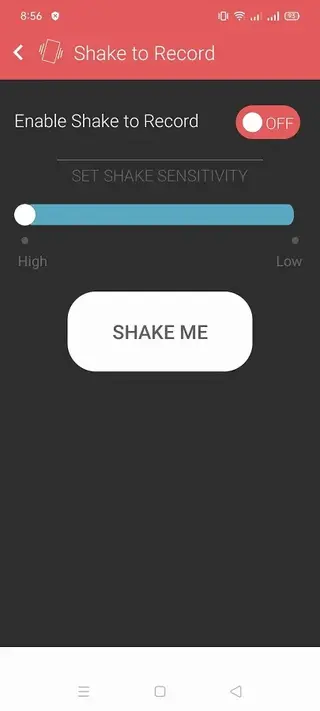
Use smart options such as shake to record or auto record modes to reduce the need for manual interaction during calls.
Support for VoIP and communication apps
Attempt to record calls from supported communication apps like WhatsApp, Skype or Telegram where device and system constraints allow.
Post-call notifications
Receive a notification after each call with shortcuts to play, share, mark as favorite or delete the new recording.
Cloud and email backup
Send recordings to your email address or back them up to services like Google Drive so you can keep copies outside your phone.
PIN protection
Set a PIN code inside the app to restrict access to your list of recordings and basic settings on the device.
Favorites and call filtering
Mark important recordings as favorites and apply filters by contact, date or call type to find conversations faster.
Screenshots
Legal and privacy considerations
Before using CallBox, it is important to understand how call recording is regulated where you live. Some regions require only one party to consent to recording, while others require all participants on the call to agree. Failing to follow these rules can cause legal issues.
To use CallBox responsibly, consider informing people that their call may be recorded, especially for business or customer interactions. You should also protect your device with a lock screen and use the in-app PIN feature to reduce the risk of unauthorized access to your recordings.
Tips for better recording quality
Recording quality in CallBox can depend on your phone model, Android version, and audio source settings. If your recordings sound low or one-sided, try changing the recording source or audio setting in the app preferences and test different options.
Keeping your device firmware updated and avoiding call on speaker in noisy environments can also help improve clarity. Running fewer background apps while making important calls may reduce performance issues or audio glitches during recording.
FAQs
Pros
- Automatic recording of incoming and outgoing calls
- Simple interface that is easy to navigate
- Notifications after each call for quick access to recordings
- Options for email or cloud backup like Google Drive
- PIN protection to keep recordings private on the device
- Flexible rules for which calls to record
Cons
- Call recording behavior can vary by Android version and device model
- Some features may require access to cloud or email accounts
- Contains ads in the free version
- May offer in-app purchases or upgrades for advanced options
Conclusion
CallBox is a practical call recording app for Android users who want to keep an organized audio log of their conversations. With automatic recording modes, notifications, basic security, and cloud export options, it can fit both personal and light work use, as long as you follow your local call recording laws and test it on your specific device. Follow Apkoll to get more apps.




Comments
No approved comments yet.