
DJ Pads
DJ Pads is a simple beat-making app that turns your Android phone into a launchpad-style controller. Tap colorful pads to trigger drums, synths, FX, and loops in real time.
With ready-made sound kits, single and repeated beats, and a built-in recorder, you can sketch ideas, perform mini DJ sets, and save your creations directly on your device.
You can download the official DJ Pads APK directly from our website and install the latest available version on compatible Android phones and tablets.
Rate this app
App details
- App name
- DJ Pads
- Category
- Music & Audio
- Version
- v1.17
- Size
- 31.8 MB
- Requirements
- 5.0 and Above
- Package name
- com.bilkon.launchpad
- Publisher
- Bilkon
- Price
- Free
- Mod
- No
- Downloads
- 5,568,452
- Rating
- 4.3 / 5
- Rating count
- 13,547
- Play Store
- Yes
- Requires root
- No
- Offline support
- Yes
- Contains ads
- Yes
- In-app purchases
- No
- Updated
- Jun 3, 2026
- Age rating
- Rated for 3+
Table of contents
What is DJ Pads?
DJ Pads is a Music & Audio app for Android developed by Bilkon. It offers a digital DJ pad with multiple sections of drums, effects, melodies, and loops so you can create and perform electronic music from your phone.
The app focuses on live performance and quick beat creation. You get a grid of pads divided into different groups, such as single-hit sounds and repeated loops. Each pad is mapped to a specific sound, so you only need to tap to start building a track.
DJ Pads also includes a built-in recording system. You can record your sessions, listen back to them in an internal playlist, and practice new ideas without needing extra hardware or software.
Why download DJ Pads APK from our website?
Downloading DJ Pads APK from our website gives you direct access to the latest available Android version without searching multiple pages. The file is already prepared for manual installation, so you can keep a copy on your device or PC.
Once downloaded, you can install DJ Pads on any compatible Android phone or tablet that meets the system requirements. This is especially useful if the Play Store version is not visible in your region or if you prefer to keep an APK backup.
All you need to do is save the APK from our download page, enable installation from unknown sources on your device, and follow the on-screen prompts to complete setup.
How is DJ Pads useful?
DJ Pads is useful for anyone who wants to experiment with electronic music without complex software. The app lets you combine kicks, snares, drops, synths, piano riffs, and FX using a simple touch interface.
Because the sound packs are pre-arranged, you can focus on timing and creativity instead of sound design. This makes it a practical tool for beginners who want to learn basic rhythm, as well as for casual users who just want to jam.
The offline-friendly design and built-in recorder also make DJ Pads handy for capturing ideas on the go. You can open the app, tap a few pads, record a short loop, and save it for later without needing a computer.
How to download and install DJ Pads APK
You can get the DJ Pads APK directly from our website in a few simple steps. Make sure your device meets the minimum Android version requirement before installing.
Scroll to the download area on this page.
Tap the APK download button to save the DJ Pads file to your device.
Wait until the download completes in your browser or downloads app.
Open your device Settings and enable installation from unknown sources if it is not already allowed.
Locate the downloaded DJ Pads APK in your Downloads folder and tap it.
Confirm the installation prompts and wait for the process to finish.
Once installed, open DJ Pads from your app drawer and start creating beats.
Features
Digital DJ pad interface
Use a grid of colorful pads to trigger drums, synths, FX, and loops in real time for live beat creation.
Single-hit sound pads
Play one-shot samples such as kicks, drops, back spins, claps, and more that stop automatically after one round.
Repeated beat loops
Trigger repeating loops including zap, box, lead, cymbal, piano, FX, and other patterns with adjustable timing control.
Multiple sound sections
Work with different sections of pads dedicated to drums, melodies, effects, and background elements to build full tracks.
Built-in audio recorder
Record your live sessions directly inside the app and store them for later playback or practice.
Recorded playlist manager
Access a list of all your recorded tracks in one place to listen, review, and practice with previous sessions.
Master volume and pitch control
Adjust master volume and pitch to fine-tune your set and shape the overall sound of your performance.
Beginner-friendly interface
Simple layout and large pads make it easy for new users to start creating music without prior DJ experience.
Screenshots
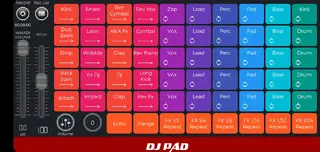
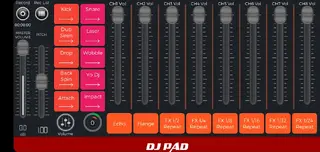
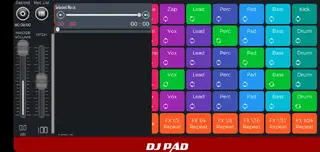
Sound pads and beat types
DJ Pads organizes its sounds into clear sections so you can build tracks step by step. Single-hit pads trigger one-time sounds such as kicks, drops, back spins, and claps that stop on their own. These are ideal for adding accents and fills.
Repeated pads focus on continuous loops. Options like zap, box, lead, cymbal, piano, and FX keep playing while active, which helps you lay down a base groove and then decorate it with extra hits and effects.
Recording and practice workflow
The recording workflow is designed for quick idea capture. You tap pads, build a short performance, and start recording inside the app. When you finish, your session appears in a recorded playlist so you can listen, analyze, and practice along.
This approach is helpful for beginners who want to hear their progress over time and for hobby producers who like to sketch musical ideas before moving to more advanced tools.
Device compatibility and requirements
DJ Pads is available for Android devices with version 5.0 and above. It does not require root access, so you can install and use it on standard phones and tablets.
For a smoother experience, it is better to run the app on a device with enough free storage and a responsive touchscreen, as the pad interface relies on fast and accurate taps.
FAQs
Pros
- Simple launchpad-style interface for quick beat making
- Includes both one-shot sounds and repeated loops
- Built-in recorder to capture live performances
- Works offline after installation for practice anywhere
- No account or registration required to start using the app
Cons
- Contains in-app advertisements during use
- Limited customization compared to full DAW software
- Sound packs and controls focus mainly on electronic genres
- Advanced users may find features basic for professional production
Conclusion
DJ Pads offers an easy way to play with beats, loops, and FX on Android without complex setup. Download the APK from our website, install it, and start experimenting with live electronic music on your phone or tablet.




Comments
No approved comments yet.