

DJI Fly
DJI Fly is the official companion app for many modern DJI drones, designed to make flying, filming and sharing aerial footage simple even for new pilots. It brings flight controls, camera settings and safety information together in a clean interface on your Android phone or tablet.
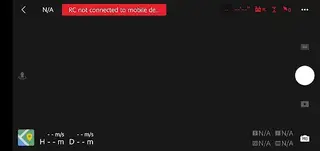
With DJI Fly you can view a live HD feed from the drone camera, adjust exposure and gimbal settings, and monitor real time flight status such as battery level, GPS strength and home point. The app also includes quick editing and sharing tools so you can turn your flights into polished clips in minutes.
You can download the original DJI Fly APK to your Android device directly from our website and install the latest available version to connect supported DJI drones and start flying.
Rate this app
App details
- App name
- DJI Fly
- Category
- Video Players & Editors
- Version
- v1.21.0
- Size
- 665.42 MB
- Requirements
- 5.0 and Up
- Package name
- dji.go.v5
- Publisher
- DJI
- Price
- Free
- Mod
- No
- Downloads
- 100,000
- Rating
- 4.7 / 5
- Rating count
- 35,000
- Play Store
- No
- Requires root
- No
- Offline support
- No
- Contains ads
- No
- In-app purchases
- No
- Updated
- May 30, 2026
- Age rating
- Rated for 3+
Table of contents
What is DJI Fly for Android
DJI Fly is DJI’s streamlined flight control and camera app for a wide range of consumer and prosumer drones. It replaces the older DJI GO and DJI GO 4 apps for many newer models and focuses on an easy learning curve, clear on-screen guidance and smart shooting modes.
Once you connect a compatible DJI drone and remote controller, the app shows a live camera preview, flight telemetry and key safety indicators. You can take off, land, change flight modes and fine-tune camera parameters such as ISO, shutter speed, white balance and resolution directly from your Android device.
The app also integrates tutorials, flight tips and automatic flight modes like QuickShots on supported models, helping beginners capture smooth cinematic shots without deep manual flying skills. After landing, you can trim, combine and export your clips using the built in editor.
We have more applications available for the users, which also offer photography services for the users. So, if you want to get more applications, then you should try LMC8.4 and Dolphin 360. Both of these are quite popular available apps, which you access.
Why download the DJI Fly APK from our site
Installing the DJI Fly APK directly on your Android device gives you full control of supported DJI drones even if the Play Store is not available or the app is not listed in your region. You can get the version provided on this page and keep it stored locally for quick reinstallation when needed.
By downloading the APK from our website, you can:
Install the version that matches your device and drone requirements.
Set up DJI Fly on phones or tablets without Google Play services, where manual APK installation is required.
Update to the provided build without searching across multiple pages.
The download link for the DJI Fly APK is available on this page, so you can save the file, move it between devices if necessary and complete installation in a few simple steps.
How DJI Fly helps drone pilots
DJI Fly is useful for both casual flyers and content creators who want a straightforward way to manage their drones and aerial footage. The interface prioritizes essential information such as GPS status, return-to-home point, signal strength and remaining flight time, which helps pilots make safer decisions in the air.
For photography and video, the app exposes key camera settings without overwhelming menus, so you can quickly switch between auto and manual exposure, change frame rates, or adjust color profiles on supported models. Intelligent flight and shooting modes help capture smooth tracking shots, orbits and quick highlight clips with minimal input.
The integrated editor lets you cut, merge and add simple transitions or music to your clips before sharing them to social platforms. This makes DJI Fly a central hub for flight control, media management and quick post-production on Android devices.
How to download and install DJI Fly APK
You can download the DJI Fly APK file directly from our website and install it manually on your Android phone or tablet. Follow these steps to complete the process safely and smoothly.
Scroll to the download section on this page and tap the DJI Fly APK download button.
Wait for the APK file to finish downloading to your device.
On your Android device, open the Downloads app or your browser download list and tap the DJI Fly APK file.
If Android asks for permission to install apps from this source, enable installation for your browser or file manager and go back to the APK.
Tap Install and wait until DJI Fly is added to your app list.
Connect your DJI remote controller and drone, open DJI Fly and follow the on screen setup instructions.
After first installation, you can revisit our website whenever you need to download this APK version again.
Features
Unified drone flight control
Connect supported DJI drones and manage takeoff, landing, gimbal movement and camera capture from a single Android interface.
Live HD camera preview
View a real time video feed from the drone camera with on screen telemetry such as altitude, distance and flight speed.
Comprehensive camera settings
Adjust ISO, shutter speed, EV, resolution and frame rate to match different lighting conditions and creative styles on compatible models.
Flight status and safety info
Monitor battery percentage, GPS signal, home point, obstacle warnings and other safety indicators during flight.
Built in tutorials and tips
Access beginner friendly flight tutorials, checklists and context aware hints that help new pilots fly more confidently.
QuickShots and intelligent modes
Use automated shooting modes like orbit, dronie or rocket on supported drones to capture cinematic moves with one tap.
In app video editor
Trim clips, combine multiple shots, add music and export ready to share videos directly from your phone or tablet.
Map and GPS view
Track the aircraft on a live map, see its orientation and quickly understand where the drone is in relation to the home point.
Screenshots
Compatibility and supported devices
DJI Fly is designed primarily for newer consumer and prosumer DJI drones, such as many models in the Mini, Air and Mavic series. Exact compatibility depends on both the drone model and the Android device you use. DJI typically publishes a list of recommended phones and tablets that have been tested for stable performance.
To avoid connection issues, it is best to run the app on devices that meet or exceed the stated Android version requirement and have sufficient RAM and processing power. Using an up to date USB cable and ensuring the DJI firmware and app version match recommended pairings also helps maintain a reliable link between your controller, drone and phone.
Flight safety tools inside DJI Fly
The app places strong emphasis on situational awareness. During flight, DJI Fly shows a clear heads up display with altitude, distance, speed, remaining battery time and signal indicators. It can display geofencing information in many regions and warns about low battery, strong wind or signal loss.
Return to Home (RTH) controls and status are easy to access, helping pilots bring the aircraft back if conditions change. Beginners can enable simplified flight modes and on screen prompts, while more experienced users can customize settings such as maximum altitude, distance limits and RTH behavior.
Tips for better aerial photos and video
To get the most from DJI Fly’s camera tools, start by selecting the appropriate shooting mode and resolution for your project. For social media, 1080p at higher frame rates may be enough, while cinematic footage often benefits from 4K recording where supported.
Use the on screen histogram and exposure controls to avoid blown highlights, and experiment with manual settings in stable lighting conditions. Gimbal tilt, yaw smoothness and flight speed also affect how your shots look, so practice slow, deliberate movements and use automated modes when you need consistent, repeatable paths.
FAQs
Pros
- Official DJI app for many modern consumer drones
- Clean interface that is approachable for beginners
- Provides live video feed with essential flight telemetry
- Offers intelligent flight and shooting modes on supported models
- Includes a simple built in video editor for quick sharing
- Regularly updated by DJI to support new hardware and features
Cons
- Requires compatible DJI drone and controller to be useful
- Needs stable internet connection for some services and updates
- Older or low end Android devices may experience performance issues
- Some advanced settings are limited compared to desktop workflows
Conclusion
DJI Fly gives Android users a focused, modern way to control compatible DJI drones, manage camera settings and quickly edit aerial footage. If you own a supported DJI aircraft and want an easy mobile workflow, you can download the DJI Fly APK from our website and start flying with a clear, streamlined interface.




Comments
No approved comments yet.