
Dragon Quest Builders
Dragon Quest Builders is a story-driven block-building RPG where you rebuild the ruined land of Alefgard, craft weapons and structures, and push back the darkness spread by the Dragonlord.
This Android version brings the console experience to mobile with touch controls, 3D graphics, and a full campaign that mixes exploration, combat, and sandbox construction.
You can download the official Dragon Quest Builders APK directly from our website and start restoring villages, helping NPCs, and creating your own unique world on your phone or tablet.
Rate this app
App details
- App name
- Dragon Quest Builders
- Category
- Role Playing
- Version
- v1.1.5
- Size
- 644.61 MB
- Requirements
- 11 and Up
- Package name
- com.square_enix.dqb
- Publisher
- SQUARE ENIX Co.,Ltd.
- Price
- Free
- Mod
- No
- Downloads
- 52,000
- Rating
- 4.8 / 5
- Rating count
- 25,000
- Play Store
- Yes
- Requires root
- No
- Offline support
- Yes
- Contains ads
- No
- In-app purchases
- Yes
- Updated
- May 30, 2026
- Age rating
- Rated for 3+
Table of contents
What is Dragon Quest Builders on Android?
Dragon Quest Builders is an action RPG and construction game from SQUARE ENIX set in the classic Dragon Quest universe. The Dragonlord has plunged Alefgard into darkness, and you play as the legendary Builder, the only one who can rediscover the power of creation.
The Android edition offers the full campaign from the original game, adapted for touch controls. You gather resources, craft tools and weapons, and rebuild settlements while defending them from monsters from the Dragon Quest series.
Gameplay blends exploration, third-person combat, and open-ended building. Each chapter gives you a base town to restore, NPCs to rescue, and quests that gradually unlock new crafting recipes, structures, and equipment.
Once you learn the basics in the introductory ruins, you set out across Alefgard, place banners of hope to push back the darkness, and design your own fortresses, houses, farms, and defenses using block-based construction.
We also have multiple games available here for you all, which you can easily get on your Android device. So, if you are willing to have unlimited fun, then you should try Ragnarok X Next Generation and Dragonary. Both of these are quite popular available games similar to Mobile Game Legends.
Why download Dragon Quest Builders APK from our site?
Downloading Dragon Quest Builders APK from our website lets you install the official Android build quickly and start playing without delay. You get the same story, characters, and building systems fans know from the console versions, optimized for mobile devices.
The game combines the charm of classic Dragon Quest with accessible building mechanics, so you can enjoy both structured quests and creative freedom. Whether you prefer following the main storyline or experimenting in free building modes, the APK available here gives you the complete experience.
Our download section provides the current available Android version in one place, so you can grab the APK file directly to your phone or tablet and install it manually when you are ready.
How is Dragon Quest Builders useful for players?
Dragon Quest Builders is useful for players who enjoy both RPG adventures and creative sandboxes. It offers clear goals and quests for those who like structure, while also giving deep building tools for players who prefer to design and experiment.
The chapter-based progression gently teaches crafting systems, resource management, and town planning. This makes it a good entry point for people who are new to construction games but already enjoy JRPG stories.
The game also encourages problem-solving. You decide how to fortify towns, where to place defenses, how to organize workshops, and which weapons or armor to craft for upcoming battles. All of this happens in a familiar Dragon Quest world filled with recognizable monsters and characters.
Because much of the content is playable offline, it can be a solid option for long trips, commutes, or any time you want a deep single-player experience without relying on a constant internet connection.
How to download and install Dragon Quest Builders APK
You can download the Dragon Quest Builders APK file directly from our website and install it manually on your Android device. Follow these steps to get started:
Scroll to the download section on this page and tap the available Dragon Quest Builders APK link.
Confirm the download in your browser and wait for the file to finish downloading to your device.
Open your device settings and allow installation from unknown apps for your browser or file manager if needed.
Locate the downloaded APK in your Downloads folder using a file manager app.
Tap the APK file and follow the on-screen prompts to complete the installation.
Once installed, launch Dragon Quest Builders from your app drawer and adjust graphics and control settings to suit your device.
After the first setup, you can launch the game directly without needing to repeat the installation steps.
Features
Story-driven building RPG
Rebuild Alefgard while following a main story with chapters, quests, and memorable characters from the Dragon Quest universe.
Block-based construction system
Collect resources and place blocks to create houses, farms, workshops, walls, and elaborate castles using flexible building tools.
Classic Dragon Quest monsters
Battle iconic enemies such as Slimes, Drackies, and the Dragonlord’s other minions as you protect your settlements.
Crafting and equipment
Forge weapons, armor, tools, furniture, and decorative items to customize both your character and your towns.
NPC quests and town development
Rescue NPCs, complete their side quests, and unlock new recipes and structures that strengthen your base.
3D graphics and camera control
Explore colorful 3D environments with a movable camera and clear visual style inspired by Akira Toriyama’s designs.
Touch-optimized controls
Use on-screen buttons and gestures tailored for smartphones and tablets for building, fighting, and navigating menus.
Challenge and free-build modes
Tackle optional challenges for each chapter or relax in creative-style modes with fewer restrictions on what you can construct.
Screenshots




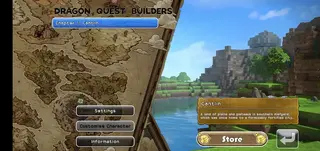
Gameplay overview and progression
Dragon Quest Builders splits its story into chapters, each focusing on a different region of Alefgard. At the start of a chapter you establish a small base and gradually expand it by gathering materials, building facilities, and recruiting townsfolk.
As your base level increases, you unlock new crafting recipes and structures. Monsters periodically attack, so you must design defenses such as walls, traps, and guard towers. Boss encounters at the end of each chapter test how well you prepared your town and equipment.
This structure keeps progression clear. You always have a main objective, but you can also step away from quests to mine resources, experiment with architecture, or improve your settlement layout.
Building and crafting systems
The heart of Dragon Quest Builders is its crafting system. Almost every object in the environment can be broken down into materials. You then use workstations, forges, and kitchens to transform those materials into blocks, furnishings, weapons, and tools.
Rooms are recognized automatically based on their layout and furniture. By building specific room types, such as bedrooms, kitchens, or workshops, you provide buffs and conveniences to your villagers. This encourages thoughtful town planning instead of random building.
Because recipes unlock gradually, you never face an overwhelming list from the start. New items appear as you complete quests and discover new resources in the surrounding regions.
Controls and performance on Android
The Android version of Dragon Quest Builders uses virtual buttons and an on-screen directional pad for movement, jumping, attacking, and placing or removing blocks. The interface is designed so you can quickly switch between tools and building materials.
Graphics options allow you to adjust visual quality to match your device capabilities. On stronger devices you can enjoy smoother frame rates and more detailed environments, while older phones can lower settings to remain responsive.
Progress is saved locally, so you can pause your adventure at any time and continue from the same town or chapter whenever you return.
FAQs
Pros
- Full story campaign adapted from the original Dragon Quest Builders release
- Deep mix of action RPG combat and flexible building mechanics
- Rich 3D world with classic Dragon Quest art style and monsters
- Strong progression with chapters, quests, and unlockable recipes
- Large amount of playable content that works well offline
- Good for both guided story play and open-ended creativity
Cons
- Premium game that may require an upfront purchase or in-app payments
- Large download size that needs plenty of storage space
- Requires a relatively modern device to run smoothly
- Touch controls can feel less precise than controller or console versions
Conclusion
Dragon Quest Builders on Android delivers a substantial story-driven building RPG experience with familiar Dragon Quest charm and flexible construction tools. If you enjoy crafting, exploring, and protecting towns from monsters, you can download the APK directly from our website and start rebuilding Alefgard at your own pace.




Comments
No approved comments yet.