
Egg NS Emulator
Egg NS Emulator is an Android app that allows you to run selected Nintendo Switch titles on compatible phones and tablets. It turns your mobile device into a portable console-style gaming machine.
With controller support, on-screen gamepad options, and a simple library system, the emulator focuses on bringing a console-like experience to Android. You can download the official Egg NS Emulator APK directly from our website and start setting up your games in a few steps.
This tool targets users who already understand emulation basics and want to experiment with Switch-style gameplay on Android. Performance, compatibility and visuals depend heavily on your device hardware and game files.
Hybrid Consoles is one of the best video game consoles for gamers to enjoy the next level of gaming using different devices. Nintendo introduced the latest technology, through which gamers can easily play different games on Nvidia’s tablets. Emulator Tools such as My Boy Full and Golden PSP are introduced. Hence, get a similar Emulator to play NS games.
Rate this app
App details
- App name
- Egg NS Emulator
- Category
- Tools
- Version
- v5.1.1
- Size
- 69.94 MB
- Requirements
- 8.0 and Above
- Package name
- com.xiaoji.gamesirnsemulator
- Publisher
- XIAOJI
- Price
- Free
- Mod
- No
- Downloads
- 916,476
- Rating
- 4.1 / 5
- Rating count
- 71,541
- Play Store
- No
- Requires root
- No
- Offline support
- Yes
- Contains ads
- No
- In-app purchases
- Yes
- Updated
- Jun 1, 2026
- Age rating
- Rated for 3+
Table of contents
What is Egg NS Emulator for Android?
Egg NS Emulator is a Nintendo Switch emulator designed specifically for Android devices. It simulates key parts of the Switch environment so that supported games can run on mobile hardware with touch or controller-based input.
The app works as a front-end and runtime for Switch game files, offering a game library, basic settings, controller mapping and performance-related options. It does not include games, firmware or system files, so you need to provide your own legally obtained game backups.
Originally promoted together with certain gamepads, Egg NS Emulator has evolved into a standalone solution that runs on modern Android phones and tablets. Devices with powerful chipsets, enough RAM and good thermal performance are more likely to achieve playable frame rates.
Because it emulates a complex modern console, configuration may require some technical understanding. However, the interface remains relatively simple, with clear sections for adding games, adjusting controls and managing graphics preferences.
Why download Egg NS Emulator APK?
Many Android gamers want to experience console titles without carrying multiple devices. Egg NS Emulator provides a way to experiment with Nintendo Switch-style gaming directly on your phone or tablet.
By downloading the Egg NS Emulator APK from our website, you gain access to a dedicated Switch emulation environment that supports on-screen controls, external gamepads and various performance tweaks. This makes it easier to test different games, compare settings and see what works best for your device.
The app is free to install and use, so you can explore its capabilities without an upfront purchase. If you have strong enough hardware and understand how to prepare compatible game files, it can add a new layer of flexibility to your gaming setup.
How Egg NS Emulator can be useful?
Egg NS Emulator is useful for Android users who want to consolidate mobile and console-style gaming into one device. Instead of switching between separate hardware, you can load compatible titles on your phone and play them with touch controls or a connected controller.
The emulator also helps enthusiasts learn more about how modern console emulation works. You can experiment with different graphics settings, frame rate targets and input layouts to see how they affect performance and responsiveness on your specific device.
For gamers who travel often, having a Switch-style environment on Android can be convenient. As long as your game files are correctly prepared and stored, you can open the app, pick a title from your library and resume play without additional setup.
How to download and install Egg NS Emulator APK?
You can download the official Egg NS Emulator APK file directly from our website and install it manually on your Android device. Follow these steps to get started.
Scroll to the download section on this page and tap the available Egg NS Emulator APK link.
Confirm the download in your browser and wait until the APK file finishes downloading.
Open your device settings and allow installation from unknown or external sources if it is not already enabled.
Locate the downloaded APK in your notifications or file manager and tap it to start installation.
Follow the on-screen prompts to complete the setup, then launch Egg NS Emulator from your app drawer.
After opening the app, configure basic settings, set up controllers and add your compatible game files to the library.
Once installed, you can update to newer versions in the future by downloading the latest APK from our website and installing it over your existing version.
Features
Nintendo Switch-style emulation
Run selected Nintendo Switch titles on compatible Android phones and tablets using emulation technology.
Touch and controller input options
Play with on-screen virtual controls or connect compatible gamepads for a more console-like feel.
Game library management
Organize supported game files into a library so you can quickly browse, select and launch titles.
Configurable performance settings
Adjust graphics, resolution and other options to balance visual quality and frame rate on your device.
User-friendly interface
Navigate clear sections for games, settings and controller options without complex menus.
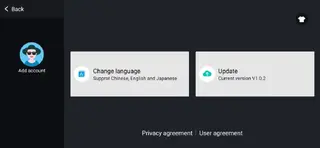
Support for multiple languages
Access the interface in various languages so more users can configure the emulator comfortably.
Free to download and use
Install the core emulator without paying an upfront fee directly from our website.
On-screen virtual gamepad
Use a built-in touch controller layout for devices where you do not have or want an external pad.
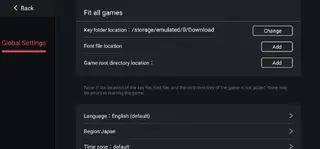
Screenshots

Device requirements and performance tips
Because it emulates a modern console, Egg NS Emulator demands relatively strong Android hardware. Devices with newer high-end chipsets, more RAM and good cooling generally perform better with complex 3D titles.
For a smoother experience, consider these suggestions:
Close background apps before starting the emulator to free RAM and CPU resources.
Keep your device charged and avoid extreme temperatures to reduce thermal throttling.
Experiment with graphics and resolution settings inside the emulator to find a balance between image quality and frame rate.
Use a quality controller when possible, since physical buttons often feel more responsive than touch controls for fast-paced games.
Controls and input configuration
Egg NS Emulator offers both virtual and physical control options so you can play the way you prefer. On-screen buttons are available for users who do not have a controller, while external pads provide a more traditional console feel.
In the settings area, you can usually:
Map controller buttons to match your preferred layout.
Adjust sensitivity for analog sticks or touch inputs.
Toggle vibration or haptic feedback if supported by your controller and device.
Spending some time fine-tuning these options can significantly improve comfort and responsiveness during longer sessions.
Basic safety and legal considerations
Egg NS Emulator itself is an Android application focused on emulation and does not include commercial game files. To stay on the safe side, use only game backups you are legally allowed to own and keep.
Always download the APK directly from our website so you know exactly which file you are installing. If your device displays any standard Android security prompts during installation, read them carefully before proceeding.
FAQs
Pros
- Allows selected Nintendo Switch titles to run on Android devices
- Offers both touch controls and external controller support
- Free to download and install from our website
- Includes a simple library system to organize game files
- Provides adjustable performance and graphics settings
- Interface is relatively straightforward for regular Android users
Cons
- Requires powerful and compatible hardware for smooth performance
- Does not include any game files or system firmware
- Setup and configuration can be challenging for beginners
- Game compatibility and stability may vary between titles
- Battery usage and heat can be high during extended sessions
Conclusion
Egg NS Emulator gives Android users a way to explore Nintendo Switch-style gaming on mobile hardware. If your device is powerful enough and you are comfortable managing your own game files, downloading the APK from our website lets you test and enjoy compatible titles with flexible control and performance options.




Comments
No approved comments yet.