

Face Play
Face Play is an AI-powered face swap video maker that lets you put your face into trending clips, cosplay scenes, fashion reels and more in just a few taps.
Using a single selfie, the app automatically detects your face and blends it into ready-made templates, so you can generate short videos to share on social media without advanced editing skills.
You can download the official Face Play APK directly from our website and install it on compatible Android phones and tablets to start creating personalized videos.
Capturing movements is one of the most common hobbies for millions of users. People love to take pictures and share them on social media platforms. Apps such as Montage Pro and KineMaster Pro Apk Download No Watermark are popular for video editing. However, this new app provides additional features.
Rate this app
App details
- App name
- Face Play
- Category
- Video Players & Editors
- Version
- v5.4.8
- Size
- 9.94 MB
- Requirements
- 5.0 and Above
- Package name
- com.aicoser.video.editor
- Publisher
- BIG HEAD BROTHERS INVESTMENTS LIMITED
- Price
- Free
- Mod
- No
- Downloads
- 655,124
- Rating
- 4.3 / 5
- Rating count
- 15,819
- Play Store
- Yes
- Requires root
- No
- Offline support
- No
- Contains ads
- Yes
- In-app purchases
- Yes
- Updated
- May 9, 2026
- Age rating
- Rated for 3+
Table of contents
What is Face Play APK
Face Play APK is an Android video editor focused on AI face swapping in short clips. Instead of editing frames manually, you select a selfie and a video template, and the app’s AI replaces the original face in the clip with yours.
The app offers themed categories such as fashion, Hanfu, Qipao, male characters, muscle bodies and dance scenes. You simply choose a template, upload a clear photo and let the AI generate a new video where you appear as the main character.
Face Play works as a simple creator tool rather than a complex timeline editor. It aims to help users who enjoy TikTok-style or Reels-style content quickly produce fun, personalized videos from a mobile device.
Why download Face Play for Android
Face Play can be useful if you want to experiment with AI face swap videos without learning advanced editing software. The templates handle camera movement, lighting and animation, so you focus only on choosing a photo and a style.
Many users download Face Play to create content for platforms like TikTok, Instagram, YouTube Shorts or messaging apps. With a few taps you can turn a selfie into a stylish fashion look, a period costume, a muscular body or a dance performance.
Downloading the APK from our website gives you direct access to the current Android version, so you can install it even when you do not see it quickly on other channels.
How Face Play can be useful
Face Play is useful for anyone who wants quick, entertaining clips without editing experience. The AI takes care of face detection, alignment and blending, saving you from frame-by-frame work.
Influencers and casual users can test different looks, outfits and roles before posting, which makes it easier to keep a feed fresh and engaging. It can also act as a creative tool for profile videos, reaction clips, or small skits with minimal effort.
Because most processing happens automatically, you can create several variations from the same selfie by mixing different template categories and exporting the results you like most.
How to download and install Face Play APK
You can get the official Face Play APK file directly from our website and install it on your Android device by following these steps.
Scroll to the download area on this page.
Tap the Face Play APK download button to save the file to your device.
When the download finishes, open your phone’s file manager and locate the APK in the Downloads folder.
Enable installation from unknown sources in your Android settings if prompted.
Tap the APK file, choose Install, and wait for the process to complete.
Open Face Play from your app drawer, sign in or create an account, and start generating AI face swap videos.
If you update to a newer version later, download the latest APK from our website again and install it over the existing app.
Features
AI-powered face swapping
Automatically detects and replaces faces in selected video templates using an AI model, with no manual masking required.
Ready-made video templates
Offers multiple clip categories including fashion, Hanfu, Qipao, male characters, muscle and dance scenes to apply your face to.
Simple interface
Uses a clean, beginner-friendly layout so users can pick a template, add a selfie and render a video in a few steps.
Account-based access
Allows sign-in with services like email or social platforms to sync favorites, purchases and generated clips across sessions.
Free and premium clips
Includes free templates plus premium diamond-marked templates that unlock after purchasing a subscription or in-app items.
Watermark and export options
Lets users preview results freely, with the option to remove watermarks and enable full download or sharing through paid access.
Short-form video output
Creates brief vertical-style clips suited for TikTok, Instagram Reels, YouTube Shorts and similar platforms.
Regular content updates
Frequently adds new templates and styles so users can match current trends and seasonal events.
Screenshots


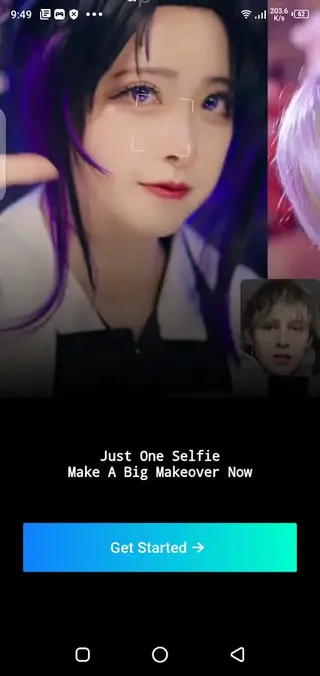


Tips for getting better face swap results
For more natural-looking videos, focus on the quality of the selfie you upload. Use a clear, front-facing photo with good lighting, where your face is not covered by heavy accessories.
Avoid blurry or low-resolution images.
Keep your face centered and fully visible.
Use neutral or slight expressions instead of extreme faces.
Match your head angle roughly to the template preview if possible.
These small adjustments help the AI align your facial features more accurately and produce smoother results in the final clip.
Privacy and safety considerations
Face Play processes your facial images to generate AI videos, so always consider what photos you upload and how you share the outputs. Avoid using sensitive images and review permissions the app requests on your device.
You can also check the latest privacy policy and terms available inside the app or on the official listing to understand how your data is handled and what controls you have over stored content.
Device compatibility and performance
Face Play is designed for Android 5.0 and above, but performance can vary by device. Newer phones with more RAM and stronger processors typically render AI videos faster and with fewer crashes.
If you experience slow processing or failed renders, try closing background apps, ensuring you have enough storage space and using a stronger network connection while generating clips.
FAQs
Pros
- AI makes face swapping fast and automatic
- Wide selection of themed video templates
- Beginner-friendly interface with minimal steps
- Works well for short-form social media content
- Free templates available along with premium options
Cons
- Requires a stable internet connection for best performance
- Watermarks and export limits apply on the free tier
- Some advanced templates are locked behind in-app purchases
- Results depend heavily on the quality of the input selfie
Conclusion
Face Play offers an easy way to turn a single selfie into a variety of AI-generated face swap videos suitable for social media and casual fun. If you want quick, trend-ready clips without learning complex editing tools, downloading the official Face Play APK from our website is a straightforward way to get started on Android.




Comments
No approved comments yet.