

FFSensity
FFSensity is a sensitivity optimizer designed for Garena Free Fire players who want smoother, more responsive controls on Android devices. It focuses on fine tuning touch and pointer behavior to match your play style.
So these players make sure that everything is correct. They check if their controls are according to their gameplay and other settings as well. Sensitivity tools such as Macro Bolitas Azules and Macro Pro are commonly used to get advanced-level customization services in the Free Fire game.
With dedicated sections for both device and in game configuration, the app helps reduce input delay and improve aim control without modifying Free Fire itself. You adjust the settings in FFSensity, then launch the game and test the results.
You can download the official FFSensity APK directly from our website and install it on compatible Android phones and tablets running Android 5.0 or higher.
Rate this app
App details
- App name
- FFSensity
- Category
- Tools
- Version
- v3.0
- Size
- 25.69 MB
- Requirements
- 5.0 and Above
- Package name
- com.ffsensity.thzzyt
- Publisher
- FFSensity Inc.
- Price
- Free
- Mod
- No
- Downloads
- 52,344
- Rating
- 4.2 / 5
- Rating count
- 15,112
- Play Store
- No
- Requires root
- No
- Offline support
- Yes
- Contains ads
- Yes
- In-app purchases
- No
- Updated
- May 7, 2026
- Age rating
- Rated for 3+
Table of contents
What is FFSensity APK
FFSensity APK is an Android tool created for Garena Free Fire players who want more control over their sensitivity and touch response. Instead of changing the game files, it works by adjusting system level and configuration based parameters that affect how your screen responds when you aim, swipe, or move.
The app uses a simple interface that is mainly in Spanish, with clear sections for configuring both your phone and Free Fire. You can change general sensitivity, scope sensitivity, pointer speed, and enable extra tweaks aimed at reducing bugs and stutter during gameplay.
Because it focuses on configuration and not on cheats or scripts, FFSensity is positioned as a helper tool to make the playing experience smoother, especially for competitive and ranked matches.
Why download FFSensity for Android
Free Fire offers built in sensitivity settings, but many players still struggle with aim control, inconsistent swipes, and lag during intense fights. FFSensity gives you a dedicated panel to experiment with different sensitivity profiles until you find a setup that feels natural on your specific device.
The app groups options into mobile configuration and Free Fire configuration, making it easier to understand what each change will affect. You can quickly test small adjustments, return to the app, and refine your settings again without digging through multiple in game menus every time.
Downloading the FFSensity APK from our website lets you keep a standalone, configurable sensitivity tool on your phone, so you can tweak performance whenever the game updates or you switch devices.
How FFSensity is useful for Free Fire players
FFSensity is particularly useful if you feel your aim is inconsistent even after trying different in game sensitivity values. By pairing device level tweaks with Free Fire specific sensitivity controls, it helps you get a more stable and predictable response when you drag to aim or flick for headshots.
Options like pointer speed control, bug reduction, and match start boost aim to mitigate small stutters that can cost you crucial fights. Pro and competitive minded players can use the tool to build a repeatable sensitivity setup and keep it consistent across updates.
Casual users can benefit as well by using the app to make swipes smoother, reduce jitter, and make overall control feel more comfortable during long gaming sessions.
How to download and install FFSensity APK
You can get the official FFSensity APK file directly from our website and install it manually on your Android device. Make sure your phone is running Android 5.0 or higher before starting the process.
Follow these steps to download and install:
Scroll to the download section on this page and tap the APK download button for FFSensity.
Wait until the APK file finishes downloading to your device.
Open your phone settings and go to the security or privacy section.
Enable the option that allows installation from unknown or external sources for your browser or file manager.
Use a file manager to find the downloaded FFSensity APK and tap on it.
In the installation wizard, review the details and tap Install.
Wait for the installation to complete, then tap Open or find FFSensity in your app drawer.
After installation, open FFSensity, adjust the settings you want, and then launch Free Fire to test your new sensitivity configuration.
Features
Dedicated Free Fire sensitivity tool
FFSensity is focused on improving control and touch response specifically for Garena Free Fire on Android.
Device configuration section
The CONFIGURACOES DO CELULAR section lets you adjust mobile related settings such as pointer speed and bug reduction options.
Pointer speed control
The VELOCIDADE DO PIONTEIRO option allows you to fine tune how fast the pointer or touch tracking reacts to your finger movement.
Bug reducer toggle
The REDUZIR BUGS 360 feature can be enabled or disabled to try to reduce minor bugs and stutter while you play.
Free Fire configuration section
The CONFIGURACOES DO FREE FIRE area focuses on in game sensitivity behavior for better aim and camera control.
General sensitivity adjustment
Use SENSIBILIDADE GERAL to change your overall sensitivity level and make movement and aiming feel smoother or faster.
Scope and aim sensitivity control
SENSIBILIDADES DAS MIRAS lets you adjust the sensitivity when using different aiming views or scopes.
Match start boost option
With IMPULSIONAR INICIO PARTIDA you can apply a small boost at the beginning of matches to help reduce early lag.
Screenshots
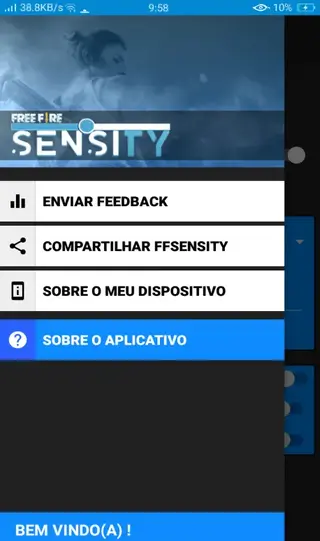

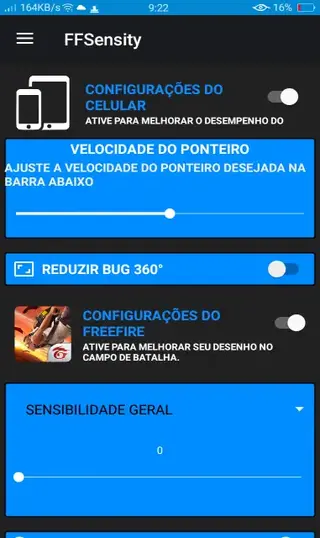
Understanding the FFSensity interface
Although FFSensity is mainly in Spanish, the structure is straightforward once you know what each section means. The first major block is labeled CONFIGURACOES DO CELULAR, which deals with device oriented adjustments. Inside it you find options like VELOCIDADE DO PIONTEIRO for pointer speed and REDUZIR BUGS 360 for bug reduction.
The second major block, CONFIGURACOES DO FREE FIRE, focuses on your in game behavior. It includes SENSIBILIDADE GERAL for overall sensitivity, SENSIBILIDADES DAS MIRAS for scope sensitivity, and IMPULSIONAR INICIO PARTIDA to try to smooth the start of each match. You can toggle and slide these options until the response feels right for your style.
Tips for configuring sensitivity with FFSensity
When you first start using FFSensity, avoid making extreme adjustments. Start by slightly increasing or decreasing SENSIBILIDADE GERAL, then jump into Free Fire and play a few matches to test your comfort level.
After that, focus on SENSIBILIDADES DAS MIRAS so your scoped aim does not feel too different from your hip fire sensitivity. If you experience small stutters or irregular movement, try enabling REDUZIR BUGS 360 and observe whether it improves stability on your specific device. Always change one or two settings at a time so you can clearly see what has helped or made things worse.
Compatibility and requirements
FFSensity is designed for Android devices running version 5.0 or higher. It targets smartphones and tablets used to play Garena Free Fire, especially low to mid range devices where fine tuning sensitivity can make a noticeable difference.
Because results may vary across manufacturers and Android skins, you may need a few test sessions to find the most reliable configuration for your phone. If you update your system or Free Fire version, it is a good idea to revisit FFSensity and confirm that your current sensitivity settings still feel right.
FAQs
Pros
- Optimizes Free Fire sensitivity beyond basic in game settings
- Includes both device level and game specific configuration options
- Simple layout with clearly labeled sections and toggles
- Helps reduce lag and stutter related to sensitivity behavior for some devices
- Available as a free download from our website
Cons
- Interface is primarily in Spanish which may confuse non Spanish speakers
- Results can vary depending on device and system version
- May require trial and error to find the best sensitivity combination
- Contains ads inside the app
Conclusion
FFSensity is a focused sensitivity configuration tool for Garena Free Fire players who want smoother, more consistent control on Android. By combining device tweaks with dedicated game sensitivity options, it can help many users improve their aim and reduce small control issues. If you play Free Fire regularly and feel limited by the default settings, downloading the FFSensity APK from our website is a practical way to experiment with a more advanced sensitivity setup.




Comments
Quỷ
.
Bro Man
51
Walid
Ff