

Fingerprint Video Locker
Fingerprint Video Locker is a privacy tool for Android that helps you lock apps, hide photos and videos, and protect sensitive files with PIN, pattern, or fingerprint.
With a built-in vault, intruder selfie, and customizable themes, it lets you secure personal content on your phone without making the interface complicated.
You can download the official Fingerprint Video Locker APK directly from our website and start protecting your apps and media in a few simple steps.
Rate this app
App details
- App name
- Fingerprint Video Locker
- Category
- Tools
- Version
- v1.23
- Size
- 20.24 MB
- Requirements
- 5.0 and Above
- Package name
- com.anavil.applockfingerprint
- Publisher
- Anavil Soft
- Price
- Free
- Mod
- No
- Downloads
- 86,645
- Rating
- 4.7 / 5
- Rating count
- 34,432
- Play Store
- Yes
- Requires root
- No
- Offline support
- Yes
- Contains ads
- Yes
- In-app purchases
- Yes
- Updated
- May 16, 2026
- Age rating
- Rated for 7+
Table of contents
What is Fingerprint Video Locker?
Fingerprint Video Locker is a security and privacy app for Android developed by Anavil Soft. It works as an app lock and media vault, allowing you to protect installed apps, photos, videos, audio, and other files behind a password, pattern, or fingerprint lock.
During the first setup, you create a PIN or pattern and choose a security question for password recovery. After that, you can lock individual apps such as messaging, social, gallery, or payment apps, and you can move private media into a secure vault that stays hidden from the default gallery.
The app also supports fingerprint unlock on compatible devices, offers different lock screen themes, and can capture a picture of anyone who enters a wrong password. This combination makes it a handy tool for users who want an extra layer of privacy on their smartphones and tablets.
Why download Fingerprint Video Locker APK from our website
Downloading the Fingerprint Video Locker APK from our website lets you get the stated version quickly without searching around. The file is provided directly on this page, so you can install it on any compatible Android device that supports apps from outside the Play Store.
Once installed, you can immediately start locking apps, hiding personal photos and videos, and organizing your private content inside the vault. The fingerprint unlock support on many devices makes daily use faster and more convenient compared with traditional password-only lockers.
If you share your phone with family or friends, or if you simply want to keep banking, social, and gallery apps away from curious eyes, this APK offers a simple and focused way to tighten your privacy using tools that most Android users can handle easily.
How Fingerprint Video Locker is useful
Fingerprint Video Locker is useful for anyone who wants more control over what others can see on their phone. Instead of locking the entire device, you can protect only the apps and media that matter most, such as chat apps, email, photos, and personal documents.
The media vault hides imported photos, videos, audio, and files from the regular gallery and file manager, so casual users of your phone will not see them. Because access requires your chosen lock method, it offers an extra barrier if someone tries to browse your content without permission.
Features like intruder capture and optional alarm add visibility when someone enters the wrong password, and the theme options help you match the lock screens with your taste. Taken together, these functions make the app a practical privacy helper for daily use.
We already shared similar security tools available here for you all, which you can also access and enjoy. So, if you are willing to get access to all these features, then download Jio phone fingerprint and X Icon Changer Pro. Both of these are quite popular tools.
How to download and install Fingerprint Video Locker APK
You can get the Fingerprint Video Locker APK directly from our website. Follow these basic steps to download and install it on your Android device:
Scroll to the download area on this page and tap the APK download button.
Wait for the APK file to finish downloading on your phone or tablet.
Open your device settings and enable installation from unknown or external sources if it is disabled.
Locate the downloaded APK file in your downloads folder and tap it.
Review the requested permissions and continue with the installation wizard.
Once the installation completes, open Fingerprint Video Locker and follow the on screen setup to create your lock and vault.
After the initial setup, you can start adding apps to the lock list and importing media files into the secure vault.
Features
App lock for installed applications
Lock individual apps such as messaging, social media, gallery, and banking with PIN, pattern, or fingerprint so they cannot be opened without your permission.
Secure media vault
Hide photos, videos, audio, and other files inside a private vault that does not appear in the default gallery or standard file browsers.
Fingerprint unlock support
Use the fingerprint sensor on supported Android devices to unlock the vault and protected apps more quickly instead of typing a PIN or drawing a pattern every time.
Password and pattern protection
Set a numeric PIN or pattern lock as your primary protection method, along with a security question that helps you recover access if you forget your password.
Intruder selfie capture
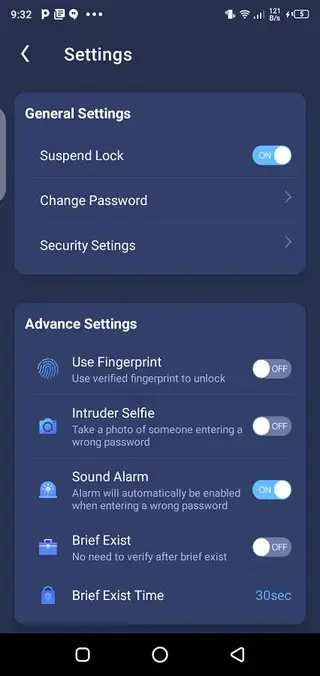
Automatically capture a picture with the front camera when someone enters an incorrect password or pattern multiple times, helping you see who tried to access your data.
Optional alarm on wrong password
Enable an alarm that triggers after failed unlock attempts so you are alerted when someone is trying to open your locked apps or vault.
Theme customization
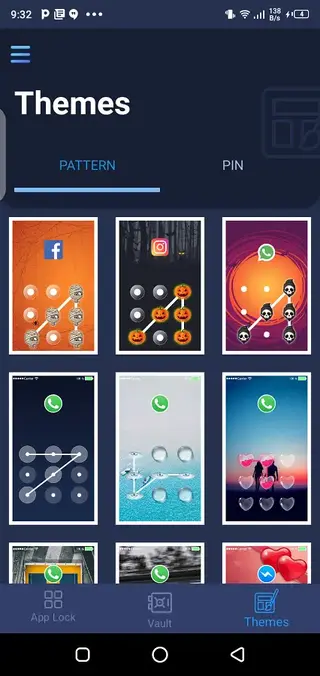
Choose from multiple themes for the lock screens and keypad to customize how the app lock and vault interface look on your device.
Simple, user friendly interface
Navigate between app lock, vault, and settings easily with a clean layout designed for non-technical users.
Screenshots
App lock and vault sections explained
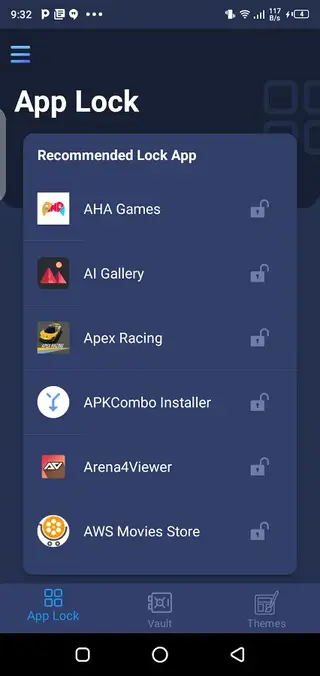
Fingerprint Video Locker splits its main features into clear sections so you can manage privacy more easily. The app lock section lists installed applications and lets you decide which ones should require a PIN, pattern, or fingerprint before opening. This is particularly useful for messaging, social, gallery, and financial apps.
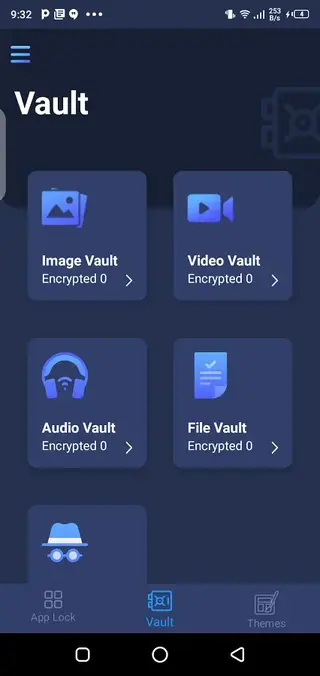
The vault section focuses on media and files. When you import photos, videos, audio, or documents into the vault, they move out of the public gallery and file manager. Access to this content is available only through the app, using the same lock method you configured at setup.
Best practices for using Fingerprint Video Locker
To get the most out of Fingerprint Video Locker, start by locking apps that hold personal conversations, financial information, or work files. Next, move private photos and clips from your default gallery into the vault and confirm they no longer appear in normal albums.
Enable intruder capture and, if you find it useful, turn on the alarm option so you know when someone is repeatedly entering the wrong password. Finally, pick a theme that keeps the keypad clear and readable to avoid mistakes when unlocking in a hurry.
Compatibility and permissions
Fingerprint Video Locker is designed for Android 4.4 and above. On supported devices, it can use the built in fingerprint sensor for unlocking. During installation and setup, the app requests permissions such as usage access for app locking, storage access for managing media, and camera access for intruder photos.
Granting these permissions is necessary for the main security features to function correctly. You can review and adjust permissions in your Android settings at any time if you want to limit or change what the app can access.
FAQs
Pros
- Simple way to lock individual apps without rooting the device
- Built in vault to hide photos, videos, audio, and files from the gallery
- Supports fingerprint unlock on compatible devices for faster access
- Intruder selfie and alarm options provide extra security awareness
- Lightweight tool with a straightforward and beginner friendly interface
- Customizable themes for the lock screen and keypad
Cons
- Contains ads that may appear during usage
- May include optional in app purchases or premium options
- Advanced users might miss backup or cloud sync features
- Performance can vary on older or low end devices
Conclusion
Fingerprint Video Locker is a practical Android privacy tool that combines app lock, media vault, fingerprint support, and intruder alerts in one place. If you want an easy way to hide sensitive apps and files on your phone, you can download the APK directly from our website and set it up in minutes.




Comments
No approved comments yet.