

Game Turbo
Game Turbo is Xiaomi’s dedicated gaming booster that helps Android users get smoother gameplay, fewer frame drops, and quick access to essential tools while playing.
By optimizing CPU, GPU, and memory usage, it focuses system resources on your selected games and reduces background interruptions. This creates a more stable and responsive gaming environment on supported devices.
You can download the official Game Turbo APK directly from our website and install it on compatible Android phones and tablets that meet the minimum system requirements.
Android devices made a massive impact on the gaming community. There are limited gamers all over the globe, but Android provides a better and easier platform for gamers to join and play. Game Turbo Xiaomi and Game Turbo 4.0 are also quite popular versions. Try all available editions and have fun.
Rate this app
App details
- App name
- Game Turbo
- Category
- Tools
- Version
- v2.0.1
- Size
- 1.62 MB
- Requirements
- 8.1 and Above
- Package name
- com.xiaomi.gameboosterglobal
- Publisher
- Xiaomi Inc
- Price
- Free
- Mod
- No
- Downloads
- 915,329
- Rating
- 4.4 / 5
- Rating count
- 61,431
- Play Store
- No
- Requires root
- No
- Offline support
- Yes
- Contains ads
- No
- In-app purchases
- No
- Updated
- May 29, 2026
- Age rating
- Rated for 3+
Table of contents
What is Game Turbo APK?
Game Turbo APK is a system utility from Xiaomi designed to optimize Android devices for gaming. It creates a dedicated game space where you can manage titles, improve performance, and access quick tools without leaving your current game.
On supported Xiaomi and Redmi devices, Game Turbo integrates deeply with the system. It can adjust performance profiles, limit background processes, and prioritize network traffic for games. This helps reduce lag, stuttering, and random slowdowns that often appear during online matches.
The app also adds a floating in-game panel. From this panel you can open apps like messaging, browser, or notes in small windows, control WiFi or mobile data, start screen recording, or take screenshots. All of this happens on top of your game so you stay focused on the action.
While Game Turbo is built primarily for Xiaomi’s MIUI-based phones, the APK can work only on compatible devices and ROM versions. Features may vary depending on your model, MIUI build, and Android version.
Why download Game Turbo for Android?
Many mobile games demand consistent performance and stable network connectivity. When background apps consume memory and bandwidth, even powerful phones can struggle. Game Turbo helps reduce these issues by allocating more resources to games and cutting unnecessary tasks.
By downloading Game Turbo APK from our website, you get a dedicated gaming hub where you can group your favorite titles, apply performance tweaks, and use tools such as screen recording or performance monitoring. This central place makes it easier to manage long gaming sessions.
For Xiaomi users, Game Turbo also offers a familiar interface that blends with MIUI. You can quickly change performance modes, control sensitivity for touch and gestures in supported games, and fine-tune options to match how you play.
How is Game Turbo useful?
Game Turbo is useful for Android gamers who want more control over how their device behaves during gameplay. Instead of manually closing apps, adjusting brightness, and changing network settings before every session, you can let the game space handle much of this automatically.
The booster engine focuses processing power and memory on the active game, which can help reduce frame drops on supported hardware. The floating panel lets you reply to messages, check guides in the browser, or control audio without quitting or pausing the game unnecessarily.
The built-in screen recorder on Xiaomi devices also gives content creators a simple way to capture high-quality gameplay with system audio. Combined with junk cleaning and performance optimization tools, Game Turbo works as an all-in-one companion for daily gaming.
How to download and install Game Turbo APK?
You can get the latest available Game Turbo APK directly from our website. Follow these steps to download and install it on your Android device:
Scroll to the download section on this page.
Tap the APK download button for Game Turbo.
Wait for the APK file to finish downloading on your device.
Open your phone’s settings and enable installation from unknown sources if it is disabled.
Locate the downloaded APK file in your downloads folder or file manager.
Tap the file and follow the on-screen prompts to complete the installation.
Once installed, open Game Turbo and add your favorite games to start using the booster features.
Make sure your device runs at least Android 8.1 or higher and is compatible with Xiaomi’s Game Turbo package before installing.
Features
Dedicated game space
Group and manage your favorite games in one place with a focused environment designed for gaming.
Performance optimization
Boost CPU, GPU, and memory allocation for selected games to help reduce lag and stutter on supported devices.
Background app control
Limit or close unnecessary background apps to free RAM and processing power before and during gameplay.
Network management
Control WiFi and mobile data usage from the gaming panel and prioritize games for more stable connections.
In-game floating panel
Access tools like settings, notes, and selected apps in small windows without leaving your current game.
Screen recording support
Record gameplay sessions on supported Xiaomi devices with video and audio capture for later sharing.
Junk cleaning tools
Remove temporary and cached files from your device to reclaim storage and help maintain smooth performance.
User-friendly interface
Navigate simple, clean menus that integrate with MIUI and make settings easy to find and adjust.
Screenshots
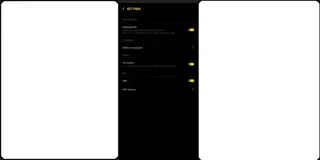

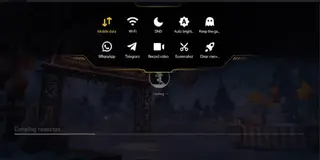
Compatibility and system requirements
Game Turbo is tied closely to Xiaomi’s MIUI ecosystem. The APK provided on this page is intended for devices that use the package name com.xiaomi.gameboosterglobal. For the best results, your device should meet the following conditions:
Android 8.1 or higher installed
MIUI-based firmware on a Xiaomi, Redmi, or POCO device
Sufficient free storage space for the APK and cached data
On unsupported ROMs or heavily customized systems, Game Turbo may not install correctly or some features may not function as expected.
Tips to get better results with Game Turbo
To make the most of Game Turbo on your device, you can combine its tools with a few practical habits:
Add only the games you actually play to keep the game space clean and organized.
Before long sessions, use the optimization feature to close background apps and clear junk files.
Monitor device temperature and avoid extended high-performance modes if your phone heats up.
Use the floating panel for quick replies and browsing instead of fully switching apps.
Adjust individual game settings inside Game Turbo where available to match your play style.
These small adjustments, together with the booster functions, can help keep your games more stable over time.
FAQs
Pros
- Optimizes CPU, GPU, and RAM allocation for games on supported devices
- Provides a dedicated game space to organize and launch titles quickly
- Offers in-game floating tools for multitasking without leaving the game
- Includes screen recording options on many Xiaomi and Redmi models
- User interface integrates well with MIUI and is simple to navigate
- Available as a free download from our website
Cons
- Full functionality is mainly available on supported Xiaomi and Redmi devices
- Some features may not work or may be limited on non-Xiaomi ROMs or ports
- Performance improvements can vary depending on hardware and game optimization
- Requires manual APK installation and permission changes for unknown sources
Conclusion
Game Turbo is a focused gaming companion for Xiaomi devices that centralizes performance tuning, multitasking tools, and recording in one place. If your phone is compatible and you want smoother, more controlled gaming sessions, downloading the Game Turbo APK from our website is a practical way to enhance how your Android handles games.




Comments
No approved comments yet.