

Gamefusion Emulator
Gamefusion Emulator is an Android app that lets you stream and play selected PC and console titles directly on your mobile screen. It focuses on delivering a more desktop-like gaming feel using your phone or tablet.
With support for heavy 3D games and flexible control options, it aims to bridge the gap between traditional PC gaming and portable gameplay. You can explore compatible titles, connect your accounts, and customize the on-screen layout for a smoother experience.
You can download the official Gamefusion Emulator APK latest version directly from our website and install it on any supported Android device that meets the minimum system requirements.
Rate this app
App details
- App name
- Gamefusion Emulator
- Category
- Tools
- Version
- v6.0.4
- Size
- 36 MB
- Requirements
- 8.0 and Above
- Package name
- com.xiaoji.egggame
- Publisher
- GameFusion Emulator INC
- Price
- Free
- Mod
- No
- Downloads
- 819,467
- Rating
- 4.5 / 5
- Rating count
- 61,241
- Play Store
- No
- Requires root
- No
- Offline support
- No
- Contains ads
- No
- In-app purchases
- No
- Updated
- Jun 4, 2026
- Age rating
- Rated for 3+
Table of contents
What is Gamefusion Emulator?
Gamefusion Emulator is a free gaming client for Android phones and tablets designed to help users play selected PC and console games on mobile. Instead of running games natively like a classic console emulator, it works more like a cloud or remote gaming platform where supported titles are delivered to your device through the app.
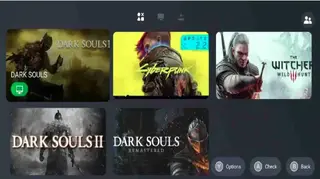
The application focuses on giving mobile users access to games that normally require a PC or console. Within the app you can browse supported games, sign in with your accounts where required, and launch titles directly from the built-in library interface.
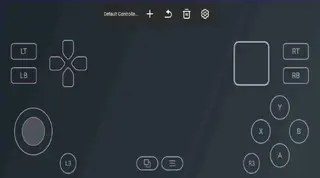
It also includes a configurable on-screen controller so you can play without external hardware, or pair a gamepad if your device supports it. The goal is to offer a more familiar PC-like gaming experience on a handheld device, with cleaner controls and smoother visuals where your connection and hardware allow.
This app connects mobile and PC gaming by letting you play games that used to be only for computers. Now, you can enjoy many of those games right on your phone or tablet. Apps such as Skyline Emulator and Vita3k also offer these services for Android users if you are looking for an alternative.
Why download Gamefusion Emulator for Android?
Many Android users want to enjoy big-budget PC or console games without sitting at a desk. Gamefusion Emulator gives you a way to access those titles on a device you already carry, making long sessions, travel time, or quick gaming breaks more convenient.
By installing the APK from our website, you get the latest available build, controller customization, and a streamlined interface tuned for mobile. For players who like experimenting with different platforms and game libraries, it can serve as a central place to try supported titles and adjust settings for better performance.
It can also be useful if you do not have a powerful gaming PC but still want to explore compatible games using your internet connection and an Android phone or tablet.
How Gamefusion Emulator can be useful?
Gamefusion Emulator is useful for players who want more flexibility in when and where they play heavier games. Instead of being tied to a desk, you can launch games from the sofa, during travel, or while away from home, as long as your device and connection support it.
The built-in control editor helps you tailor the layout to your grip and screen size, which can make demanding games easier to handle on touchscreens. For users who enjoy tinkering with settings, options like graphics, sensitivity, and layout adjustments can improve comfort over time.
Because the app is free to install, you can test how well it works with your connection and device before committing to using it regularly for your gaming sessions.
How to download and install Gamefusion Emulator APK?
You can get the official Gamefusion Emulator APK file directly from our website. Follow these steps on your Android phone or tablet to download and install it safely.
Scroll to the download section on this page and tap the available Gamefusion Emulator APK download button.
Wait while the APK file finishes downloading to your device.
Open your phone’s Downloads app or file manager and tap the downloaded APK file.
If prompted, enable installation from unknown sources in your device settings so Android can install apps from our website.
Confirm the installation and wait until the setup process completes.
Once installed, open Gamefusion Emulator from your app drawer, complete any initial setup, and start exploring supported games.
Whenever a newer version is released, return to this page and download the latest APK from our website to keep the app up to date.
Features
Access to selected PC and console titles
Browse and launch a range of supported PC and console style games directly from your Android device inside the app interface.
Cross platform account connectivity
Connect with supported platforms such as major PC game launchers or services where available so you can access compatible titles you already own.
Customizable on screen controls
Edit the touch layout by moving, resizing, hiding, or adding buttons so the control scheme matches your preferences and screen size.
Optimized performance settings
Adjust resolution, graphics related options, and sensitivity where available to balance visual quality and responsiveness on your device.
Game library management
Organize and quickly open supported games from a unified mobile library instead of switching between multiple apps or launchers.
Support for external controllers
Use compatible Bluetooth gamepads or controllers if your device supports them for a more traditional console like experience.
Free to install and use
Download and install the APK at no cost so you can test the app and explore supported titles without an upfront fee.
Regular version updates
Receive improvements, fixes, and new features through updated APK versions when you download the latest release from our website.
Screenshots
System requirements and device compatibility
For the best experience, Gamefusion Emulator works on modern Android devices with at least Android 8.0 or higher. Newer chipsets, more RAM, and a strong Wi-Fi or mobile data connection usually provide smoother gameplay and more consistent frame rates.
Low end phones or tablets may run into lag, lower visual quality, or longer loading times, especially with heavier games. If possible, keep your device updated, close background apps, and maintain enough free storage space before installing the APK.
Tips for better performance and controls
You can often improve your experience in Gamefusion Emulator by adjusting a few options inside the app:
Start with moderate graphics or streaming quality settings, then raise them gradually if performance stays smooth.
Customize the on screen controls so frequently used buttons are easy to reach with your thumbs.
Reduce transparency, vibration, or extra overlays if they affect responsiveness.
Use a compatible Bluetooth controller when possible for more accurate input, especially in shooters or racing games.
Experimenting with these settings helps you find a balance between image quality and responsiveness that suits your device and connection.
Safety and update considerations
Always download Gamefusion Emulator APK directly from our website so you know you are getting the official file associated with this page. When a new version is released, you can return here, download the updated APK, and install it over the existing version so you keep your data where possible.
Before updating, check that your device has enough free storage and a stable connection so the process completes without interruption. Keeping the app updated helps you benefit from new features, potential compatibility improvements, and bug fixes.
FAQs
Pros
- Lets you play selected PC and console style games on Android devices
- Offers customizable on screen controls to match your preferred layout
- Free to download and install from our website
- Can work with external controllers for more comfortable gameplay
- Centralizes supported games in one library style interface
Cons
- Requires a stable internet connection for smooth gameplay
- Performance and quality can vary depending on device and network
- Game selection is limited to supported titles and services
- Not available on the official Google Play Store at the time of writing
Conclusion
Gamefusion Emulator gives Android users a way to experience selected PC and console style games on mobile, with flexible controls and a unified library interface. You can download the official APK directly from our website, install it on a compatible device, and test how well it fits your gaming habits before relying on it as a regular part of your setup.




Comments
No approved comments yet.