
Go Partner
Go Partner is the official driver app from Gojek that helps you receive ride and delivery orders, manage your schedule, and track your daily income from one place. It is designed specifically for partners who provide transport and other services through the Gojek platform.
With real-time order notifications, GPS navigation, and built-in wallet tools, drivers can focus on the road while the app handles the details. You can download the Go Partner APK directly from our website and install it on compatible Android phones and tablets.
The app supports multiple Gojek services in eligible regions, so you can accept different types of jobs, improve your rating, and grow your earnings using a single, easy-to-use interface.
Rate this app
App details
- App name
- Go Partner
- Category
- Travel & Local
- Version
- v1.123.0
- Size
- 211 MB
- Requirements
- 6.0 and Above
- Package name
- com.gojek.partner
- Publisher
- PT. Aplikasi Karya Anak Bangsa
- Price
- Free
- Mod
- No
- Downloads
- 139,876
- Rating
- 4.6 / 5
- Rating count
- 61,775
- Play Store
- Yes
- Requires root
- No
- Offline support
- No
- Contains ads
- No
- In-app purchases
- Yes
- Updated
- May 7, 2026
- Age rating
- Rated for 12+
Table of contents
What is Go Partner Android App
Go Partner is an Android application for Gojek driver-partners. It helps taxi, bike, car, and delivery drivers receive customer orders, navigate to pickup and drop-off points, and monitor their performance in real time.
Developed for the Gojek ecosystem, the app connects you with nearby customers who request rides or deliveries. When a request appears, you see the customer details, estimated route, and fare information so you can decide quickly whether to accept the job.
The app integrates GPS navigation to guide you to the customer’s location and destination. It also includes tools for tracking completed trips, daily and weekly earnings, incentives, and account status, which makes it easier to manage work as a professional driver.
Go Partner is intended for registered Gojek partners in supported countries. New drivers usually need to complete registration and verification with Gojek before they can start receiving live orders through the app.
So, just download this application and start using it. If you still have any problems with using this application then you are free to contact us by accessing Apkoll communication channel.
Why Download Go Partner APK from Our Site
Downloading the Go Partner APK from our website lets you get the available version quickly without waiting for staged rollouts or device-specific delays. You can keep a backup installer on your phone or PC, which is useful if you frequently change devices or reset your phone.
Some users prefer APK files so they can install the app manually after checking permissions or transferring the file offline. By getting the Go Partner APK directly from our website, you have direct access to the installer whenever you need to reinstall or update it.
This is especially helpful for active drivers who rely on Go Partner every day, as any downtime can affect ride acceptance and earnings. Keeping the APK ready ensures you can get back online faster after a reset, device upgrade, or app issue.
How Go Partner Helps Drivers
Go Partner is built to make daily work easier for Gojek drivers. Instead of hunting for passengers on the street, you receive nearby requests directly on your device. This helps reduce empty drives and fuel costs while increasing the number of completed trips.
The integrated GPS view shows customer pickup points and best routes, so you can navigate unfamiliar areas more confidently. Ratings and feedback help you understand how customers see your service, and higher ratings can improve trust and the chances of getting more requests.
The earnings dashboard allows you to monitor completed trips, incentives, and bonuses. Drivers can review their performance by day or week, plan working hours around busy periods, and keep track of withdrawals to their bank account or Gojek wallet.
Because everything is handled in one app, Go Partner also reduces administrative work. Order history, payment status, and support access are available from the same interface, which lets you focus more on driving and customer service.
How to Download and Install Go Partner APK
You can download the Go Partner APK file directly from our website and install it on your Android device. Follow these steps to complete the process safely and correctly.
Scroll to the download section on this page and tap the available Go Partner APK download button.
Wait until the APK file finishes downloading to your device.
Open your phone settings and go to the security or apps section.
Allow installation from unknown or external sources for your browser or file manager, if it is not already enabled.
Open your file manager, find the downloaded Go Partner APK, and tap it to start installation.
Read the permissions shown on screen and confirm the installation.
After installation completes, open Go Partner and sign in or register with your Gojek driver account.
Once you are logged in and your account is active, you can start receiving and managing orders directly from the app.
Features
Real-time order requests
Receive ride and delivery requests instantly with sound and on-screen notifications so you can accept jobs quickly.
Integrated GPS navigation
View customer locations and suggested routes through built-in map and location services for easier navigation.
Earnings and trip history
Check daily and weekly earnings, incentives, and a history of completed trips to understand your performance.
Rating and feedback system
See customer ratings and comments to improve service quality and maintain a strong driver profile.
Multiple service types
Support for different Gojek services such as bike rides, car rides, and deliveries where available.
Account management tools
Monitor account status, required documents, and verification to stay compliant with platform policies.
In-app support access
Access help resources and contact support channels from within the app if you run into account or trip issues.
Optimized for drivers
Simple, driver-focused interface designed to be clear and usable while you are working on the road.
Screenshots
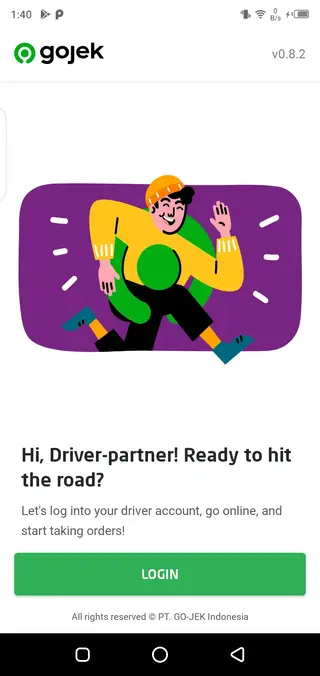
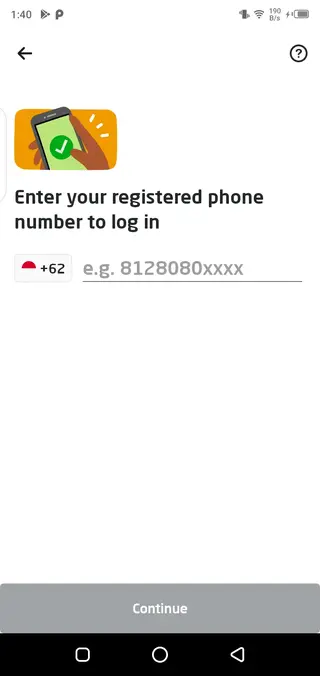
Compatibility and System Requirements
Go Partner is designed for Android smartphones and tablets. The version listed on this page targets devices running Android 4.0 and above according to the original release information. For the best experience, a newer Android version with adequate RAM and storage is recommended.
Because the app relies on GPS and mobile data, it works best on devices with accurate location hardware and a stable network connection. Keeping your operating system updated also helps maintain compatibility with the latest Go Partner features.
Tips for New Gojek Drivers
If you are new to the Gojek platform, it helps to get familiar with Go Partner before going online.
Review all sections of the app, including profile, documents, earnings, and support menus.
Test navigation in your local area so you understand how routes and pickup pins are displayed.
Check your internet and GPS signal quality in places where you plan to work.
Read Gojek guidelines about cancellations, waiting times, and safety before accepting live orders.
Taking a few minutes to explore features and preferences in Go Partner can reduce mistakes on your first trips and improve customer satisfaction from the beginning.
FAQs
Pros
- Official driver app for the Gojek platform
- Real-time order notifications with GPS navigation
- Clear earnings and trip history overview
- Rating system helps build driver reputation
- Supports multiple service types where available
Cons
- Requires stable internet connection to work properly
- Limited to Gojek-supported regions and cities
- New users must complete driver registration before using it
- Continuous use may consume battery due to GPS and data usage
Conclusion
Go Partner is a focused driver application for Gojek partners who want a structured way to receive orders, track income, and manage trips. If you work with Gojek in a supported region, downloading the Go Partner APK from our website gives you direct access to the installer so you can keep your driver app ready on any compatible Android device.




Comments
No approved comments yet.