

GSpace
GSpace is a lightweight Android cloning tool that lets you run multiple instances of the same app on one device. You can keep work, personal, and guest accounts completely separate while using a single phone.
With GSpace you can log in to two or more accounts for social apps, messaging tools, and supported games at the same time. The cloned apps behave like normal installations, so you can switch between them quickly without logging out.
You can download the official GSpace APK directly from our website and install it on any compatible Android phone or tablet running Android 5.0 or higher.
Rate this app
App details
- App name
- GSpace
- Category
- Tools
- Version
- v2.3.3
- Size
- 14.50 MB
- Requirements
- 5.0 and Above
- Package name
- com.gspace.android
- Publisher
- ZHUOHUA TECHNOLOGY LIMITED
- Price
- Free
- Mod
- No
- Downloads
- 618,242
- Rating
- 4.2 / 5
- Rating count
- 7,152
- Play Store
- No
- Requires root
- No
- Offline support
- Yes
- Contains ads
- Yes
- In-app purchases
- Yes
- Updated
- May 14, 2026
- Age rating
- Rated for 3+
Table of contents
What is GSpace App?
GSpace is an Android utility app by ZHUOHUA TECHNOLOGY LIMITED designed to create isolated clones of apps installed on your device. Each clone runs in its own space, so you can sign in with a different account without interfering with your main installation.
The app works especially well for users who manage multiple social, messaging, shopping, or game accounts. Instead of constantly logging in and out, you add the desired apps into GSpace and create separate instances that you can open side by side.
GSpace focuses on a simple, guided interface. You tap the add button, choose an app from your phone, and the tool creates a new clone inside its workspace. The cloned version opens from within GSpace and keeps its own data, notifications, and login session.
If you are not satisfied with the services, then try App Cloner Premium and VPhoneGaGa. Both of these are also quite similar tools, which provide the same service for the users. So, you can also try both of these tools on your device and enjoy.
Why download GSpace APK from our site?
Downloading the GSpace APK from our website gives you quick access to the latest available version without needing any extra tools. The installation file is ready to use on most modern Android devices, including both phones and tablets.
Once installed, you can instantly start cloning compatible apps and logging in with multiple accounts. This is useful for users who juggle work and personal accounts, run side businesses, or share a device with family members.
Our download page keeps the core details in one place, including package name, Android version requirement, and version information, so you know exactly what you are installing before you tap the download button.
How GSpace is useful for everyday Android users?
GSpace is helpful whenever you need more than one account for the same app. Many people use one phone for both work and personal life, but popular apps typically allow only a single login at a time. Cloning solves this limitation.
With GSpace you can:
Keep separate profiles for work and personal messaging apps.
Use multiple social media or marketplace accounts on one device.
Test app configurations in a separate space without touching your main data.
Create extra spaces for games to manage additional profiles.
Because the interface is straightforward, users who are new to cloning tools can still set it up in a few taps. You do not need root access, complex settings, or technical knowledge to get started.
How to download and install GSpace APK?
You can download the official GSpace APK file directly from our website and install it manually on your Android device. Follow these steps to get started:
Scroll to the download section on this page.
Tap the download button for the latest GSpace APK version.
Wait for the APK file to finish downloading to your device.
Open your device settings and enable installation from unknown sources if it is not already allowed.
Locate the downloaded APK in your notifications or file manager and tap it.
Follow the on screen prompts to complete the installation.
Open GSpace, tap the add button, and start cloning your apps.
After installation you can update GSpace in the future by returning to our website and downloading the newer APK version when it becomes available.
Features
Multiple app cloning
Create more than one clone of supported apps so you can sign in with different accounts on the same device.
Separate data spaces
Each cloned app runs in its own space, keeping logins, cache, and settings separate from your original installation.
Simple add and clone workflow
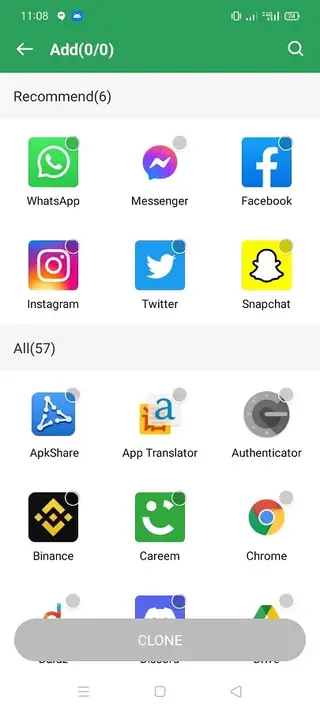
Use a clear add button to select apps from your device and generate clones in a few taps without complex configuration.
Support for popular apps and games
Clone many common social, messaging, utility, and gaming apps, depending on their technical compatibility.
User friendly interface
Navigate a clean, guided layout that makes it easy for beginners to create and manage clones.
Notification support for clones
Receive notifications from cloned apps so you can respond to multiple accounts without switching devices.
No root required
Install and use GSpace on standard Android devices without rooting or system modifications.
Lightweight and fast
Designed to be relatively small and responsive so it can run on a wide range of Android phones and tablets.
Screenshots

Getting started with your first clone
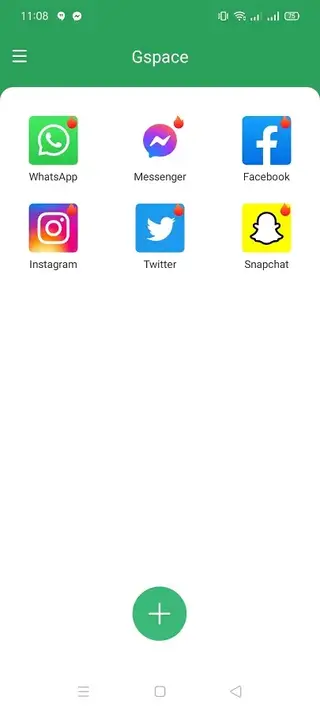
After installing and opening GSpace you see a simple home screen with an add icon. Tap this icon to view a list of apps installed on your device that can be added to GSpace.
Select the app you want to clone, wait for the short setup process, and a new icon appears inside the GSpace interface. Launch it, sign in with a different account, and it will run alongside your original app installation.
Managing and organizing cloned apps
As you add more apps into GSpace, organization becomes important. You can reorder icons, remove clones you no longer use, and keep only the accounts that matter. Removing a clone from GSpace deletes its data inside the space but does not touch your original app outside the tool.
This separation lets you experiment with different accounts, business profiles, or test configurations without risking changes to your main app setup.
Privacy and security considerations
GSpace creates a parallel space for your apps, but it does not replace good security habits. Protect your phone with a screen lock, avoid sharing your device with people you do not trust, and review permissions requested by cloned apps just as you would with normal installations.
For sensitive banking, finance, or work tools, follow your organization’s policies and consider whether cloning is allowed before adding them into GSpace.
FAQs
Pros
- Allows multiple accounts for the same app on one device
- Does not require root access to work
- Simple and clean interface suitable for beginners
- Helps separate work and personal app data
- Supports many popular social apps and games
- Notifications can be enabled for cloned apps
Cons
- May show ads inside the app
- Performance of heavy games can be slower in cloned space
- Not every app or game may clone or run perfectly
- Cloned apps consume extra storage and memory
- Battery usage can increase when running many clones
Conclusion
GSpace provides a practical way to run multiple app accounts side by side on one Android device without root. If you need clean separation between work, personal, or extra profiles, you can download the GSpace APK from our website and start cloning your favorite apps in a few minutes.




Comments
No approved comments yet.