

HttpCanary
HttpCanary is a powerful HTTP/HTTPS traffic capture and analysis tool for Android. It helps you inspect how apps and browsers communicate with servers in real time.
With a clean interface, support for multiple protocols, and flexible filters, it lets developers, testers, and advanced users debug APIs, monitor requests, and understand data packets in detail.
As you know networking is one of the most common ways to share data from one device to another. For Secure Web surfing mostly people prefer VPNs such as Iceland VPN and Super Touch VIP. However, this new tool provides additional features for users. Hence, learn about the advanced-level tool.
You can download the latest original HttpCanary APK directly from our website and start analyzing network traffic on your Android phone or tablet.
Rate this app
App details
- App name
- HttpCanary
- Category
- Tools
- Version
- v3.3.6
- Size
- 9.5 MB
- Requirements
- 5.0 and Above
- Package name
- com.guoshi.httpcanary
- Publisher
- GuoShi
- Price
- Free
- Mod
- No
- Downloads
- 65,914
- Rating
- 4.6 / 5
- Rating count
- 19,873
- Play Store
- No
- Requires root
- No
- Offline support
- No
- Contains ads
- No
- In-app purchases
- No
- Updated
- May 15, 2026
- Age rating
- Rated for 12+
Table of contents
What is HttpCanary?
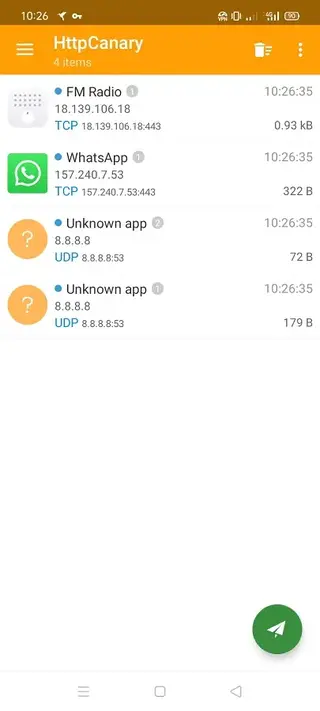
HttpCanary is an advanced packet capture and HTTP/HTTPS sniffer app for Android. It monitors network traffic generated by your installed apps and browsers, then presents each request and response in a structured view so you can study headers, body content, cookies, statuses, and timing.
The app works as a proxy-based sniffer and supports popular protocols such as HTTP, HTTPS, HTTP/2, TCP, and WebSocket for many apps. This makes HttpCanary a useful tool for API debugging, QA testing, security research, and learning how mobile networking works.
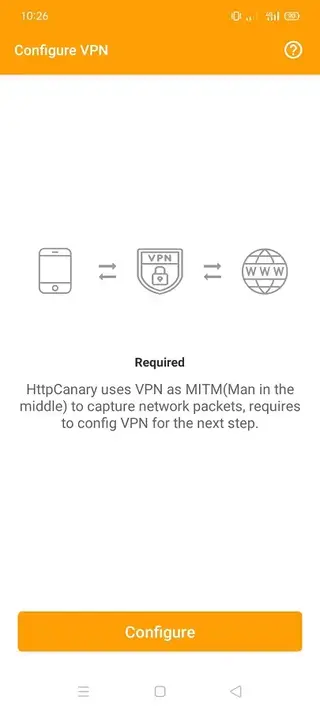
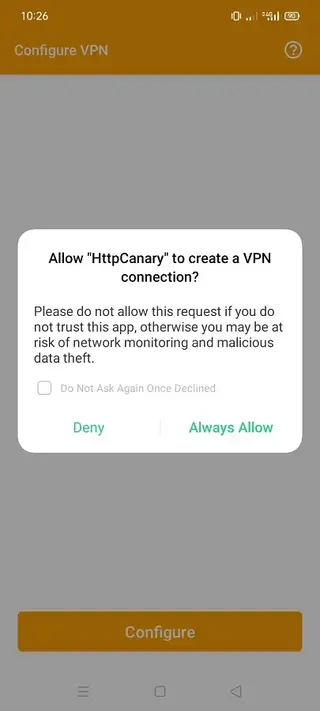
Although some users associate it with VPN-style behavior because it creates a local VPN interface to capture traffic, HttpCanary is mainly designed for traffic inspection and analysis, not as a traditional privacy VPN service.
Why download HttpCanary for Android?
Developers, testers, and power users download HttpCanary because it gives them visibility into what their apps are doing on the network. Instead of guessing why an API call fails or why a page loads slowly, you can inspect each request and response directly on your device.
HttpCanary also helps you understand data usage patterns. By analyzing data packets, you can see which apps talk to which servers, how often they connect, and what kind of payloads they send and receive.
The APK available on our website lets you install HttpCanary even if it is not accessible in your region through the usual stores, so you can keep using its traffic capture features on compatible Android devices.
How is HttpCanary useful?
HttpCanary is useful whenever you need to diagnose or study network behavior on Android:
API debugging: Inspect REST calls, query parameters, headers, and JSON or XML bodies to find integration issues.
Performance analysis: Measure response times, payload sizes, and connection reuse to spot bottlenecks.
QA and testing: Verify that apps hit the correct endpoints and send expected data during manual or automated tests.
Learning and research: Explore how different apps implement networking, authentication, and content delivery.
For rooted devices, HttpCanary can hook deeper into the system for wider coverage. On non-rooted devices, you can still capture traffic using its local VPN mode or by running target apps inside supported container apps like Parallel Space, as suggested in the original guidance.
How to download and install HttpCanary APK
You can get the official HttpCanary APK directly from our website. Follow these steps to download and install it on your Android device:
Scroll to the download section on this page.
Tap the available HttpCanary APK download button.
Wait for the APK file to finish downloading to your device.
Open your phone settings and enable installation from unknown sources if required.
Locate the downloaded APK in your downloads folder and tap it.
Confirm the installation prompts and wait until the app is installed.
Open HttpCanary, grant the requested permissions, and start capturing network traffic.
Once installed, you can update the app in the future by returning to our website and downloading the newer APK version the same way.
Features
Advanced HTTP and HTTPS sniffer
Capture and inspect HTTP and HTTPS traffic from apps and browsers with detailed request and response information.
Data packet analysis
Analyze data packets to see headers, methods, URLs, status codes, cookies, and payloads for each captured session.
Per-app capture control
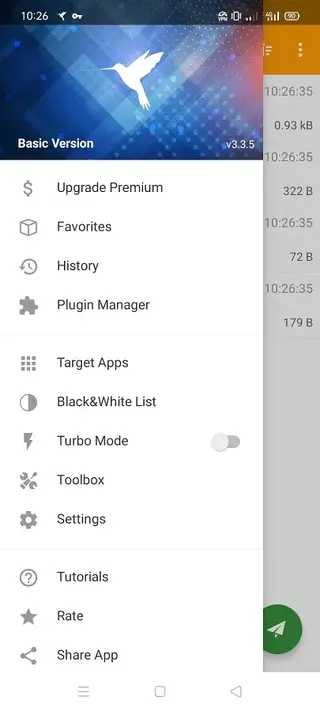
Select specific apps to monitor so you only capture traffic that matters to your debugging or testing session.
Host and URL filtering
Filter captured traffic by host, path, or keyword to quickly focus on the requests you need to inspect.
Multiple protocol support
Support for HTTP, HTTPS, HTTP 2, WebSocket and other common protocols used by Android applications.
Plugin and extension support
Use plugins to extend functionality, automate tasks, or enhance how captured data is displayed and processed.
User friendly interface
Navigate captured sessions easily with a clean UI, color coded statuses, and clear request detail screens.
Root and non root modes
Work on rooted devices for deeper capture or use VPN based capture and cloning tools on non rooted phones.
Screenshots

Using HttpCanary on rooted and non rooted devices
HttpCanary behaves slightly differently depending on whether your device is rooted. On rooted phones, the app can hook directly into system networking, which typically results in broader and more reliable packet capture across all apps.
On non rooted devices, HttpCanary relies on a local VPN interface to intercept traffic. In some setups you may run target apps inside a cloning container such as Parallel Space so that HttpCanary can capture their packets more effectively. This approach does not modify your original apps and helps keep your primary data separate while you test.
Tips for effective traffic analysis with HttpCanary
To get the most value from HttpCanary, start by selecting only the apps you need to monitor and apply host or path filters. This reduces noise and makes captured sessions easier to review.
When inspecting requests, look closely at HTTP methods, headers, and response codes to understand how your client and server interact. For APIs, expand JSON or XML bodies to verify that payloads match your expectations. You can also compare multiple sessions to see how behavior changes under different conditions, such as slow networks or failed logins.
FAQs
Pros
- Powerful HTTP and HTTPS traffic capture and analysis on device
- Helpful for developers, testers, and advanced users debugging APIs
- Per app filtering and rich packet details improve productivity
- Works on both rooted and non rooted Android devices
- Clean, user friendly interface despite advanced capabilities
Cons
- Primarily aimed at technical users with networking knowledge
- Requires additional setup steps for full capture on non rooted devices
- Cannot meaningfully analyze traffic from some apps that use extra encryption or certificate pinning
Conclusion
HttpCanary is a capable HTTP and HTTPS sniffer for Android that gives you fine grained visibility into app network traffic. If you need to debug APIs, test mobile apps, or study how data flows between your device and remote servers, you can download the latest HttpCanary APK from our website and start capturing packets in just a few minutes.




Comments
No approved comments yet.