

IG Best
IG Best APK is an Android tool that helps Instagram users increase likes, followers, comments and views automatically. It targets people who want to boost basic engagement on their profiles without manual effort.
The app connects to your Instagram account and sends interactions such as auto likes, auto follows and auto views on public posts and stories. You can download the original IG Best APK file directly from our website and install it on compatible Android devices.
Because IG Best uses automation and growth methods that go against Instagram’s rules, there are real risks such as warnings, temporary blocks or account bans. Use the tool carefully and only if you understand the possible consequences for your Instagram account.
Rate this app
App details
- App name
- IG Best
- Category
- Tools
- Version
- v1.5
- Size
- 2.82 MB
- Requirements
- 4.0.3 and Above
- Package name
- com.igliker.app
- Publisher
- IGLiker
- Price
- Free
- Mod
- No
- Downloads
- 714,291
- Rating
- 4.1 / 5
- Rating count
- 8,162
- Play Store
- No
- Requires root
- No
- Offline support
- No
- Contains ads
- Yes
- In-app purchases
- No
- Updated
- May 22, 2026
- Age rating
- Rated for 3+
Table of contents
What is IG Best APK?
IG Best APK is a third-party Android application designed to automate basic engagement on Instagram. After you log in with your Instagram credentials, the app offers options to send auto likes, gain followers, generate comments and increase views on videos and stories.
The tool focuses on public Instagram content. When your posts, reels or stories are public, IG Best can send interactions in bulk so your profile looks more active. Many users rely on this type of app when they struggle to grow organically or want a quick visibility boost.
IG Best is not available on Google Play Store and is not affiliated with Meta or Instagram. It works as an external automation service and uses methods that can violate Instagram’s terms of use, so every user should treat it as a risky growth shortcut rather than a safe official solution.
It is easy for those who are already popular or have an amazing ability to shine among others, but what about an ordinary one? Therefore we love to share this app with all, by using it anyone can be the shining one. Get the best social media platform tools like, RPWLiker & Rocky Liker to gain real followers.
Why download IG Best APK from our website?
Users who search for IG Best generally want faster growth on Instagram without running paid ad campaigns or spending hours engaging manually. By downloading IG Best APK directly from our website, you get the specific version referenced here, along with clear usage and risk information in one place.
The app can help you quickly add likes and followers to new profiles, experiment with growth strategies or test how automated engagement affects reach. Our download page provides the current available version, package name and technical details so you know exactly what you are installing.
Keep in mind that IG Best is a third-party automation tool. If you decide to download and use it, always consider using a secondary or low-risk account and avoid aggressive usage patterns that may trigger Instagram’s security systems.
How IG Best can be useful?
IG Best can be useful for users who want to:
Give a new or inactive Instagram account a quick engagement boost.
Make profiles look more active by adding likes, comments and views to recent posts.
Test how different engagement levels affect impressions or discovery on Instagram.
Reduce the time spent on basic engagement tasks such as liking or following.
Because the app offers separate tools for likes, followers, comments and views, you can choose which type of interaction you want to focus on. However, its usefulness always needs to be balanced against safety, legality and long-term reputation, since automated engagement can damage trust if real users or platforms detect it.
How to download and install IG Best APK?
You can get the IG Best APK file directly from our website. Follow these steps to download and install it on your Android device:
Scroll to the download area on this page.
Tap the available IG Best APK download button.
Wait for the APK file to finish downloading to your device.
After the download completes, install the app manually:
Open the Settings app on your Android device.
Go to the security or privacy section.
Enable installation from unknown or external sources for your browser or file manager.
Open your file manager and navigate to the Downloads folder.
Tap the IG Best APK file you downloaded from our website.
Choose Install and wait until the process finishes.
Once installed, open IG Best and log in with your Instagram account if you decide to proceed.
Installation steps may vary slightly depending on your Android version and device brand, but the general process remains similar.
Features
Auto liker for posts and stories
Send automatic likes to your Instagram photos, videos, reels and stories shared publicly to increase visible engagement counts.
Auto follow to gain followers
Use the auto follow feature to receive new followers on your Instagram account within the limits available inside the tool.
Auto comments generation
Generate basic comments on public posts so your uploads show more activity in the comment section.
Auto video views
Increase view counts on public Instagram videos by sending automated views through the app.
Auto story views
Raise the number of views on your public Instagram stories to make your profile look more active.
Simple login interface
Log in with your Instagram username and password inside a straightforward interface and access all tools from a single dashboard.
Free to download and use
The APK file is free to download from our website and the core engagement services are offered without subscription fees.
Spam comment handling option
Includes basic options intended to control or limit spam-like comments when using automated features.
Screenshots
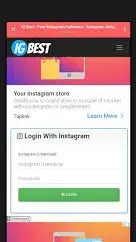
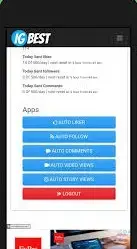
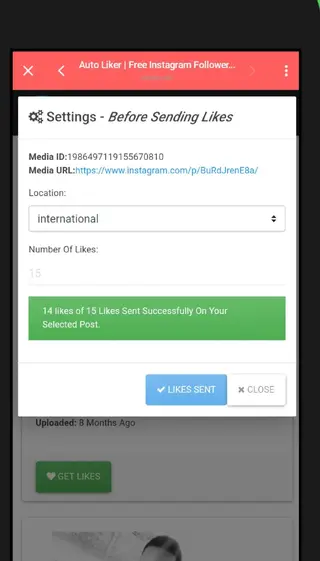
How IG Best works with your Instagram account
After you install IG Best and open it, the app asks for your Instagram username and password. When you sign in, it connects to your account and displays several tools such as auto liker, auto follow, auto comments and view boosters.
You usually select a feature, set the desired quantity within the available limits and apply it to eligible posts or your profile. The app then processes your request and sends interactions over a short period of time rather than instantly all at once, which is meant to look more natural, although it still remains automated.
Because this process uses your login session, you should always assume that Instagram can detect unusual patterns. That is why slow, limited usage and non-critical accounts are safer than heavy daily automation on your main profile.
Legal and policy considerations
IG Best is an unofficial automation tool that conflicts with Instagram’s platform policies. Instagram explicitly discourages the use of bots, auto liker tools and services that artificially inflate metrics like followers or likes.
Using an app like IG Best can breach those conditions. If Instagram detects such activity, it may send warnings, block certain actions, remove fake engagement, require password resets or permanently deactivate accounts. From a legal and compliance point of view, this means you are responsible for any consequences that result from using the app.
For long-term brand building or influencer work, organic growth and paid official advertising are generally safer strategies. IG Best should only be considered by users who understand and accept the policy violations involved.
Tips for using IG Best more cautiously
If you still plan to try IG Best despite the risks, the following cautious practices may help reduce potential problems:
Use a secondary or test Instagram account instead of your main profile.
Avoid sending very large numbers of likes or follows in a short time.
Leave gaps between sessions and do not rely on the app every day.
Keep your posts and stories public if you want features to work properly.
Regularly review your account for any warnings or unusual login alerts.
These suggestions do not remove the risk, but they may lower the chance of sudden action blocks or permanent penalties when compared with highly aggressive automation.
FAQs
Pros
- Simple interface that is easy to understand for new users
- Offers auto likes, followers, comments and views in one place
- Free to download from our website and free to use
- Can quickly make a new Instagram account look more active
- Does not require root access to work on Android devices
Cons
- Violates Instagram terms of use and is not legal to use under those rules
- Real risk of account restriction, shadowban or permanent ban
- Requires entering Instagram username and password into a third-party app
- Automation quality and interaction sources may not feel authentic
- Not available or verified on Google Play Store
Conclusion
IG Best APK provides fast automated likes, followers, comments and views for Instagram, but it does so by breaking Instagram rules and carrying significant account risk. If you still choose to use it, install the APK from our website, use a low-risk account and keep your usage conservative to reduce potential problems, understanding that no approach completely removes the danger of penalties.




Comments
No approved comments yet.