

Insta Orange
Insta Orange is an Android helper tool that aims to increase Instagram followers, likes, views, and comments by using a built-in coin and task system. It targets users who want to grow engagement faster than they can through normal posting.
This is a third-party Insta utility, not an official Instagram product, and it works only with an internet connection. You can download the official Insta Orange APK file directly from our website and install it on compatible Android phones and tablets.
Because it interacts with Instagram activity in non-standard ways, you should use it carefully and at your own risk, preferably with a secondary or test account instead of your main profile.
Rate this app
App details
- App name
- Insta Orange
- Category
- Tools
- Version
- v5.6.3
- Size
- 3.05 MB
- Requirements
- 4.1 and Above
- Package name
- com.orengi.inshas
- Publisher
- Nazanin Ahmadi
- Price
- Free
- Mod
- No
- Downloads
- 46,000
- Rating
- 3.6 / 5
- Rating count
- 16,000
- Play Store
- No
- Requires root
- No
- Offline support
- No
- Contains ads
- Yes
- In-app purchases
- Yes
- Updated
- May 9, 2026
- Age rating
- Rated for 3+
Table of contents
What is Insta Orange?
Insta Orange is a third-party Android application designed to boost visible engagement on Instagram profiles. Instead of relying only on organic growth, it uses a coin-based system that lets you exchange coins for followers, likes, views, and comments on selected posts or profiles.
The app is not affiliated with Instagram or Meta, and it does not replace the official Instagram client. You still need a standard Instagram account, but you interact with Insta Orange separately to run tasks and then spend the earned coins on different engagement packages.
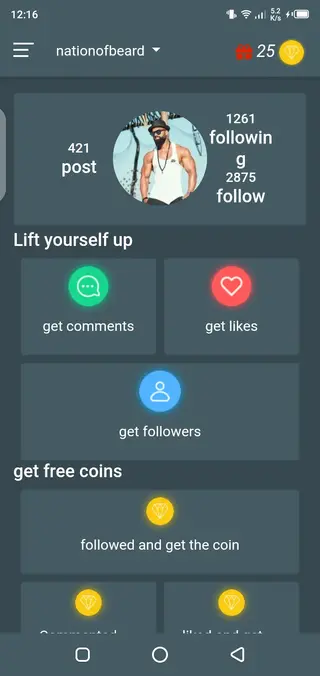
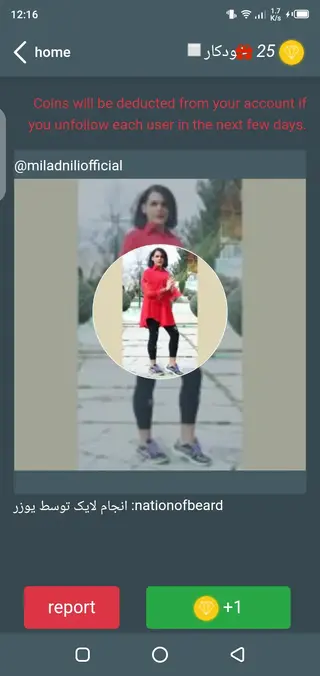
After registration, users receive a small welcome balance and can start performing simple in-app actions such as following accounts, liking posts, or completing other tasks. These actions grant coins inside Insta Orange, which can then be used to request engagement back on your own profile.
Because this activity goes beyond normal Instagram usage, there is a risk that Instagram may detect unusual behavior. For this reason, many people choose to log in with a secondary or experimental account inside such tools. We have other tools for you all. Insta Up and Fast Followers x1 are the best tools to gain popularity on Instagram. So, access these tools to gain followers, likes, and comments.
Why download Insta Orange APK from our website
Downloading Insta Orange APK from our website lets you get the current release directly as an installable file for your Android device. You do not need to search across multiple sources or rely on bundled installers. The APK is available on this page, and you can save it to your phone for manual installation.
By keeping the file locally, you can install or reinstall the app whenever you need and test it on different devices that meet the minimum Android version requirement. This is useful if you manage several accounts or want to experiment with growth strategies on separate phones.
Our page also brings together the main usage details, pros and cons, and common questions so you understand clearly how the app behaves before you decide whether to install it.
How Insta Orange can be useful
Insta Orange can be useful for users who want to see quick, visible activity on their Instagram profiles without building everything from scratch. Small creators, new brands, or experimental pages sometimes use tools like this to create an initial layer of engagement around their content.
The coin system gives you a simple structure: complete tasks to earn coins, then exchange those coins for followers, likes, or other reactions. This can be easier to understand than complex marketing dashboards or advertising panels.
It can also serve as a testing environment. Instead of risking your main Instagram account, you can try different posting frequencies, profile setups, and engagement patterns on a secondary account connected through Insta Orange, and then apply what you learn to your primary profile through fully organic methods.
However, because this breaks from Instagram’s usual usage patterns, you should always keep in mind the potential for account restrictions and treat the tool as an optional experiment rather than a guaranteed long-term growth strategy.
How to download and install Insta Orange APK
You can get the Insta Orange APK file directly from our website and install it manually on your Android device. Follow these basic steps to complete the process:
Scroll to the download section on this page and tap the APK download button for Insta Orange.
Wait for your browser to finish downloading the APK file to your device storage.
On your phone, open the Downloads folder or notification panel and tap the Insta Orange APK file.
If prompted, allow installation from unknown sources in your Android security or app settings.
Confirm the installation prompt and wait until the setup completes successfully.
Open Insta Orange from your app drawer, create your account or log in, and start exploring the available tasks and engagement options.
Make sure your device runs the required Android version or higher so the app can install and function correctly.
Features
Coin based engagement system
Earn coins by completing tasks and spend them on followers, likes, views, and comments for your Instagram profile.
Tasks for earning coins
Perform simple actions such as following accounts or liking posts inside the app to build up your coin balance.
Multiple engagement types
Request followers, post likes, video views, and comments instead of being limited to a single engagement metric.
Simple registration
Sign up quickly with basic details and start using the internal coin system after creating an account.
Optional coin purchases
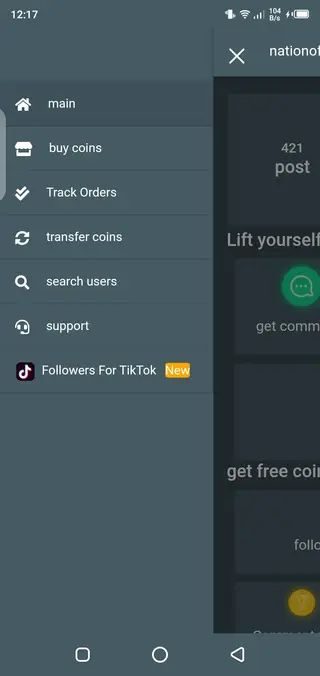
Buy additional coins with real money if you prefer to pay instead of spending time completing tasks.
Lightweight Android client
Small and straightforward app focused on Instagram engagement tools instead of heavy extra features.
Beginner friendly interface
Menus and options are arranged in a clear layout so new users can navigate tasks and orders easily.
Fast processing of orders
Engagement requests generally begin processing quickly once you submit them with enough coins.
Screenshots
Account safety and risk considerations
Any external app that interacts with Instagram metrics carries some degree of risk. Instagram actively monitors for unusual activity patterns such as rapid spikes in followers or repetitive automated actions. If such behavior is detected, the platform may respond with temporary blocks, verification prompts, or permanent suspensions.
Because Insta Orange focuses on boosting followers and interactions quickly, you should be cautious when connecting accounts and placing large orders. Using a secondary account for testing, spacing out your actions, and avoiding extreme engagement targets can help reduce exposure, but it does not remove the risk completely.
Tips for using Insta Orange more responsibly
If you decide to try Insta Orange, aim to combine it with genuine content and organic engagement so that your profile does not rely entirely on artificial numbers. Post regularly, respond to real comments, and use the app for small experiments rather than continuous heavy boosting.
Monitoring how your account reacts over time is important. If you notice unusual warnings, login challenges, or reduced reach, it may be wise to pause usage and focus on fully organic methods for a while.
Device compatibility and requirements
Insta Orange targets Android phones and tablets that run at least Android 4.1 or higher, according to the original release information. Most modern devices exceed this requirement, but very old models may not install the app correctly.
For best performance, keep some free storage space, maintain a stable internet connection, and avoid running too many heavy apps in the background while using Insta Orange.
FAQs
Pros
- Helps new or small Instagram accounts quickly display visible engagement
- Simple coin and task system that is easy to understand for beginners
- Supports multiple engagement types including followers, likes, views, and comments
- Lightweight app that generally runs smoothly on older Android versions
- Does not require root access to function
Cons
- Third party tool that is not affiliated with Instagram or Meta
- Risk of account restrictions or suspension if Instagram detects abnormal activity
- Requires a constant internet connection as it depends on online services
- Contains advertising inside the app interface
- Encourages non organic growth which may not build a genuine audience
Conclusion
Insta Orange offers a quick way to trigger extra followers, likes, and other reactions on Instagram by using a coin based task system. It can be interesting for experiments or secondary accounts, but users should stay aware of platform rules and possible risks before relying on it for long term growth.




Comments
No approved comments yet.