

iPad View
iPad View is a PUBG Mobile helper tool that lets you switch your Android screen to an iPad-style wide view. It adjusts the in-game resolution and aspect ratio so you can see more of the battlefield on the same device.
This graphics utility focuses on giving Android players a cleaner, wider display similar to what iPad users enjoy. You can enable or disable the custom view at any time, so you always keep control over how PUBG Mobile looks on your phone or tablet.
The official iPad View APK file is available directly on our website, so you can download and install the latest version without searching around the internet.
Rate this app
App details
- App name
- iPad View
- Category
- Tools
- Version
- v2.1
- Size
- 6.05 MB
- Requirements
- 4.4 and Above
- Package name
- com.dynooo.ipad
- Publisher
- DYNOOO
- Price
- Free
- Mod
- No
- Downloads
- 356,290
- Rating
- 4.5 / 5
- Rating count
- 6,655
- Play Store
- No
- Requires root
- No
- Offline support
- Yes
- Contains ads
- No
- In-app purchases
- No
- Updated
- May 18, 2026
- Age rating
- Rated for 3+
Table of contents
What is iPad View APK
iPad View APK is an Android graphics configuration tool created for PUBG Mobile players. It tweaks your game resolution and aspect ratio to mimic the wider field of view that many players know from iPad screens.
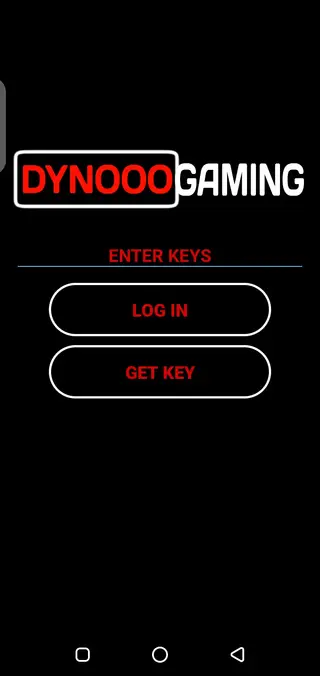
The app works like a focused GFX-style tool. After installation, you open iPad View, unlock it with the provided password, select your PUBG Mobile version, and apply the custom layout. When you launch the game, the interface stretches to a wider iPad-like view while trying to keep gameplay smooth and responsive.
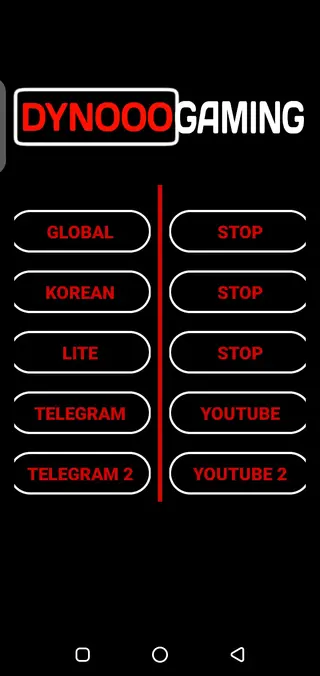
iPad View currently supports multiple PUBG Mobile clients such as Global, Korean, and Lite editions. You can switch views on or off whenever you want, so you are not locked into one layout.
Why Download iPad View APK for Android
Many competitive PUBG Mobile players prefer the wider visual space that iPad screens offer. On Android phones and tablets, that view is not available by default. iPad View helps bridge this gap by adjusting game graphics to a similar wide-screen style.
By downloading the iPad View APK from our website, you get a simple way to:
Increase visible area on the screen compared to the stock layout.
Improve spotting of enemies at medium and long ranges.
Experiment with different views without changing your device.
Quickly revert to the official display if you are not comfortable.
The app is lightweight and focuses only on view and resolution changes, so most users can set it up within a few minutes.
How iPad View Can Be Useful for PUBG Mobile Players
For ranked matches or competitive play, even small visual advantages can matter. A wider field of view can help you track enemy movements, control recoil more comfortably, and manage close-range fights with better awareness of your surroundings.
iPad View aims to provide:
More information on screen: You can see more of the left and right sides of the map without rotating the camera as often.
Better target visibility: Higher perceived resolution and a cleaner image can make distant opponents easier to spot.
Flexible layout: You can enable, test, and disable the iPad-style display in a few taps.
However, like any graphics tool, behavior can vary with different devices and game updates, so it is wise to test the configuration in training or casual matches first.
How to Download and Install iPad View APK
You can download the official iPad View APK directly from our website. Follow these steps to get it on your Android device:
Scroll to the download section on this page.
Tap the download button for the latest version of iPad View APK or XAPK.
Wait for the file to finish downloading to your device.
Open your phone settings and enable installation from unknown sources for your browser or file manager.
Locate the downloaded file in your Downloads folder.
Tap the file and follow the on-screen instructions to complete the installation.
After installation, open iPad View, enter the password "DYNOOO" when requested, select your PUBG Mobile version, apply the view, and then launch the game to test the new layout.
Features
iPad-style field of view
Transforms the default Android PUBG Mobile view into a wider, more iPad-like screen layout.
Support for multiple PUBG versions
Works with several editions of PUBG Mobile including Global, Korean, and Lite, depending on installed client.
Password-protected access
App interface is locked with a password so only authorized users can adjust the settings.
Simple one-tap configuration
Choose your game version, apply the iPad view, and start PUBG Mobile with a single tap.
Toggle on and off anytime
You can stop the tool and revert to the original game display whenever you like.
Fast and smooth graphics focus
Designed to improve responsiveness and smoothness while using the wider aspect ratio where device allows.
Wide display and comfortable controls
Helps stretch the interface for a broader view while keeping controls accessible.
User-friendly interface
Clean layout so even new users can apply or remove settings without confusion.
Screenshots
Supported PUBG Mobile Versions
iPad View focuses on the main Android releases of PUBG Mobile. According to the original description, it can work with:
Global version
Korean version
Lite version
Make sure the correct game client is installed on your device, then pick the matching version inside iPad View before launching PUBG Mobile, so the display settings apply correctly.
Important Notes and Safety Considerations
iPad View behaves like a graphics and resolution adjustment tool, similar to many GFX utilities. The developers present it as a non-hacking helper app, but they also do not provide any guarantees.
Game publishers can change their policies or detection methods over time. Because of this, you should always:
Use the tool at your own discretion.
Test settings in training or casual modes first.
Stay informed about the latest rules for third-party tools in competitive games.
Our role is to provide the original APK file as described, so you can decide whether it fits your personal use case.
Tips for Better Experience With iPad View
To get smoother performance while using iPad View, consider the following tips:
Close heavy background apps before launching PUBG Mobile.
Adjust in-game graphics to a level your device can handle comfortably.
Try different sensitivity settings after enabling the wider view.
If you notice visual glitches, revert settings and test again later.
Every device behaves differently, so some fine-tuning may be required to find a setup that feels natural and responsive.
FAQs
Pros
- Helps create a wider iPad-style field of view in PUBG Mobile
- Supports multiple PUBG Mobile versions such as Global, Korean, and Lite
- Simple interface that is easy to configure for most users
- View changes can be reverted at any time without reinstalling the game
- No in-app purchases and no third-party ads reported in the original description
Cons
- May not work perfectly on all Android devices or screen sizes
- Lobby display can show black bars on the sides for some users
- Functionality can be affected by future PUBG Mobile updates
- Uses non-official graphics adjustments that some players may not be comfortable with
Conclusion
iPad View is a dedicated PUBG Mobile helper app for Android users who want an iPad-style wide display. If you are looking to experiment with a broader field of view and test how it affects your gameplay, you can download the latest iPad View APK directly from our website and try it in a few matches before deciding whether to keep it active.




Comments
Tandin
Yes I like it