

Jack Game Booster
Jack Game Booster is an Android optimization app designed for mobile gamers who face lag, stutters, and unstable ping during gameplay. It focuses on freeing RAM, closing background apps, and improving device responsiveness.
By combining game management tools, cleaning functions, and a built-in VPN, Jack Game Booster helps create a smoother environment for popular online and offline titles on both phones and tablets.
You can download the official Jack Game Booster APK directly from our website and install it manually on any compatible Android device running Android 5.0 or above.
Rate this app
App details
- App name
- Jack Game Booster
- Category
- Tools
- Version
- v1.3.7
- Size
- 6.08 MB
- Requirements
- 5.0 and Above
- Package name
- com.pubg_speedup.ram_freeup.game_booster.master_vpn
- Publisher
- SAILFISH PTE. LTD
- Price
- Free
- Mod
- No
- Downloads
- 364,768
- Rating
- 4.5 / 5
- Rating count
- 3,401
- Play Store
- No
- Requires root
- No
- Offline support
- Yes
- Contains ads
- No
- In-app purchases
- No
- Updated
- May 20, 2026
- Age rating
- Rated for 3+
Table of contents
What is Jack Game Booster APK
Jack Game Booster APK is a utility app for Android that aims to improve gaming performance by optimizing system resources before and during play. It targets common problems such as low frame rates, delayed touch response, high ping, and random lag spikes caused by apps running in the background.
The app scans your device for unnecessary background processes and cached data, then offers a one-tap boost to clear RAM and storage pressure. This helps games load faster and run more smoothly on many mid-range and older devices.
Jack Game Booster also includes a simple game manager so you can organize installed titles in one place, launch them directly through the booster, and apply your preferred optimization profile each time you play.
In addition, the built-in VPN component lets you connect to different servers to help stabilize network routes for certain online games where ping and packet loss are a problem.
There are similarly more tools available for the users, which you can also try. So, if you are not satisfied with the provided services, then try Game Booster VIP GFX Lag Fix and Game Booster 4x Faster Pro. Both of these Apk files are also quite popular boosters, which are developed for gamers.
Why Download Jack Game Booster for Android
Many Android gamers use the same device for chatting, streaming, social media, and gaming. This constant multitasking can leave little free memory and CPU headroom when you launch a demanding title. Jack Game Booster provides a quick way to prepare your device for gaming without manually closing every app or digging into system settings.
By downloading Jack Game Booster APK from our website, you get an all-in-one tool that cleans cache, frees RAM, and routes your connection through optional VPN servers before you join a match. This can help reduce lag, improve stability, and make gameplay feel more responsive, especially on devices that are starting to slow down.
The app is lightweight, easy to set up, and focuses on practical tools rather than complex tuning, which makes it suitable for casual and competitive players who want simple, fast optimization.
How Jack Game Booster Is Useful for Gamers
Jack Game Booster is useful because it automates several tasks that typically require manual effort. Instead of closing dozens of apps and clearing cache one by one, you can trigger a deep clean that stops background processes and removes temporary files that consume memory.
For players of online games, high ping and unstable connections are a frequent issue. The app’s VPN feature offers multiple server options so you can try alternative routes that may provide more stable latency for certain regions or game servers.
Support for FPS improvements and assistive tools further enhances the experience. By reducing system load, the app helps your device maintain more consistent frame rates and smoother animations, which is especially useful in fast-paced shooters and battle royale titles.
All of this is bundled in a straightforward, user-friendly interface, so even users who are not technically experienced can benefit from basic performance tuning before launching their favorite games.
How to Download and Install Jack Game Booster APK
You can get the official Jack Game Booster APK directly from our website and install it on your Android device in a few simple steps.
Follow these steps to download and install:
Scroll to the download area on this page and tap the APK download button for Jack Game Booster.
Wait for your browser to finish downloading the APK file to your device.
If this is your first manual install, open your phone settings and allow installation from unknown or browser sources.
Open your file manager, find the downloaded Jack Game Booster APK, and tap it to start the installer.
Confirm the on-screen prompts to complete installation.
Launch Jack Game Booster, add your games if needed, and run a boost before you start playing.
Features
Deep clean of background apps
Closes unnecessary background apps and processes to free RAM and reduce CPU load before you start playing.
Cache cleaning
Removes temporary cache files that can slow down your device and affect overall game performance.
Game manager hub
Organizes installed games in one place so you can launch titles directly through the booster with your preferred settings.
Built-in VPN service
Offers VPN servers you can connect to in order to help stabilize ping and network routes in online games.
FPS optimization focus
Aims to improve and stabilize frames per second by reducing background activity and resource usage.
Assistive gaming tools
Provides additional helper tools to tweak performance and support smoother gameplay during long sessions.
Ping improvement options
Allows you to try different server locations in an attempt to reduce in-game latency and lag spikes.
Ultra performance modes
Includes stronger boost profiles intended to maximize available resources for demanding titles.
Screenshots



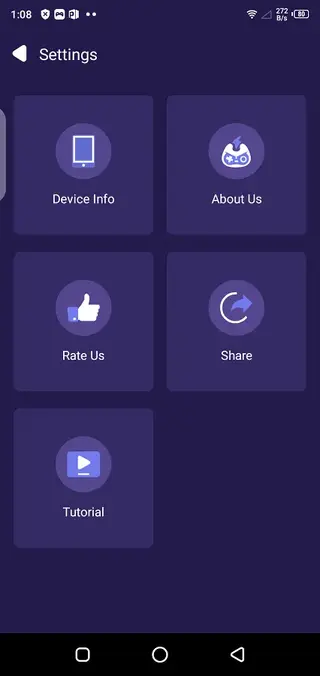
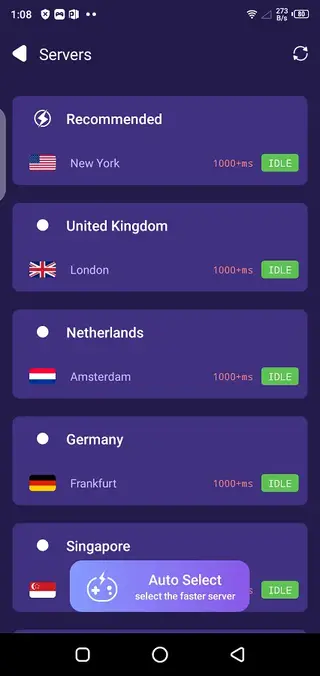
Deep Clean and RAM Optimization
The deep clean function is at the core of Jack Game Booster. When you trigger a boost, the app identifies non-essential background tasks that consume RAM and CPU cycles. It then closes these processes to free resources for your current game.
This approach is particularly helpful on devices with limited memory, where even a few heavy social or streaming apps left running can cause frame drops and stutters during gameplay.
Improving FPS and Visual Stability
Jack Game Booster focuses on improving frame stability rather than simply pushing graphics beyond what your device can handle. By reducing background load and cleaning system clutter, it helps your device maintain more consistent FPS in supported games.
While it cannot upgrade your hardware, it can help you get closer to the best possible performance for your current device by minimizing unnecessary tasks and resource conflicts.
Handling Ping and Online Game Issues
For online multiplayer titles, network stability often matters as much as raw performance. Jack Game Booster includes a VPN component that lets you choose different server locations to attempt a more stable path to game servers.
This setup may help reduce ping or limit sudden spikes for some players, especially when their default route is congested. Results will still depend on your local connection quality and distance to the targeted servers.
Tips for Getting Better Results
To make the most of Jack Game Booster, combine its tools with a few simple habits:
Run a deep clean before launching heavy games, especially if you have many apps open.
Keep your device storage from filling completely, as very low free space can slow performance.
Test different VPN locations if you experience unstable ping in a particular game.
Disable unnecessary auto-start apps in your system settings where possible.
Used together, these steps can help Jack Game Booster deliver more noticeable improvements on supported devices.
FAQs
Pros
- Deep cleaning quickly frees RAM and closes unnecessary background apps
- Built-in VPN offers alternative routes that can help stabilize game ping
- Simple interface makes it easy for non-technical users to optimize games
- Lightweight app size is suitable for low and mid-range devices
- Free to download and use with core features available out of the box
Cons
- Results can vary depending on device hardware and game optimization
- VPN performance and server quality may not be consistent across all regions
- Does not replace the need for good internet and sufficient device specs
- Aggressive cleaning may close apps you want to keep running in the background
Conclusion
Jack Game Booster is a focused Android tool for players who want quicker, cleaner performance before launching their favorite games. By combining RAM cleanup, cache removal, game management, and optional VPN routing, it offers a practical way to reduce lag and stabilize gameplay. Download the APK from our website to try its features on your own device and see how it fits your gaming routine.




Comments
No approved comments yet.