

Keylimba
Keylimba is a simple virtual kalimba app that lets you play relaxing melodies directly on your Android phone or tablet. It recreates the feel of a thumb piano with clear tones and responsive keys.
With customizable layouts, tuning control, and built-in recording, you can practice, experiment with songs, and save your ideas anytime. You can download the official Keylimba APK directly from our website and start playing within minutes.
Whether you are completely new to instruments or already play the real kalimba, this app offers an accessible way to learn notes, try different sounds, and enjoy calm, melodic music on the go.
Rate this app
App details
- App name
- Keylimba
- Category
- Music & Audio
- Version
- v7.5
- Size
- 25.11 MB
- Requirements
- 4.4 and Up
- Package name
- com.dvdfu.keylimba
- Publisher
- dvdfu
- Price
- Free
- Mod
- No
- Downloads
- 1,000,000
- Rating
- 4.9 / 5
- Rating count
- 100,000
- Play Store
- Yes
- Requires root
- No
- Offline support
- Yes
- Contains ads
- No
- In-app purchases
- Yes
- Updated
- May 19, 2026
- Age rating
- Rated for 3+
Table of contents
What is Keylimba App
Keylimba is a music and audio application that turns your Android device into a virtual kalimba, also known as a thumb piano. The app shows a set of tines (keys) on the screen that you tap to produce soft, bell-like notes.
The core focus of Keylimba is simplicity. You get an instrument-style interface instead of a complex digital audio workstation. You can adjust how many tines appear, change the key and tuning, and personalize the appearance so it feels comfortable to play.
The app is suitable for beginners who want to learn basic melodies and scales, as well as for more experienced players who want a portable kalimba practice tool. Because it runs on your phone, you can explore ideas, warm up, or relax with gentle patterns wherever you are.
So, today we are here with different Apps like MP3 Quack and Spotiflyer, through which you can get some of the best collections of instruments on your Android device. There are various types of instruments available for the users, which you can play with this Music App.
Why Download Keylimba APK from Our Site
Downloading the Keylimba APK from our website gives you direct access to the official Android build without extra steps. You can get the current version, install it quickly, and start playing the virtual kalimba right away.
Our page provides key details such as version information, Android requirements, and feature highlights in one place. If you do not want to depend only on app store availability or updates, keeping the APK from our site lets you reinstall it whenever you need.
For users who enjoy calm, melodic instruments and want an easy way to practice or experiment with tunes on mobile, getting the APK directly from here is a practical and straightforward option.
How Keylimba is Useful for Music Lovers
Keylimba is useful because it lowers the barrier to playing a real-world instrument. You do not need to buy a physical kalimba or carry it around. Instead, you can learn finger patterns, intervals, and melodies on your screen.
The tuning controls help you understand how scales and keys work. You can retune the instrument and immediately hear how each change affects the sound. This makes the app a simple ear-training and music theory companion.
The built-in recording feature lets you capture ideas while you experiment. You can listen back to your patterns, refine them, and gradually build complete pieces. For relaxation, study breaks, or creative moments, Keylimba offers a quiet and focused music experience.
How to Download and Install Keylimba APK
You can download the official Keylimba APK directly from our website and install it on your Android device in a few simple steps.
Scroll to the download section on this page and tap the Keylimba APK download button.
Wait for your browser to finish downloading the APK file to your device.
Open your phone’s file manager or the download notification and tap the Keylimba APK file.
If prompted, allow installation from this source in your Android security settings.
Tap Install and wait until the process completes, then tap Open to launch Keylimba.
After installation, you can find Keylimba in your app drawer, open it, and start playing the virtual kalimba without any extra setup.
Features
Virtual kalimba instrument
Play a digital thumb piano on your Android device with clear, soft tones and responsive on-screen tines.
Configurable number of tines
Adjust how many tines appear so you can choose simpler or more advanced layouts for practice or performance.
Custom tuning options
Change the key and tuning of individual tines to explore different scales, chords, and musical moods.
Recording function
Record your playing inside the app so you can save melodies, review ideas, and listen back later.
Sound and volume control
Fine-tune overall output levels and other sound-related options for comfortable listening on speakers or headphones.
Visual customization
Personalize the look of the instrument interface with different visual styles to match your preference.
Beginner-friendly design
Simple controls and a clean layout make it easy for complete beginners to start playing within minutes.
Lightweight and responsive
The app focuses on smooth performance so notes trigger quickly as you tap, helping timing and accuracy.
Screenshots
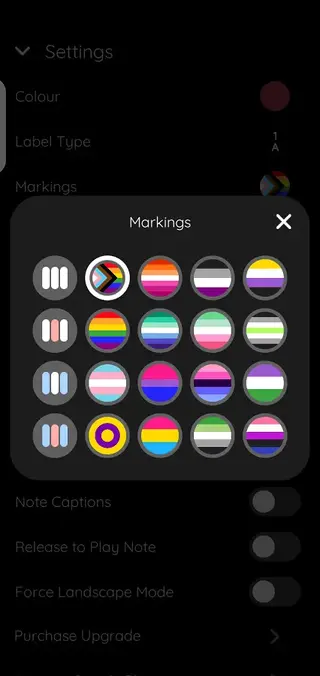
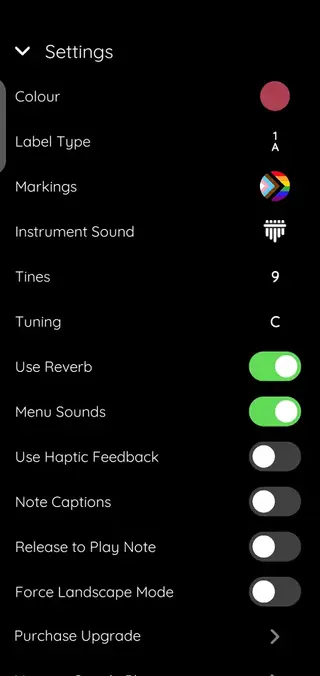
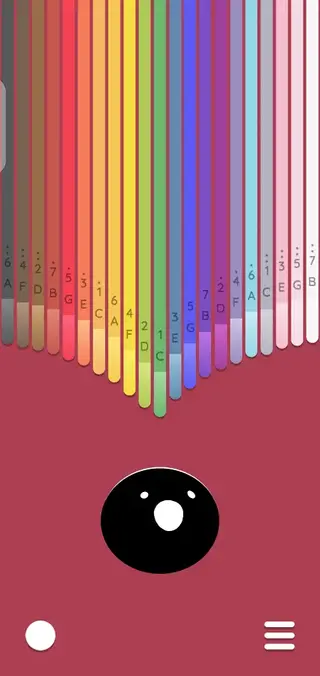
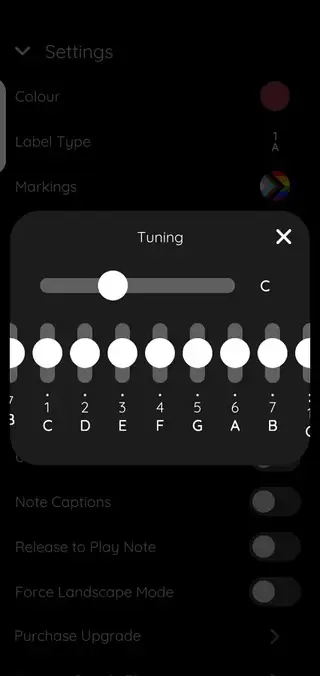
Kalimba Layout and Playing Experience
When you open Keylimba, you see a row of tines arranged like a real kalimba. Tapping each tine triggers a clear, sustained note. Because the layout is consistent, you can build muscle memory for songs and patterns over time.
You can increase or decrease the number of tines to match your skill level. Fewer tines keep things simple for beginners, while more tines give experienced players access to wider note ranges and more complex harmonies.
Tuning, Keys, and Musical Exploration
One of the strongest aspects of Keylimba is control over tuning. You can change the root key and adjust individual tines, which lets you explore different scales such as major, minor, or modal patterns.
By listening closely as you retune, you can train your ear to recognize intervals and chords. This makes Keylimba a compact tool for basic music theory practice, songwriting sketches, and creative experimentation.
Recording and Creative Workflow
The recording feature in Keylimba supports a simple creative workflow. You can tap once to start recording, play your idea, and tap again to stop. Recordings are saved inside the app so you can replay them later.
This is useful when you discover a melody by accident and do not want to forget it. Over time, you can build a small library of patterns and progressions that you can refine, combine, or transfer to other instruments.
FAQs
Pros
- Simple, focused virtual kalimba for quick practice and relaxation
- Configurable number of tines allows both basic and advanced layouts
- Custom tuning options support learning keys and scales
- Built-in recording helps capture and review musical ideas
- Beginner-friendly interface that is easy to understand
Cons
- Limited to kalimba-style instruments compared with full music workstations
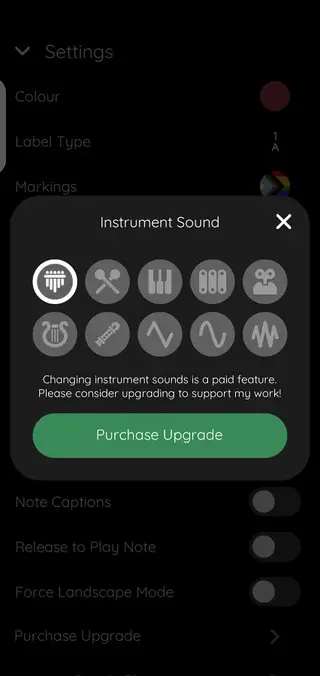
- Some visual or sound customization options may require in-app purchases
- Not a full substitute for the feel and resonance of a real acoustic kalimba
Conclusion
Keylimba offers a clean, distraction-free way to explore kalimba music on Android. By downloading the APK directly from our website, you can install the official app, customize the instrument to your style, and record gentle melodies whenever you want a calm, creative break.




Comments
No approved comments yet.