

Mausam
Mausam is a dedicated India-focused weather app that helps you track changing conditions with clear, location-based forecasts. It brings together key weather details in one simple interface.
With hourly, daily and short-range updates, Mausam makes it easier to plan travel, agriculture work, and daily routines around rain, heat, humidity and wind.
You can download the official Mausam APK directly from our website and install it on your Android phone or tablet in a few quick steps.
Rate this app
App details
- App name
- Mausam
- Category
- Weather
- Version
- v40.22
- Size
- 19.14 MB
- Requirements
- 4.1 and Above
- Package name
- com.ndsoftwares.mausam
- Publisher
- Naresh Dhakecha
- Price
- Free
- Mod
- No
- Downloads
- 66,754
- Rating
- 5.0 / 5
- Rating count
- 3,920
- Play Store
- Yes
- Requires root
- No
- Offline support
- No
- Contains ads
- No
- In-app purchases
- No
- Updated
- May 19, 2026
- Age rating
- Rated for 3+
Table of contents
What is Mausam App for Android
Mausam is a weather forecast application for Android that provides detailed updates for locations across India. After you choose or search your city, the app displays a structured forecast that includes temperature, wind speed and direction, humidity, and sunrise and sunset times.
The app focuses on giving Indian users clearer insight into monsoon patterns, heat waves and other local weather events. Information refreshes frequently, so you can follow changing conditions during the day.
Mausam supports multiple languages such as English and Hindi, and it requests access to your device location to deliver more accurate, area-specific forecasts.
Mousam App is available in multiple languages like English, and Hindi. You can easily select a suitable language for yourself. The application asks for some permission like access to your device’s location. So, this mobile application provides a seamless forecast like AniCloud.
Why Download Mausam APK from Our Website
Downloading the Mausam APK from our website lets you get the official installation file directly to your Android device. You can keep a backup of the APK, share it with other devices, and reinstall it whenever needed without visiting any other source.
Once installed, Mausam helps you monitor important parameters like rainfall chances, cloud cover and wind changes before you head out, travel to another city, or schedule outdoor work. This is especially helpful during the monsoon season and extreme weather events.
Our website provides the latest available version details, so you can quickly check the version name, Android requirements and file information before you start the download.
How Mausam App Helps You In Daily Life
Mausam is useful for anyone who needs reliable, India-centric weather information on a regular basis. Farmers can watch rainfall, humidity and cloud movement to better plan irrigation and field work. City users can check short-term forecasts before commuting or arranging outdoor activities.
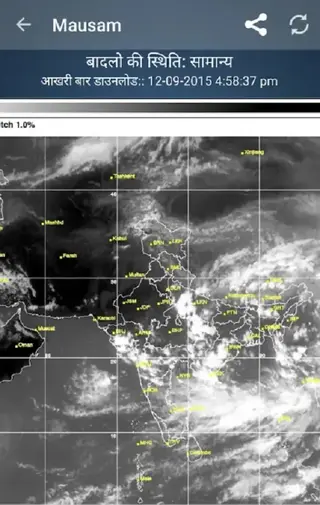
The app’s forecast maps give a visual overview of clouds, rainfall zones and storm-prone areas, which can support better preparation during heavy rain or flood-prone periods. District-wise views make it easier to follow conditions in your hometown as well as locations where friends and family live.
Because the interface is simple and available in regional languages, people with different levels of technical experience can still quickly understand the latest conditions and plan accordingly.
How to Download and Install Mausam APK
You can download the official Mausam APK file directly from our website and install it manually on your Android phone or tablet. Follow these steps to complete the process smoothly.
Steps to download Mausam APK from our website:
Scroll to the download section on this page.
Tap the available Mausam APK download button.
Wait a few moments while the APK file is prepared and the download begins.
Confirm the download in your browser if it asks for permission.
Steps to install the APK on Android:
Open your phone’s Settings and go to Security or Apps & notifications, then allow installation from unknown or this browser source if required.
Open your file manager and locate the downloaded Mausam APK file.
Tap the APK file to launch the installation wizard.
Select Install and wait until the process finishes.
Tap Open to start Mausam or Done to exit the installer.
After installation, grant the location permission if prompted so the app can provide accurate forecasts for your current area.
Features
Location-based detailed forecast
Enter or select your location to view temperature, wind speed and direction, humidity and sunrise or sunset times in one place.
Hourly and short-range updates
Forecast information refreshes regularly, helping you follow changes in temperature, cloud cover and rain through the day.
Weather maps and cloud cover
View cloud conditions over your area using visual maps that make it easier to understand current and upcoming weather.
Rainfall probability maps
Check maps that show the likelihood and impact of rainfall so you can plan travel and outdoor activities more safely.
Satellite and storm overview
Use satellite-style map layers to see broader storm and heavy-rain patterns around your region.
District-wise forecast view
Browse forecasts by district to monitor weather in multiple locations across India at a glance.
Multi-language interface
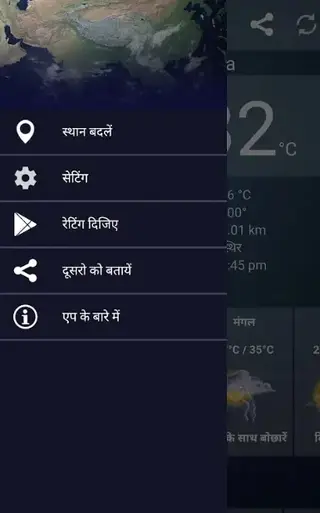
Switch between languages such as English and Hindi for easier use by different users in the same household.
Simple, user-friendly design
Clean layout and straightforward menus help new users quickly find forecasts and maps without confusion.
Screenshots
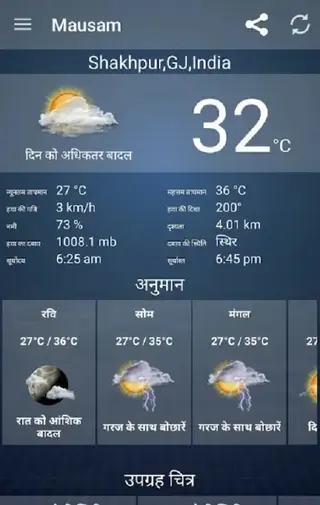
Weather Maps And Visual Forecast Layers
One of the most helpful parts of Mausam is its map-based view of the atmosphere. Instead of reading only numbers and text, you can switch to cloud and rainfall layers that show where weather systems are moving. This makes it easier to see if rain is approaching your city or if nearby districts are already affected.
During monsoon or storm seasons, these maps can support personal safety decisions and travel planning. Users can quickly compare conditions between their home area, workplace and frequently visited locations.
Language Support And Usability
Mausam keeps the interface straightforward with clear labels and an uncluttered layout. Support for languages such as English and Hindi helps more users read the data comfortably, including those who do not prefer English-only apps.
Large icons, readable fonts and simple navigation make the app suitable for a wide range of age groups, from students checking daily temperatures to older users monitoring rainfall.
Permissions And Privacy Considerations
To deliver local forecasts, Mausam may request access to your device location. Allowing this permission lets the app automatically detect your area, but you can also search for locations manually if you prefer.
As with any weather app, you can review permissions in your device settings at any time and adjust access according to your comfort level.
FAQs
Pros
- India-focused weather information with local details
- Detailed view of temperature, wind, humidity and sun times
- Forecast maps for clouds, rainfall and storms
- District-wise coverage for multiple locations
- Simple interface with language options like English and Hindi
- APK can be downloaded directly from our website for manual install
Cons
- Requires active internet for latest data and maps
- Some areas may not have very granular hyperlocal data
- Manual APK installation requires changing installation settings
Conclusion
Mausam is a practical weather app tailored to Indian conditions, offering clear forecasts, maps and district-wise views. Download the APK from our website to install it on your Android device and track changing weather more confidently.




Comments
No approved comments yet.