
Mcpro24fps
Mcpro24fps turns your Android device into a professional video camera with full manual controls, log profiles, and flexible frame rate options for serious creators.
With detailed control over focus, exposure, bitrate, color, and aspect ratio, the app helps you shoot cinematic video directly from your phone. It is built for filmmakers, YouTubers, and mobile videographers who want more than a basic camera app.
You can download the official Mcpro24fps APK latest version directly from our website and start recording high-quality footage with advanced tools tuned for manual shooting.
Rate this app
App details
- App name
- Mcpro24fps
- Category
- Photography
- Version
- v043dd
- Size
- 7.3 MB
- Requirements
- 7.0 and Up
- Package name
- lv.mcprotector.mcpro24fps
- Publisher
- Chantal Pro SIA
- Price
- Free
- Mod
- No
- Downloads
- 48,007
- Rating
- 4.6 / 5
- Rating count
- 22,000
- Play Store
- Yes
- Requires root
- No
- Offline support
- Yes
- Contains ads
- No
- In-app purchases
- Yes
- Updated
- Jun 5, 2026
- Age rating
- Rated for 3+
Table of contents
What is Mcpro24fps Android App
Mcpro24fps is a professional video camera application for Android developed by Chantal Pro SIA. It gives you deep manual access to your phone’s camera, including exposure, focus, frame rate, resolution, bitrate, color profiles, and more. Instead of relying on automatic modes, you can tune every important setting to match your shooting style.
The app focuses on filmmaking features such as 24 fps cinema-style recording, custom FPS ranges, log and gamut controls, aspect ratio tools, and on-screen analyzers. This makes it suitable for short films, vlogs, social media content, mobile cinematography, and any project where you need predictable, repeatable results from your camera.
Mcpro24fps works on supported Android devices running Android 7.0 or later. Once installed, you can use it like a dedicated video camera interface, switching between front and rear cameras, saving presets, and monitoring exposure and focus directly on screen.
Why Download Mcpro24fps APK from Our Website
Downloading the Mcpro24fps APK from our website lets you get the official file quickly and install it on compatible Android phones and tablets without waiting for staged rollouts. You can keep a backup installer, test it on multiple devices, or use it on phones where Play Store access is limited.
Our download section provides the current Android APK version listed on this page, so you can install or reinstall Mcpro24fps whenever you need. Once installed, you gain a pro-grade video camera interface with manual exposure, focus tools, log profiles, and flexible resolution and frame rate settings.
If you want more creative control than your stock camera app offers, downloading the Mcpro24fps APK directly from our website is a practical way to start shooting with advanced manual controls on Android.
How Mcpro24fps is Useful for Creators
Mcpro24fps is useful because it gives you the type of control normally found on dedicated video cameras. You can lock exposure, adjust shutter-related parameters, fine-tune white balance, and choose custom frame rates for cinematic motion or slow motion.
The built-in analyzer helps you see how light and color behave in your frame, while log and gamut tools give you more latitude for color grading in post-production. Combined with manual focus controls and separate settings for front and rear cameras, it becomes a flexible tool for many shooting situations.
For content creators who edit footage later, the app’s adjustable bitrate, aspect ratio, and de-squeeze options simplify preparing clips for YouTube, social media, and professional editing software. This combination of control and flexibility is what makes Mcpro24fps stand out among Android camera apps.
How to Download and Install Mcpro24fps APK
You can download the official Mcpro24fps APK directly from our website and install it on your Android device in a few simple steps.
Scroll to the download section on this page.
Tap the APK download button for Mcpro24fps.
Wait until the APK file finishes downloading to your device.
Open your device settings and enable installation from unknown sources if it is not already enabled.
Locate the downloaded APK file in your downloads folder and tap it.
Follow the on-screen prompts to complete the installation.
Launch Mcpro24fps from your app drawer and configure your preferred camera settings.
After installation, you can return to our website anytime to download the APK again if you need to update or reinstall the app.
Features
Full manual camera controls
Adjust exposure, focus, white balance, bitrate, and more instead of relying only on automatic modes.
Cinematic frame rates
Record at film-style 24 fps and use other frame rates up to around 60 fps depending on device support.
Log and gamut profiles
Use LOG and GAMUT-style controls to capture flatter footage with more flexibility for later color grading.
Built-in analyzer tools
View on-screen analyzers and visual aids to better judge exposure, color, and image balance while recording.
Advanced focus options
Use continuous autofocus, tap-to-focus, and manual focus adjustments for precise control over sharpness.
Resolution and aspect ratio control
Select different resolutions and aspect ratios and apply video cropping and de-squeeze for anamorphic lenses.
Audio configuration
Adjust audio source, sample rate, and bitrate to match your recording environment and workflow needs.
Front and rear camera profiles
Use separate settings for front and back cameras so each lens can be tuned for its typical use.
Screenshots
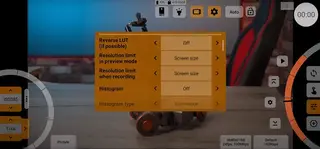
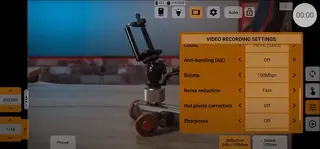
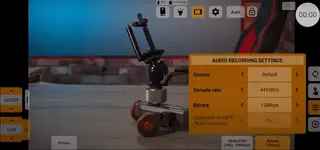
Manual Focus and Exposure Control
One of the key strengths of Mcpro24fps is the level of control it gives you over focus and exposure. Instead of relying only on auto mode, you can lock exposure, adjust parameters like ISO-related behavior and shutter-style timing where supported, and fine-tune white balance. Manual focus sliders and tap-to-focus options let you choose exactly what should be sharp in the frame.
This type of control is particularly useful for narrative scenes, interviews, and product shots where a shifting autofocus would be distracting. By locking and adjusting settings yourself, you can create consistent, repeatable looks across multiple takes.
Log Profiles, Gamut, and Color Workflow
Mcpro24fps offers log-style and gamut controls that help you capture a flatter, more flexible image for color grading. With these tools, highlights and shadows can be preserved better than with standard contrasty profiles. You can then bring the footage into editing software and apply LUTs or custom grades to achieve your preferred style.
This workflow is popular among filmmakers who want a cinematic look or need to match footage from different cameras. The ability to tune gamma, contrast, and related parameters inside the app supports a more professional post-production pipeline.
Device Compatibility and Performance
Mcpro24fps runs on Android 7.0 and above, but the exact feature set and performance depend on your device’s camera hardware and chipset. Higher-end phones generally offer more stable high-resolution recording, higher bitrates, and more frame rate options.
If you notice limitations or missing options, they are often due to hardware or vendor restrictions rather than the app itself. It is a good idea to test different resolutions and frame rates on your device to find the most stable combination for longer shoots.
Best Practices for Shooting with Mcpro24fps
To get the most out of Mcpro24fps, start by creating a few presets for different scenarios, such as indoor interviews, outdoor daylight, and low-light scenes. Lock exposure and white balance once the scene is lit, then set focus manually if possible.
Use the built-in analyzer tools to check exposure and contrast, and consider recording in a log-style profile if you plan to color grade later. Monitoring storage space and temperature is also important when recording at high bitrates or resolutions, especially on longer takes.
FAQs
Pros
- Deep manual control over camera settings for serious video work
- Supports cinematic frame rates and flexible resolution options
- Log and gamut tools give more room for color grading in post
- Built-in analyzer and overlays make exposure and composition easier to judge
- Separate settings for front and rear cameras improve flexibility
- Designed specifically for filmmakers and advanced mobile creators
Cons
- Interface and settings can feel complex for beginners
- Performance and features depend heavily on device hardware support
- Some advanced options may require experimentation to use correctly
- Paid features and in-app purchases may be required for full functionality
Conclusion
Mcpro24fps is a powerful Android video camera app for users who need more than a default camera can offer. With manual controls, log profiles, and flexible frame rates, it is well suited to filmmakers and advanced mobile creators. You can download the official Mcpro24fps APK directly from our website and start experimenting with pro-style video on your phone.




Comments
No approved comments yet.