
My City Election Day
My City Election Day is a kid-friendly role‑play game that turns the election process into an interactive story. Children explore how candidates campaign, how people vote, and what a mayor does after winning.
The Android version lets kids control characters, design campaigns, and manage city projects through simple touch controls. Everything runs offline, so young players can enjoy open‑ended play anywhere.
You can download the latest My City Election Day APK directly from our website and start the full election day adventure on your Android phone or tablet.
Rate this app
App details
- App name
- My City Election Day
- Category
- Role Playing
- Version
- v7.03.01
- Size
- 168.54 MB
- Requirements
- 8.0 and Above
- Package name
- mycity.mayorsoffice
- Publisher
- My Town Games Ltd
- Price
- Free
- Mod
- No
- Downloads
- 132,003
- Rating
- 4.7 / 5
- Rating count
- 70,432
- Play Store
- Yes
- Requires root
- No
- Offline support
- Yes
- Contains ads
- No
- In-app purchases
- Yes
- Updated
- May 9, 2026
- Age rating
- Rated for 3+
Table of contents
What is My City Election Day App
My City Election Day is an educational simulation game for children created by My Town Games Ltd, the studio behind the My Town and My City series. The game focuses on election day in a colorful city, where kids can explore every stage of choosing a mayor.
Players pick candidates, run campaigns, decorate the city with posters and flags, and finally take part in the voting process. After the results, the winning character becomes mayor and starts working on new projects for the community.
The gameplay uses simple tap and drag controls, cartoon visuals, and a sandbox structure that lets kids create their own stories. It helps children understand leadership, responsibility, and decision making without pressure or complex mechanics.
There are tons of more amazing activities, through which you can easily enjoy playing this 2D Game and get tons of amazing knowledge. The controls of the game are also provided smoother for the players, through which they can easily control all the work.
The app is designed primarily for younger children and families, with no ads in the premium game and a safe environment. On our website you can download the current Android APK version and install it directly on compatible devices.
Why Download My City Election Day for Android
My City Election Day gives kids a playful way to see how elections work. Instead of only watching adults talk about politics, children can experiment with campaign ideas, see how votes are counted, and discover what happens when someone becomes mayor.
The game encourages creativity and curiosity. Kids can try different candidates, customize logos and flags, and test new ideas for city projects. Each play session can lead to a different story, so the experience stays fresh over time.
Parents who look for screen time that combines fun and learning will find this game useful. It works offline, has intuitive controls, and fits well into the wider My City and My Town game universe that many families already know.
How My City Election Day Helps Kids
My City Election Day focuses on soft skills and basic civic understanding rather than scores and competition. Kids see that leadership involves choices, teamwork, and listening to others.
Basic civic education: Children follow the full path from campaigns to voting and decision making at city hall.
Critical thinking: Players compare candidates, explore consequences of their choices, and learn that different decisions lead to different outcomes.
Social and emotional skills: Role‑play sequences show cooperation, empathy, and responsibility towards other citizens.
Fine motor practice: Tap and drag controls help younger kids practice coordination in a gentle way.
Because the app runs offline, parents can use it as a guided learning activity, discussing what is happening in the game and connecting it to real‑world events.
How to Download and Install My City Election Day APK
You can get the My City Election Day APK file directly from our website. Follow these steps to download and install it on your Android device:
Scroll to the download section on this page.
Tap the available download button for the My City Election Day APK file.
Wait until the APK download finishes on your phone or tablet.
Open your device settings and enable installation from unknown sources if prompted.
Locate the downloaded APK file in your Downloads folder or notification bar.
Tap the file and follow the on‑screen instructions to complete installation.
Once installed, launch My City Election Day from your app drawer and start playing offline.
Whenever a new version is released, you can return to our website and download the updated APK using the same simple steps.
Features
Interactive election storyline
Children follow the full election process, including campaigns, voting, and the mayor taking office.
Multiple playable characters
Kids can choose from different characters to run for mayor and interact with them throughout the city.
Campaign customization
Players design campaigns using logos, flags, and decorations to support their chosen candidate.
Voting and results sequence
The game includes a voting stage where ballots are cast and a winner is announced as the new mayor.
City projects and decisions
As mayor, kids help decide which projects to start, seeing how choices affect the city and its citizens.
2D kid-friendly graphics
Bright, cartoon‑style visuals create a safe and appealing environment for younger players.
Simple touch controls
Tap and drag mechanics make the game easy to handle for children without reading-heavy menus.
Multitouch support
Multiple touch inputs allow more than one child to interact on the same screen in supported scenes.
Screenshots
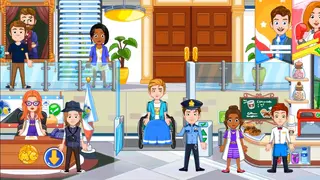
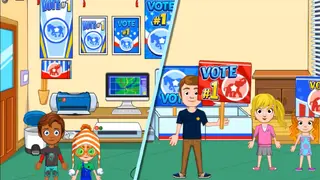
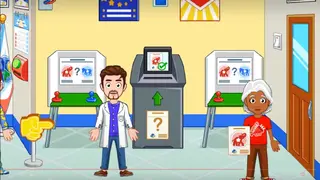
Gameplay Overview
My City Election Day follows the familiar open‑ended style of the My City series. Instead of strict levels, children explore different locations, interact with objects, and move characters freely to build their own stories.
The game centers on three main phases. First, kids prepare for the election by creating campaign materials and talking with citizens. Second, they go through the voting day, visiting polling stations and taking part in the ballot process. Third, after results are announced, the new mayor starts planning projects like improving public spaces or helping local residents.
There are no time limits or high‑pressure tasks, so children can repeat scenes, change candidates, and experiment with new ideas as often as they like.
Visual Style and Interface
The visual design of My City Election Day mirrors the rest of the My Town and My City catalog. Characters are expressive, environments are bright, and important objects are easy to spot.
The interface uses large icons and clear touch zones, so kids can move characters, open doors, pick up items, and interact with voting machines with simple taps. Text is kept minimal and the game focuses more on visual cues, which helps younger players who are still learning to read.
Parents Guide and Tips
Parents can join the experience by asking questions while children play. For example, you can talk about what makes a good leader, why people vote, and how decisions at city hall affect everyday life.
It can also help to set short play sessions, focusing on one phase at a time: first learning about campaigns, then trying the voting process, and later exploring the responsibilities of the mayor. This turns the game into a series of small, understandable lessons rather than one long session.
Because the game works offline, it is well suited for travel, waiting rooms, or times when you want an educational activity without an internet connection.
FAQs
Pros
- Educational focus on elections and civic concepts
- Colorful, kid-friendly graphics and characters
- Offline gameplay without an internet connection
- Simple controls suitable for younger children
- Multitouch support for collaborative play on one device
- Part of a larger My City and My Town game universe
Cons
- Paid premium game on official stores despite being simple
- Educational depth may feel limited for older kids
- Requires enough storage space for installation
- No online multiplayer or community features
Conclusion
My City Election Day is a gentle, educational role‑play game that helps kids explore how elections work through hands‑on play. You can download the latest Android APK directly from our website and let children experience the full election journey on your device.




Comments
No approved comments yet.