
My City London
My City London is a kids-friendly pretend play game that lets you explore a cartoon version of London with a virtual family, interactive locations, and simple puzzles. Children can wander around famous landmarks, discover new items, and create their own stories.
The game focuses on open-ended role play and light educational content, so kids can learn about city life while having fun. You can install the official My City London APK directly from our website and start your London adventure on compatible Android phones and tablets.
With touch-based controls, colorful graphics, and no disruptive third‑party ads, it offers a safe and relaxed environment where children can play at their own pace, discover hidden surprises, and enjoy short activities in each scene.
If you want to go to a world, where you can have all animals as friends, then you should try Animal Crossing Pocket Camp or My Town World. In this simulation game, you will be the best buddy of animals and enjoy your life. There are more amazing games and hacks available on our Website.
Rate this app
App details
- App name
- My City London
- Category
- Simulation
- Version
- v7.03.01
- Size
- 145.36 MB
- Requirements
- 4.4 and Above
- Package name
- mycity.london
- Publisher
- My Town Games Ltd
- Price
- Free
- Mod
- No
- Downloads
- 100,963
- Rating
- 4.8 / 5
- Rating count
- 48,819
- Play Store
- Yes
- Requires root
- No
- Offline support
- Yes
- Contains ads
- No
- In-app purchases
- Yes
- Updated
- May 30, 2026
- Age rating
- Rated for 3+
Table of contents
What is My City London App
My City London is a premium pretend play and educational game for Android created by My Town Games Ltd. It is part of the popular My City and My Town series, designed for children who enjoy open-ended role playing instead of competitive gameplay.
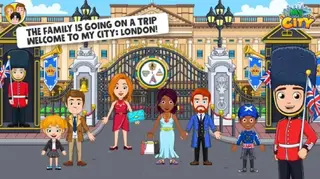
In this title, kids explore a stylized version of London, often called the Big Smoke, together with a virtual family. They can visit well-known spots such as Buckingham Palace, Trafalgar Square, the Tower of London, London Bridge, Oxford Street, and several local shops, restaurants, and boutiques.
The gameplay does not follow strict levels or timers. Instead, children drag and drop characters, change outfits, tap objects to see how they react, and uncover hidden items in each room. The app encourages curiosity, storytelling, and basic problem-solving while keeping controls simple for younger players.
My City London is a one-time purchase on Google Play, and the APK available on our website corresponds to the official Android release listed under the package name mycity.london.
Why Download My City London APK from Our Website
Downloading the My City London APK from our website lets you install the game directly on your Android device without needing to search through multiple pages. The current version information, package name, and file details match the official release, so you know exactly what you are getting before you install.
Once installed, your kids can immediately start exploring London with no registration or online account required. The app works primarily offline, which makes it suitable for trips, flights, and situations where internet access is limited or you prefer to keep children offline while they play.
Because everything is stored locally, loading screens are short, and children can jump between locations like the palace, shopping street, and city square in just a few taps. Our download page keeps the process straightforward so parents can focus on setting up a safe play experience.
How My City London Is Useful for Kids
My City London mixes entertainment with light educational value. By walking through a digital version of London, kids get a gentle introduction to famous landmarks, public squares, and city routines. They learn basic concepts like sightseeing, shopping, eating out, and using public spaces, all within a friendly cartoon world.
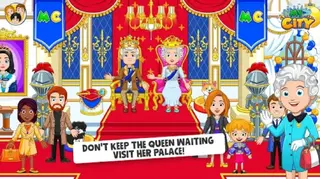
The open-ended format also supports creativity. Children can invent their own stories about meeting the Queen, visiting guards at the palace, feeding pigeons at the square, or choosing outfits in a fashion store. This type of free play can help with language development as kids describe what is happening in the game.
Because there is no score system or complex controls, younger players can experiment without pressure. Parents and older siblings can join the fun by asking questions, suggesting new story ideas, or using the game as a starting point to talk about real London and its culture.
How to Download and Install My City London APK
You can download the official My City London APK file directly from our website and install it on any compatible Android device. Make sure you have enough storage space and a device running Android 4.4 or higher.
Follow these steps to get started:
Scroll to the download section on this page and tap the My City London APK download button.
Wait for the APK file with package name mycity.london to finish downloading to your device.
Open your device settings and, if needed, temporarily allow installation from unknown sources for your browser or file manager.
Locate the downloaded APK in your notifications or downloads folder and tap it to start the installation.
Confirm the prompts on screen and wait until the installation completes.
Launch My City London from your app drawer and adjust audio or other in-game settings before handing it to your child.
After installation you can play without staying online. When a newer version becomes available, visit our page again and download the updated APK to install over the existing game.
Features
Interactive London city map
Explore multiple connected locations inspired by real London landmarks, including palaces, bridges, squares, and shopping streets.
Open-ended pretend play
Create your own stories with no time limits, no scores, and no strict missions, ideal for younger kids and relaxed play sessions.
Famous landmarks for kids
Visit simplified versions of Buckingham Palace, Trafalgar Square, the Tower of London, London Bridge, and other iconic spots.
Virtual family characters
Control a full family and additional characters, move them between scenes, and let them interact with objects in each location.
Mini-games and simple puzzles
Solve small tasks, find hidden items, and enjoy short mini-games that reward curiosity and observation skills.
Closets and fashion store
Change outfits, try on new clothes, and customize how your characters look using wardrobes and fashion shops.
Offline-friendly gameplay
Play without a constant internet connection after installation, making it suitable for travel and on-the-go use.
Child-focused design
Colorful graphics, large touch targets, and intuitive drag-and-drop controls help younger children play independently.
Screenshots
Gameplay Overview
My City London follows the familiar structure of the My City and My Town series. There is no fixed beginning or end. Instead, players start in one location and can move characters through doors, streets, and transport points to reach new places. Each area contains interactive props, food items, outfits, and small secrets.
Children can, for example, wake up the family at home, dress everyone, travel into the city, visit the palace, stop by a café or restaurant, and end the day shopping for souvenirs. Because everything is driven by tapping and dragging, kids can quickly understand how to interact with the environment.
Locations and Landmarks
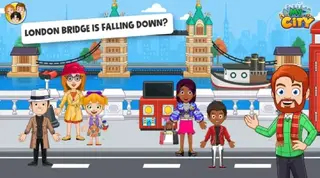
The app focuses on recognizable London-style locations presented in a friendly, cartoon form. Players can visit Buckingham Palace and meet royal guards, spend time in a bustling square feeding pigeons, explore the Tower of London-inspired area, and cross a bridge reminiscent of London Bridge.
There are also everyday city spots like fashion stores, restaurants, boutiques, and other shops. Each scene includes multiple rooms and small areas, encouraging kids to tap around and see what opens, moves, or triggers a short animation.
Tips for Parents
Parents can use My City London as both a toy and a conversation starter. Sit with your child for the first few sessions and talk about what each place represents. You can connect events in the game with real-world topics, such as what a palace is, why guards wear uniforms, or what people usually do at a big city square.
It can also help to set simple goals, like finding a hidden item in each location or creating a story about a family trip from home to the city center and back. This approach keeps children engaged while supporting imagination and basic planning skills.
Device Compatibility and Requirements
My City London runs on Android devices that meet the minimum requirement of Android 4.4 or higher. Because the game includes multiple locations and detailed scenes, it is better suited to phones and tablets with enough free storage and a stable performance profile.
For the best experience, close background apps before playing and keep some free space on your device. If you notice slowdowns, lowering other system loads or restarting your device can help the game run more smoothly.
FAQs
Pros
- Kid-friendly pretend play focused on creativity instead of competition
- Includes multiple London-inspired locations and famous landmarks
- Works mainly offline after installation, ideal for travel and limited data
- Simple touch controls suitable for young children
- No disruptive third-party advertisements during gameplay
Cons
- Paid title on Google Play despite being a relatively small game
- Content depth may feel limited for older children or long-term play
- File size can be noticeable on devices with low storage
- Requires manual APK updates when installing from a website
Conclusion
My City London is a gentle, story-driven pretend play game that brings a kid-friendly version of London to Android devices. If you want an offline, interactive city to explore with your child, you can download the official My City London APK from our website and start playing within minutes.




Comments
No approved comments yet.