

My Mini Mart
My Mini Mart is a fast-paced 2D management game where you grow a small grocery stand into a bustling supermarket chain. You run between shelves, harvest produce, restock items and serve a constant flow of customers.
The Android version offers simple tap-and-drag controls, short levels and light strategy, which makes it easy to pick up on phones and tablets. You can download the official My Mini Mart APK directly from our website and start building your own store in minutes.
As you progress, you unlock new products, hire workers, automate parts of your mart and expand into new areas. The mix of idle-style progression and active play keeps the game relaxing but still challenging enough to stay engaging.
We have more similar games, which you can also play and have fun with. So, if you want to get more exciting games on your Android device, then get Rainy Attic Room and Downhill Smash. Both of these are quite amazing available Android games.
Rate this app
App details
- App name
- My Mini Mart
- Category
- Action
- Version
- v1.88.2
- Size
- 292.3 MB
- Requirements
- 5.0 and Up
- Package name
- com.KisekiGames.smart
- Publisher
- Supersonic Studios LTD
- Price
- Free
- Mod
- No
- Downloads
- 130,000
- Rating
- 4.6 / 5
- Rating count
- 32,000
- Play Store
- Yes
- Requires root
- No
- Offline support
- Yes
- Contains ads
- Yes
- In-app purchases
- Yes
- Updated
- Jun 1, 2026
- Age rating
- Rated for 3+
Table of contents
What is My Mini Mart Android game
My Mini Mart is an action management and idle-style simulation game for Android created by Supersonic Studios LTD. In this game you control a character who runs every part of a small grocery store, from growing organic vegetables to placing items on shelves and checking out customers.
The gameplay starts with a tiny shop and only a few products. You run back and forth to harvest crops, refill displays and serve each visitor. As you make money, you unlock new stands, more shelves and additional product lines, turning your modest shop into a full mini mart chain.
The game uses simple 2D graphics and one-finger controls, so you can play comfortably on both phones and tablets. Short sessions, clear visual feedback and progressive upgrades make it suitable for casual players who want something light but still satisfying.
Why download My Mini Mart APK from our website
Downloading the My Mini Mart APK directly from our website lets you get the latest available Android version quickly without searching around. You can save the installer file, share it between your own devices and reinstall it whenever you need.
Once installed, you can jump straight into running your virtual shop, unlocking stands, adding new products and hiring helpers. The game is free to play, so you can explore the main progression and try different strategies without any upfront cost.
If you already play on another device, the APK option is also useful when you want to set the game up on additional phones or tablets in your household using the same version.
How My Mini Mart is fun and useful for players
My Mini Mart might look simple, but it helps players practice planning and time management in a playful way. You constantly decide what to prioritize first: harvesting crops, filling shelves, serving customers or unlocking a new stand.
The loop of earning money, upgrading the store and seeing instant visual changes makes progress feel rewarding. Because the controls are easy, children and adults can enjoy the same game, taking turns or comparing how they grow their shops.
The game is also well suited for short breaks. You can complete a few tasks in just a couple of minutes, then return later to continue expanding your mini mart empire.
How to download and install My Mini Mart APK
You can get the official My Mini Mart APK file directly from our website and install it manually on your Android phone or tablet. Follow these steps to complete the process smoothly.
Scroll to the download section on this page and tap the My Mini Mart APK download button.
Wait for the APK file to finish downloading to your Android device.
On your phone, open the Downloads folder or your browser download list and tap the APK file.
If prompted, allow installation from this source in your Android security settings.
Confirm the installation and wait until My Mini Mart is successfully installed.
Find the game icon in your app drawer and launch it to start building your mini mart.
Features
Simple one-touch controls
Move, harvest and restock using easy tap-and-drag gestures that work well on phones and tablets.
2D casual graphics
Colorful 2D visuals make it clear where products, customers and stands are at a glance.
Store management gameplay
Run the full mini mart by growing produce, stocking shelves and serving every customer personally.
Business expansion system
Unlock new stands, add more product types and gradually turn a small stall into a busy supermarket chain.
Organic farming elements
Grow vegetables and other organic items that you harvest and sell directly in your mart.
Hire and upgrade workers
Recruit helpers to restock shelves and manage different areas so you are not doing all the work yourself.
Progressive upgrades
Invest earnings into faster movement, more capacity and better equipment to serve more customers in less time.
Offline-friendly play
Core gameplay can be enjoyed without a constant internet connection, ideal for commuting or travel.
Screenshots
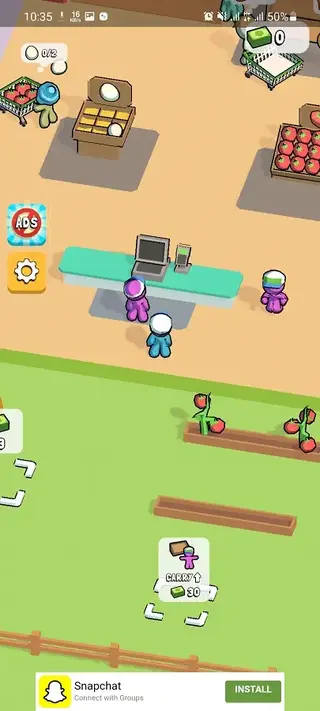
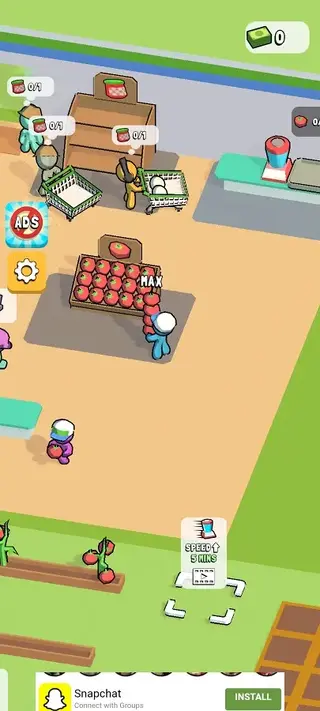
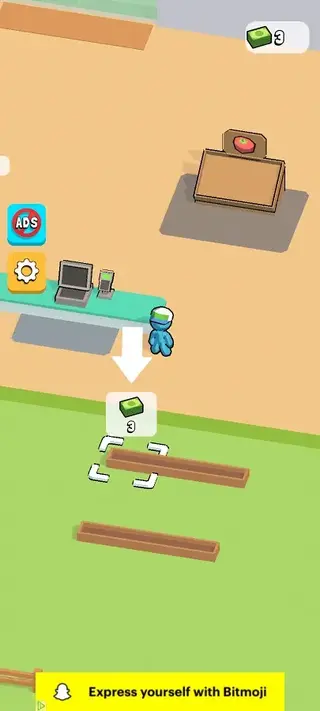
Gameplay overview and core loop
When you start My Mini Mart, you control a single character who does everything in the store. You harvest products from small plots, carry them to shelves and then run to the checkout to serve waiting customers. Each satisfied customer pays you, which increases your in-game balance.
You then reinvest this money to unlock new areas. That can mean an extra crop field, a new shelf for a different product, or a new counter to serve more people at once. Over time you can also hire workers who automatically harvest or restock, while you focus on higher-priority tasks and expansions.
Upgrades, workers and progression
Progress in My Mini Mart depends on how you spend your earnings. Movement speed upgrades help you cross the store faster, while capacity upgrades let you carry more items in a single trip. Both improvements reduce the time you spend running back and forth.
Hiring workers is another key step. Assistants can continuously harvest crops, refill stands or manage distant parts of the store. As you advance, you unlock new locations and store layouts, keeping the experience fresh while still using the same simple controls.
Tips for new players
If you are new to My Mini Mart, start by focusing on upgrades that save time, such as movement speed and carrying capacity. This lets you serve more customers quickly and earn money faster.
Next, unlock a few core products that sell regularly instead of spreading your money across too many stands at once. Once income feels stable, start hiring workers so you can spend more time on expansion rather than constant restocking.
FAQs
Pros
- Easy one-touch controls suitable for all ages
- Engaging mix of action, management and light idle mechanics
- Rewarding progression with many upgrades and store expansions
- Colorful 2D graphics that run on a wide range of Android devices
- Playable in short sessions and mostly offline
Cons
- Contains ads that can interrupt gameplay at times
- Includes optional in-app purchases to speed up progress
- Repetitive tasks may feel grindy during longer sessions
- No built-in multiplayer or co-op mode
Conclusion
My Mini Mart offers a light but addictive shop-management experience on Android, combining simple controls, steady upgrades and short sessions. If you enjoy casual business and supermarket simulators, you can download the official My Mini Mart APK from our website and start growing your own mini mart chain right away.




Comments
No approved comments yet.