

Napsternetv
Napsternetv is an advanced VPN tunneling client that lets you import and use custom configuration files to protect your traffic and bypass internet restrictions on Android. It is designed for users who need flexible, protocol-rich connectivity rather than a simple one-tap VPN.
With support for multiple tunneling protocols, Napsternetv helps you mask your real IP address, encrypt your connection, and reach content that may be blocked by networks or local providers. You stay in control by loading your own open or private servers.
You can download the latest official Napsternetv APK directly from our website and install it on compatible Android phones and tablets without any complicated steps.
Rate this app
App details
- App name
- Napsternetv
- Category
- Tools
- Version
- v123.1
- Size
- 69.17 MB
- Requirements
- 4.4 and Above
- Package name
- com.napsternetlabs.napsternetv
- Publisher
- NapsternetLabs
- Price
- Free
- Mod
- No
- Downloads
- 107,725
- Rating
- 4.7 / 5
- Rating count
- 49,220
- Play Store
- Yes
- Requires root
- No
- Offline support
- No
- Contains ads
- Yes
- In-app purchases
- No
- Updated
- May 22, 2026
- Age rating
- Rated for 12+
Table of contents
What is Napsternetv?
Napsternetv is an Android tunneling and VPN client that works with various encrypted protocols and configuration files instead of relying on built-in servers. It allows you to import custom configs and connect to different types of servers around the world to encrypt your traffic and route it through secure tunnels.
Unlike basic VPN apps that only offer a fixed list of locations, Napsternetv focuses on flexibility and protocol support. You can load your own servers or shared configuration files to change your apparent IP address and location, and to make it harder for networks to inspect or block your traffic.
The app supports several modern tunneling technologies and can be used to improve privacy, overcome network censorship, and stabilize connectivity on restrictive or throttled networks when paired with suitable servers.
So, we are here with Napsternetv App for you, which provides you a platform to add any VPN. You know there are different tools available in the market such as Argo VPN and Shoora VPN. But we are here with the best of all time for you.
Why download Napsternetv APK from our website
Downloading Napsternetv APK directly from our website gives you quick access to the latest available Android build without waiting for staged rollouts. You can save the installer, share it across your devices, and reinstall it whenever needed.
The APK on our website keeps the original package name and functionality, so you get the same core experience as the official release. Once installed, you can import your own configuration files, connect to supported protocols, and adjust settings according to your network conditions.
Having the standalone APK file is especially helpful for users whose devices cannot access the Play Store reliably or who prefer manual installation and backup of important apps.
How Napsternetv is useful for Android users
Napsternetv is useful for users who need more than a one-click VPN. It gives you the tools to connect through different tunneling methods, which can help against deep packet inspection, local firewalls, or aggressive throttling on certain networks.
By importing compatible configuration files, you can route your traffic through private or public servers that you trust. This can make it harder for third parties on the same network to monitor what you are doing online and can help you reach services or websites that might otherwise be blocked in your region.
The app interface focuses on clarity, with profile lists, connection logs, and protocol options that make it easier for intermediate and advanced users to understand what is happening in the background while staying in control of their connectivity.
How to download and install Napsternetv APK
You can get the Napsternetv APK directly from our website and install it on your Android device in a few simple steps. Make sure your device meets the minimum Android version requirement before starting.
Follow these steps to download and install:
Scroll to the download section on this page.
Tap the Napsternetv APK download button to start downloading the file from our server.
Wait until the APK finishes downloading to your device.
Open your phone settings and enable installation from unknown sources if it is not already allowed.
Locate the downloaded APK in your downloads folder and tap it.
Confirm the installation prompts and wait for the process to complete.
Launch Napsternetv from your app drawer and start importing your configuration files.
After installation, you can update the app later by downloading the newer APK from our website and installing it over the existing version.
Features
Multiple tunneling protocols
Supports various protocols such as VMess, VLess, Shadowsocks, Socks and Trojan, giving advanced users flexibility to choose how to tunnel their traffic.
Custom configuration import
Lets you import configuration files from storage or links so you can use open-source projects or private servers instead of relying on fixed built-in locations.
VPN-style traffic routing
Can route your device traffic through the configured tunnels to help hide your real IP address and make your connection harder to track or filter.
Censorship circumvention focus
Designed to help users work around network censorship and blocks when combined with suitable servers and configs, especially on restrictive networks.
Protocol extensions and Psiphon support
Includes support for Psiphon-related protocols and custom extensions that aim to improve connectivity on heavily filtered networks.
Fronted and meek-style transports
Offers options for fronted and meek-style transports, which can disguise traffic patterns and make it more difficult for simple blocking techniques to detect tunnels.
User-friendly interface
Provides a clean layout with profiles, logs and quick-connect controls so users can manage multiple configs without feeling overwhelmed.
Profile-based connection management
Allows saving different server and protocol setups as separate profiles so you can quickly switch between them according to network conditions.
Screenshots
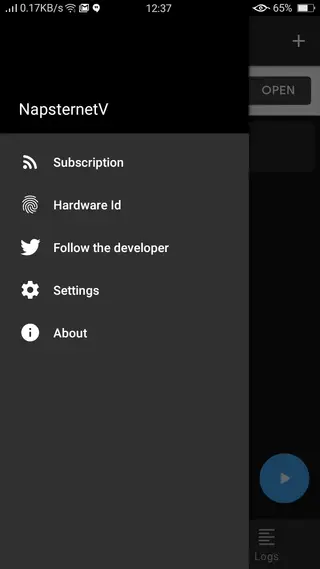
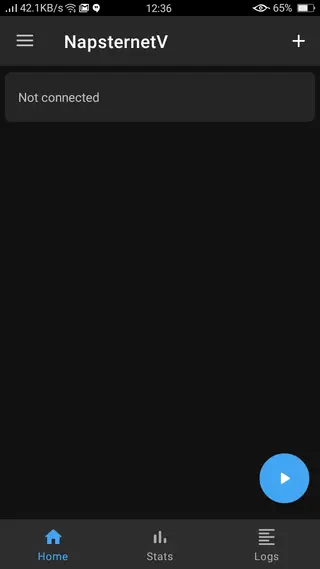
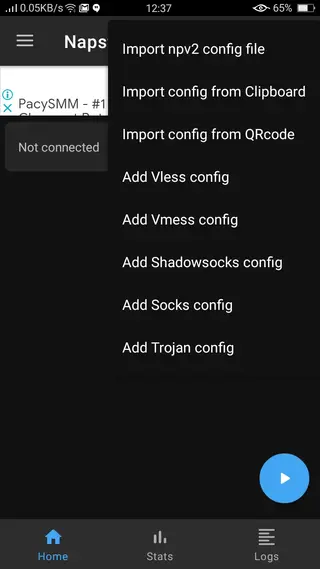
Getting started with Napsternetv configurations
After installing Napsternetv, the most important step is adding at least one working configuration. These configs define which server you connect to, which protocol is used, and how your traffic is tunneled. Many users create their own setups or obtain configs from communities and administrators who manage private servers.
You can usually import configs from a file stored on your device or by using import links, depending on the format provided. Once imported, the profile appears in the app, and you can tap it to connect, check logs, or adjust basic options if they are exposed by the configuration.
Privacy, security and responsible use
Napsternetv can contribute to better privacy by encrypting your traffic and separating it from the local network environment, but no tool can guarantee complete anonymity. The actual level of protection depends on the protocols used, how the server is configured, and the policies of whoever operates that server.
Use the app responsibly and follow the laws and terms of service that apply in your region. Avoid using tunnels for harmful or illegal activities and carefully consider which servers and configuration sources you trust before routing your traffic through them.
Compatibility and performance tips
Napsternetv is designed for Android devices that meet the minimum version requirement and have stable network access. For the best performance, test different protocols and servers, as some combinations work better on mobile data while others are more stable on Wi-Fi.
If you experience slow speeds or frequent disconnections, try switching to another configuration, changing protocols where possible, or reconnecting on a different network. Keeping your device updated and closing unnecessary background apps can also help maintain a smoother tunneling experience.
FAQs
Pros
- Supports multiple advanced tunneling and VPN protocols
- Allows importing custom configuration files and private servers
- Can help bypass local network censorship and access restricted content
- Profile-based design makes it easier to manage different setups
- Interface is relatively simple for a feature-rich tunneling client
- Available as a direct APK download for manual installation
Cons
- Requires some technical knowledge to configure correctly
- No built-in servers for beginners who expect one-tap VPN use
- Performance and stability depend heavily on the quality of external configs and servers
- May not work reliably on all networks or with all blocked services
Conclusion
Napsternetv is a powerful tunneling client for Android users who want control over how their traffic is routed and protected. When used with suitable configuration files and servers, it can help improve privacy and reach restricted content, while our website provides an easy way to download and install the latest APK version.




Comments
No approved comments yet.