
NS Tool
NS Tool is an Android utility for Garena Free Fire players who want to unlock character skins, weapon skins, emotes and other cosmetic items without direct top-ups. It focuses on cosmetic customization rather than changing the core gameplay.
With this tool you can swap selected free items with premium-looking outfits, gun skins, gloo wall designs and emote packs. The app aims to give non-spending players more visual variety, but it still carries the usual risks of using third-party tools with online games.
You can download the latest NS Tool APK version directly from our website and install it on any compatible Android phone or tablet running Android 5.0 or higher.
Rate this app
App details
- App name
- NS Tool
- Category
- Tools
- Version
- v4.9
- Size
- 57.04 MB
- Requirements
- 5.0 and Above
- Package name
- com.my.namitsutar
- Publisher
- NAMITSUTAR
- Price
- Free
- Mod
- No
- Downloads
- 394,566
- Rating
- 4.4 / 5
- Rating count
- 3,942
- Play Store
- No
- Requires root
- No
- Offline support
- No
- Contains ads
- No
- In-app purchases
- No
- Updated
- May 12, 2026
- Age rating
- Rated for 3+
Table of contents
What is NS Tool APK
NS Tool is a third-party Android app created for Garena Free Fire users who want more cosmetic options without buying every item individually. It works like an injector and item exchanger for selected game skins and emotes.
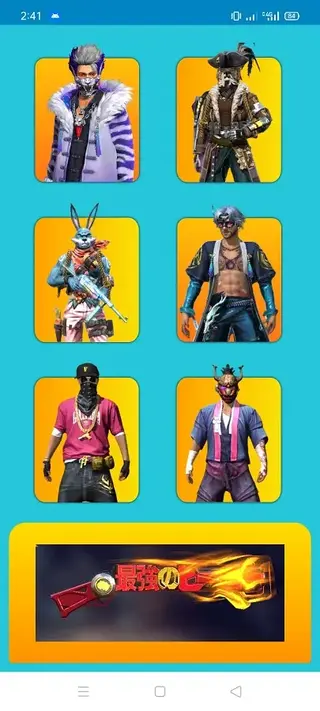
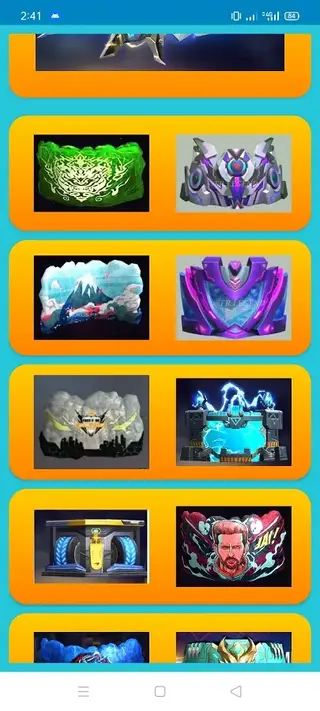
The app focuses on visual assets such as character outfits, weapon skins, gloo wall skins and emotes. Instead of providing a wide range of cheats, NS Tool mainly targets appearance changes so players can refresh the look of their characters and gear.
Inside the tool, you usually browse organized lists of available skins and packs, select what you like and then apply or inject those choices into the game data. Many options work through an exchange logic, where a basic or free item is replaced visually with a premium-style variant.
Because it interacts with an online game in ways that are not officially supported, using NS Tool can violate Free Fire’s terms of service. Players should clearly understand these risks before trying any external injector app.
Why download NS Tool for Android
Players download NS Tool mainly to expand their cosmetic collection in Free Fire without constant top-ups. It provides a quick way to test different looks and combinations that might otherwise be locked behind paid crates or bundles.
The app combines several types of customization in one place, including outfits, guns, emotes and gloo walls. That makes it attractive for users who like to change their style often or want their character to stand out in the lobby and during matches.
Another reason is convenience. Instead of waiting for specific events or limited-time bundles, you can open NS Tool, browse curated items and apply them directly. This saves time for players who focus more on visual customization than grinding for cosmetics.
How NS Tool can be useful
NS Tool can be useful for Free Fire players who value cosmetic variety and want to experiment with different visual setups. It lets you test how certain outfits or weapon skins look in matches before deciding if they are worth pursuing in the official game.
By collecting multiple character costumes, weapon designs and emotes in one interface, the app helps you build a consistent style or theme for your account. For example, you can match character outfits with weapon skins and gloo walls to create a signature look.
However, its usefulness comes with clear limitations. As a third-party modifying tool, it may break game rules and can lead to penalties such as account warnings or bans. For that reason, many users who still decide to try apps like this often prefer using secondary or dummy accounts instead of their main profile.
If you want to get some hacks to improve your gameplay, then try Hack FF OB29 and MGA V12. These are modified versions of the FF, which provide multiple tools to improve the gameplay of users. So, don’t forget to try these.
How to download and install NS Tool APK
You can download the official NS Tool APK file directly from our website and install it manually on your Android device. Make sure your phone runs Android 5.0 or higher before starting.
Follow these steps to get started:
Scroll to the download section on this page and tap the NS Tool APK download button.
Wait until the APK file finishes downloading to your device.
Open your phone’s settings and enable app installation from unknown sources if it is disabled.
Locate the downloaded APK in your downloads folder and tap it to start installation.
Confirm the on-screen prompts and wait until the installation completes.
Launch NS Tool, grant the requested permissions, and then open Free Fire to check the available cosmetic options.
After installation, review your in-game account carefully and remember that using any external injector tool can put your account at risk, so proceed with caution.
Features
Focused on Free Fire cosmetics
The app targets Garena Free Fire and concentrates on visual items like skins and emotes rather than broad hacks or gameplay cheats.
Character outfit exchange
Users can swap basic character outfits with premium-style costumes using an exchange system that replaces free looks with more attractive ones.
Weapon skin options
The tool offers a collection of popular weapon skins so players can change the appearance of guns and make loadouts look more advanced.
Emote collection access
It provides access to selected premium emotes through an exchange process, helping players showcase unique dance moves and expressions in the lobby and in-game.
Gloo wall skin choices
Multiple gloo wall skins are available so defensive walls can match the player’s overall style instead of using default designs.
Bundle and pack support
Some full packs combine outfits, emotes and other cosmetics, letting users apply matched sets in just a few steps.
Simple interface
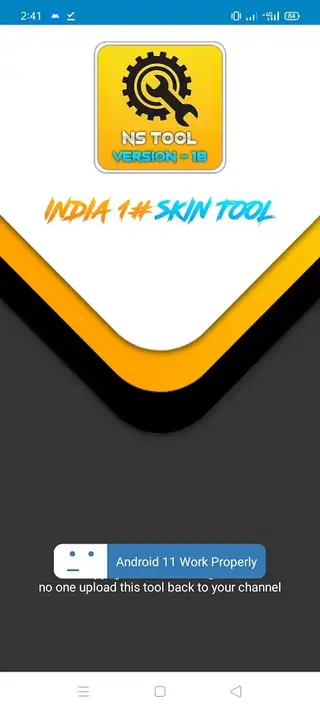
The user interface is straightforward, with categories and item lists that are easy to navigate even for first-time users.
Fast injection workflow
Once an item is selected, the injection or exchange process is typically quick, reducing waiting time between selections and in-game testing.
Screenshots
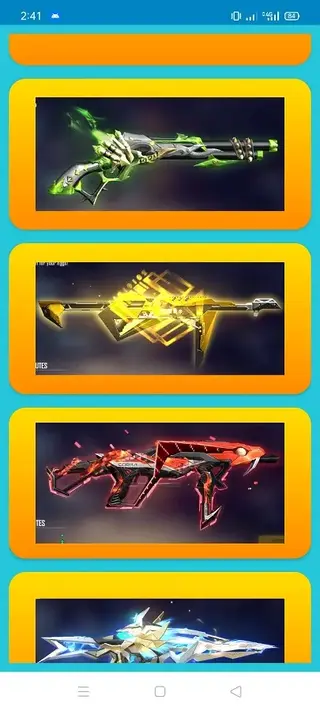

Safety and account risk considerations
Any tool that modifies or injects content into an online game sits outside the official ecosystem. NS Tool interacts with Free Fire in ways that are not supported by Garena, so there is always a chance that anti-cheat systems detect unusual behavior.
Players should understand that no injector or hack can be considered completely safe from detection over time. Developers of online games regularly update security systems, and methods that work today may become risky after an update. If you still proceed, using a secondary account can reduce the personal impact of a possible suspension.
Compatibility and requirements
NS Tool is designed for Android devices running Android 5.0 and above. It works alongside the standard Free Fire client rather than replacing it. For the smoothest experience, it is better to have enough free storage, stable internet connectivity and up-to-date game files.
Because the app is not distributed through the Google Play Store, you need to enable installation from unknown sources on your device. After installation, you can disable that option again if you wish to keep a tighter security posture on your phone.
Tips for using NS Tool responsibly
If you decide to experiment with NS Tool, consider a few basic precautions. Use a dummy or secondary Free Fire account for testing so that your main profile and purchased items are not at immediate risk. Avoid combining multiple cheat tools at the same time, as this can further increase detection chances and create instability.
Regularly check for newer versions of both Free Fire and NS Tool, because outdated injector builds often stop working or behave unpredictably after big game updates. Finally, always remember that cosmetic variety is optional and that long-term account safety is usually more valuable than temporary visual upgrades.
FAQs
Pros
- Provides access to a wide range of Free Fire cosmetic items in one app
- Allows players to experiment with premium-style skins and emotes without direct top-ups
- Simple and lightweight interface that is easy to navigate
- Supports character outfits, weapon skins, gloo walls and emotes together
- Fast injection process for applying selected items quickly
Cons
- Violates Free Fire terms of service and can lead to account suspension
- Stability may vary across game updates and some skins can stop working
- Requires granting permissions and modifying game-related files
- Not available on the official Google Play Store
- Intended only for Free Fire and not useful for other games
Conclusion
NS Tool is a specialized cosmetic injector for Garena Free Fire that focuses on skins, emotes and visual bundles. It appeals to players who like extensive customization but it remains a third-party tool that can conflict with the game’s rules, so anyone considering it should clearly understand the possible account and security risks before use.




Comments
No approved comments yet.