

Nxxxa Ace Video Converter
Nxxxa Ace Video Converter is an all-in-one video and audio editor for Android. It combines cutting, merging, converting and compressing tools in a simple mobile app.
With this app you can trim clips, join multiple videos, add music, convert formats and control speed for slow-motion or reverse effects. Most tools work directly on your phone without needing a PC.
There are Android applications in the market like Video Star Pro and Adobe Premiere Pro, which are developed to edit any record. But there are different problems with them. One of the most common problems is damage quality. Usually, free apps destroy the quality of the edited clips.
You can download the official Nxxxa Ace Video Converter APK latest version directly from our website and start editing videos and audio files on your Android device in just a few minutes.
Rate this app
App details
- App name
- Nxxxa Ace Video Converter
- Category
- Tools
- Version
- v0.2.73
- Size
- 64.67 MB
- Requirements
- 5.0 and Above
- Package name
- jaineel.videoconvertor
- Publisher
- VidSoftLab
- Price
- Free
- Mod
- No
- Downloads
- 120,330
- Rating
- 4.7 / 5
- Rating count
- 56,704
- Play Store
- Yes
- Requires root
- No
- Offline support
- Yes
- Contains ads
- Yes
- In-app purchases
- Yes
- Updated
- Jun 3, 2026
- Age rating
- Rated for 7+
Table of contents
What is Nxxxa Ace Video Converter APK
Nxxxa Ace Video Converter is an Android video and audio editing application developed by VidSoftLab. It brings common desktop-level editing options to mobile, so you can quickly improve clips, change formats and prepare files for social media or personal use.
The app works as both a video editor and an audio editor. You can cut unwanted parts, merge multiple files, change playback speed, compress large clips and convert between popular video and audio formats. It is designed for everyday users who want simple tools rather than a complex professional workstation.
Nxxxa Ace follows a freemium model. The base app is free to install and includes essential tools, while premium features and an ad-free experience are available through an affordable in-app purchase. The APK available on our website matches the official package name jaineel.videoconvertor.
Why download Nxxxa Ace Video Converter for Android
Many mobile editors either reduce quality during export or lock basic tools behind expensive subscriptions. Nxxxa Ace Video Converter focuses on giving Android users a straightforward way to edit and convert clips while keeping good output quality.
If you often record on your phone and need quick fixes, this app helps you cut, merge and compress videos so they are easier to store or share. You can also adjust speed for slow-motion or reverse effects and attach custom audio tracks to your footage.
Because the APK is available directly on our website, you can download the latest version, install it manually and start editing even if the app is hard to find in other stores.
How Nxxxa Ace Video Converter is useful
Nxxxa Ace Video Converter is useful for anyone who wants to manage media files directly on an Android phone or tablet without a computer.
Content creators: Prepare short clips for YouTube, Instagram, TikTok and other platforms by trimming, merging and compressing files.
Casual users: Clean up personal recordings, remove unwanted sections and add background music to family or travel videos.
Storage managers: Reduce file size through compression or format conversion to save space on your device.
Audio-focused users: Extract, cut and convert audio tracks independently from video, or sync them back to clips.
The combination of editing, converting and compression tools in one place makes the app a practical utility for everyday media handling on Android.
How to download and install Nxxxa Ace Video Converter APK
You can download the official Nxxxa Ace Video Converter APK file directly from our website and install it manually on your Android device. Follow these steps to complete the process:
Download the APK file from the download button provided on this page. The file is hosted on our server.
On your Android phone, open Settings and allow installation from unknown or external sources for your browser or file manager.
Open your Downloads folder or file manager and tap the Nxxxa Ace Video Converter APK file.
Review the prompts on screen and tap Install to begin the installation.
Once installation finishes, open the app from your app drawer and grant the requested permissions to start editing your videos and audio files.
If you update to a newer version later, repeat the same steps and install the latest APK from our website over the existing app.
Features
Video trimming and cutting
Quickly remove unwanted sections from the beginning, middle or end of your clips to keep only the important moments.
Video merging
Combine two or more videos into a single file to create longer stories, compilations or simple highlight reels.
Slow motion and reverse playback
Adjust playback speed to create slow-motion sequences or reverse the entire clip for creative visual effects.
Audio editing tools
Cut, trim and edit audio files separately, then use them as background music or sound effects for your videos.
Video and audio conversion
Convert video and audio between multiple formats so your files work better with different players and platforms.
Compression with quality control
Compress large videos to smaller sizes while aiming to maintain acceptable visual and audio quality.
Built-in media player
Preview videos and audio files inside the app before and after editing without switching to another player.
Multi-language support
Use the app interface in different languages to match your preference and make navigation easier.
Screenshots
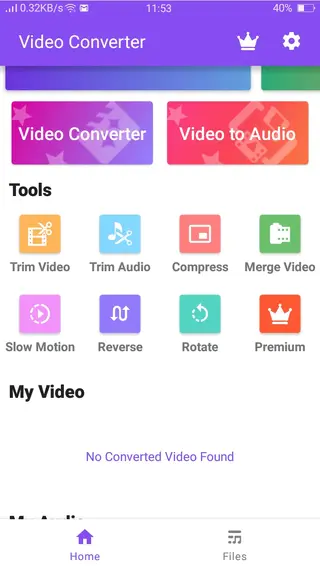
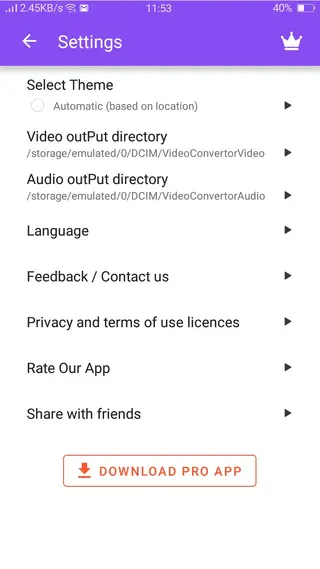
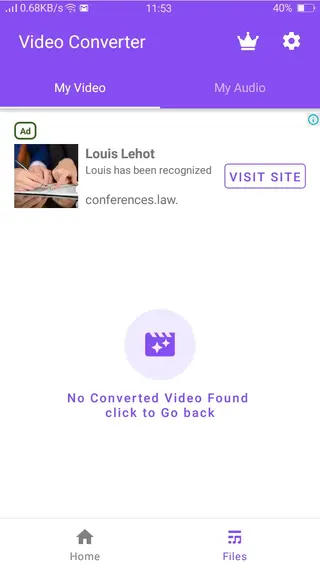
Editing tools and workflow
The workflow in Nxxxa Ace Video Converter is designed to be straightforward. After launching the app, you select a video or audio file from your device, choose the operation you want to perform and apply changes with a few taps. Most tools provide a preview so you can check the result before saving.
Typical workflows include trimming the start and end of a recording, merging a few short clips into one file, converting the final output into a more convenient format and then compressing it to reduce file size before sharing.
Device compatibility and performance
Nxxxa Ace Video Converter is built for Android 5.0 and above, which covers a wide range of phones and tablets. Performance will depend on your hardware, video resolution and file size. Higher resolution clips and longer videos take more time to convert or compress, so closing other heavy apps during processing can help.
For best results, keep your device charged during longer conversions and ensure you have enough free storage for temporary files and final exports.
FAQs
Pros
- All-in-one toolkit for video and audio editing on Android
- Simple interface that is easy for beginners to understand
- Supports trimming, merging, speed control and compression
- Includes tools for both video and standalone audio files
- Available as an APK download directly from our website
Cons
- Free version may show advertisements during use
- Some advanced tools require in-app purchase to unlock
- Compression and conversion quality depends on settings and source file
Conclusion
Nxxxa Ace Video Converter is a practical video and audio editor for Android users who want quick control over clips without using a computer. With trimming, merging, speed adjustment, compression and conversion tools in one place, it covers most everyday editing needs. Download the latest Nxxxa Ace Video Converter APK from our website to start improving and managing your media files on your phone.




Comments
No approved comments yet.