
ORG 2017
ORG 2017 is a digital piano and arranger keyboard app that turns your Android phone or tablet into a powerful music workstation. It offers realistic instrument sounds, rhythms, and recording tools in one compact studio.
Whether you are a beginner learning basic chords or an experienced player arranging full songs, ORG 2017 provides layered keyboards, chord modes, and MIDI support to help you play and create music anywhere.
You can download the official ORG 2017 APK directly from our website and install the latest version on compatible Android devices without any complicated steps.
Rate this app
App details
- App name
- ORG 2017
- Category
- Music & Audio
- Version
- v2026.05.26
- Size
- 88.69 MB
- Requirements
- 4.1 and Up
- Package name
- com.sofeh.android.musicstudio3
- Publisher
- Sofeh Sunri
- Price
- Free
- Mod
- No
- Downloads
- 90,097
- Rating
- 4.7 / 5
- Rating count
- 23,000
- Play Store
- Yes
- Requires root
- No
- Offline support
- Yes
- Contains ads
- Yes
- In-app purchases
- Yes
- Updated
- May 29, 2026
- Age rating
- Rated for 3+
Table of contents
What is ORG 2017 Android App
ORG 2017 is a free music and audio application for Android developed by Sofeh Sunrise. It simulates an arranger keyboard and digital piano on your mobile device, combining high quality instrument samples, rhythm styles, and professional control options.
The app offers a full piano keyboard with support for different key notations such as C, D, E and Do, Re, Mi, which you can switch from the settings. It also supports a double keyboard layout, so you can play two different sounds or octaves at the same time on one screen.
Beyond piano sounds, ORG 2017 includes a wide range of instruments such as strings, guitars, flutes, synths, pads, and more. You can adjust tempo, use background accompaniments, and trigger rhythms similar to popular arranger keyboards.
The app also features audio recording so you can capture your performances, practice sessions, or song ideas directly on your device. With MIDI keyboard support and flexible configuration options, ORG 2017 works as a pocket studio for hobbyists and serious musicians alike.
Why Download ORG 2017 APK from Our Website
Downloading the ORG 2017 APK from our website lets you get the current version quickly and install it on any compatible Android phone or tablet, even if the Play Store download is slow or not available on your device.
We provide the official app package using the package name com.sofeh.android.musicstudio3, so you can keep ORG 2017 on your device, reinstall it whenever needed, and share it across your Android devices.
With the APK stored locally, you can:
Install ORG 2017 on devices without Google Play services.
Update manually whenever a new version is published on our website.
Avoid repeated large downloads when you switch or reset devices.
The app itself remains free to use, with optional in-app purchases and ads controlled by the developer.
How ORG 2017 is Useful for Musicians
ORG 2017 is useful for both learning and creating music. Beginners can use it to understand note positions, chords, and rhythm patterns without buying a physical keyboard. The app’s chord support, tempo control, and accompaniment styles make practice sessions more engaging.
For intermediate and advanced players, ORG 2017 works as a portable arranger. You can layer multiple instruments, mix sounds in duet mode, and experiment with chord progressions. The recording function helps you save ideas and listen back to your performance for improvement.
Because it runs on mobile devices and supports offline use for core features, you can rehearse, compose, or just relax with music wherever you are, using only your phone or tablet and headphones or speakers.
How to Download and Install ORG 2017 APK
You can download the ORG 2017 APK file directly from our website and install it manually on your Android device. Follow these steps to get started:
Scroll to the download section on this page.
Tap the available APK download button for ORG 2017.
Confirm the download in your browser and wait for it to complete.
Open your device’s file manager and locate the downloaded APK file.
If prompted, enable installation from unknown sources in your Android security settings.
Tap the APK file and follow the on-screen instructions to complete installation.
Once installed, open ORG 2017 from your app drawer and allow any required permissions.
After installation, you can run ORG 2017 directly from your device and start playing the digital piano without needing to stay connected to our website.
Features
Digital piano and arranger keyboard
Play a full virtual piano keyboard with arranger-style accompaniments directly on your Android device.
Double keyboard layout
Use a dual keyboard view to play two different sounds or octaves at the same time on one screen.
Customizable key notation
Switch between C, D, E and Do, Re, Mi notations and adjust key system settings to match your preferences.
Wide range of instruments
Access multiple instrument sounds such as piano, flute, guitar, strings, synths, pads and more.
Rhythms and background music
Use built-in rhythms and background accompaniments to create full song performances.
Tap tempo and speed control
Control tempo precisely and adjust instrument and rhythm speed for practice or performance.
Mixed instruments and duet mode
Blend multiple instruments and use duet mode to mix different sounds together in a single performance.
Chord tools and chord memory
Practice creating chords, trigger them easily, and use chord memory features to streamline playing.
Screenshots
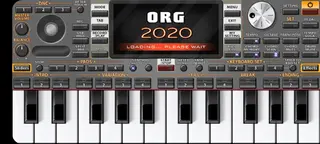
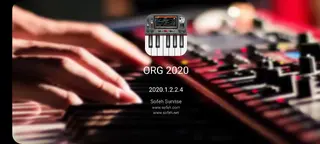
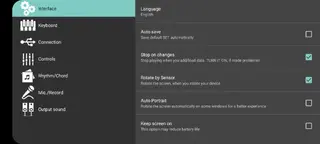
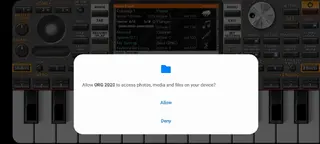
App Details and Compatibility
ORG 2017 is listed in the Music and Audio category and is designed for Android smartphones and tablets. The APK associated with package name com.sofeh.android.musicstudio3 typically supports Android 4.1 and above, so most modern devices can run it.
For the best experience, use a device with a responsive touchscreen, enough RAM for audio processing, and quality headphones or speakers. Keeping your system updated and closing background apps can help reduce latency while playing.
Tips for Better Playing Experience
To get more out of ORG 2017, start by exploring the settings menu and customizing the keyboard layout, key notation and audio preferences to suit your style. Beginners can begin with single keyboard mode and slower tempos, then gradually move towards duet mode and more complex rhythms.
Use the recording feature regularly to track your progress. Try layering different instruments and experimenting with chord progressions using chord memory. If you connect a MIDI keyboard, you can combine the feel of a physical instrument with the flexibility of the app’s sounds and rhythms.
FAQs
Pros
- Realistic digital piano and arranger experience on mobile
- Double keyboard layout for advanced playing and layering
- Large collection of instruments and rhythms for creativity
- Audio recording to capture practice and performance
- Supports offline use for most core features
- Free to download and start using with optional purchases
Cons
- Contains ads during use which can distract some users
- Advanced features may feel complex for complete beginners
- Performance can vary on low-end or older Android devices
- In-app purchases are required to unlock some premium content
Conclusion
ORG 2017 is a capable digital piano and arranger app that brings a rich keyboard experience to Android devices. If you want to practice, compose, or simply enjoy playing realistic instruments on your phone or tablet, downloading the official ORG 2017 APK from our website is a practical way to keep this versatile music tool always available. Don’t forget to come by again our Apkoll for more amazing apps.




Comments
No approved comments yet.