

Pear Live
Pear Live is a social live-streaming and video chat app where you can watch broadcasters, join real-time chats, and meet new people from different countries. It focuses on interactive shows, gifts, and one-to-one conversations.
Inside the app, you can follow your favorite hosts, send virtual gifts, join live rooms, or start your own broadcast to build an audience. Everything runs online in real time, so you always have a new stream to watch and new people to talk to.
You can download the official Pear Live APK directly from our website, install it on your Android phone, and start streaming or chatting within minutes.
Rate this app
App details
- App name
- Pear Live
- Category
- Social
- Version
- v1.5.7
- Size
- 168.94 MB
- Requirements
- 6.0 and Above
- Package name
- com.peaer.showlive
- Publisher
- Pear Live
- Price
- Free
- Mod
- No
- Downloads
- 73,498
- Rating
- 4.7 / 5
- Rating count
- 21,849
- Play Store
- Yes
- Requires root
- No
- Offline support
- No
- Contains ads
- Yes
- In-app purchases
- Yes
- Updated
- May 13, 2026
- Age rating
- Rated for 12+
Table of contents
What is Pear Live App
Pear Live is a live video broadcasting and social chat app for Android. It combines live streaming, random chat, and virtual gifting in one place, so users can spend their free time watching shows or interacting with creators.
After installing the app, you create an account or sign in using options like email or social profiles. Once you log in, you can browse different live rooms, join chats, follow broadcasters, and send gifts to support the performers you like.
The app provides separate experiences for both viewers and streamers. Viewers can relax and watch live shows, while streamers can turn on their camera, go live, and grow a fan base. Popular broadcasters often receive more gifts, which can help them increase their visibility in the app.
Pear Live focuses on a community-driven experience, where conversation, interaction, and engagement matter more than pre-recorded content. It is designed for adults who enjoy live interaction, casual conversation, and entertainment-style broadcasts.
What we are recommending for mobile users is to try installing these best alternative applications available here, which you can also use. So, if you want to get more similar apps, then try Huli Live and QQlive. Both of these are quite popular applications, which you can also access and have fun with.
Why Download Pear Live APK for Android
Downloading Pear Live APK on your Android device lets you access a large community of live broadcasters who stream at different times of the day. Instead of just scrolling through static feeds, you join real-time sessions and talk directly with people on camera.
The APK available on our website helps you install the app even when it is hard to find or not visible for some devices on official stores. Once installed, you can sign in, explore live rooms, and start streaming without waiting for regional rollouts.
If you like interactive entertainment, random chat, and discovering new creators from different countries, Pear Live offers a simple way to do all of that from a single app on your phone.
How Pear Live Is Useful for Users
Pear Live is useful for anyone who wants live interaction rather than passive scrolling. You can ask questions in chat, react to moments in real time, and get instant responses from hosts and other viewers.
For creators, the app offers a straightforward way to start streaming from a mobile phone without technical setup. Streamers can run casual talk shows, talent performances, or simple hangout sessions and gradually grow a loyal audience.
The gifting and follower systems make it easy to show appreciation to broadcasters and keep track of your favorite creators. Well-organized categories, recommendations, and search tools help you find rooms that match your interests, whether you prefer music, chatting, or casual lifestyle content.
How to Download and Install Pear Live APK
You can download the official Pear Live APK file directly from our website and install it on your Android device. Follow these steps to get started:
Scroll to the download section on this page and tap the Pear Live APK download button.
Wait for the APK file to finish downloading to your Android phone or tablet.
Open your device settings and enable installation from unknown or external sources if it is not already allowed.
Locate the downloaded APK file in your Downloads folder and tap it to start the installation.
Follow the on-screen prompts to complete the setup and grant the required permissions.
Launch Pear Live, create or sign in to your account, and start watching or hosting live streams.
Once installed, you can return to our website whenever you need to download the latest available version of Pear Live for your device.
Features
Live video streaming
Watch hosts broadcast in real time and interact with viewers through video and chat.
Real-time text and video chat
Chat with streamers and other viewers instantly or join one-to-one sessions where available.
Simple account sign-in
Register quickly with your mobile number or supported social accounts to start using the app.
Global broadcaster community
Discover creators from different regions and explore diverse cultures and languages.
Virtual gifts and rewards
Send virtual gifts to support your favorite streamers and help them gain more popularity.
Follow and notifications
Follow broadcasters you like and receive alerts when they go live again.
Category-based discovery
Browse streams by categories and sections to quickly find content that suits your mood.
Creator-friendly streaming tools
Start a live show from your phone with basic controls and simple rules for going live.
Screenshots

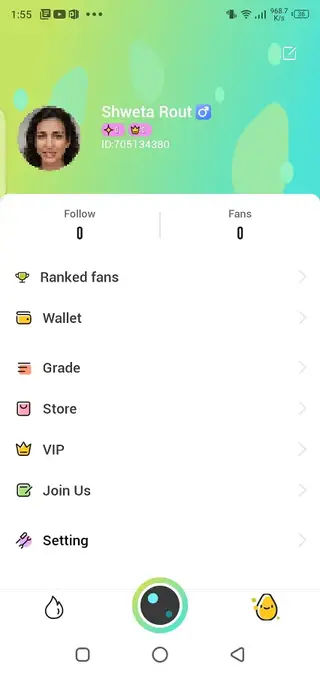
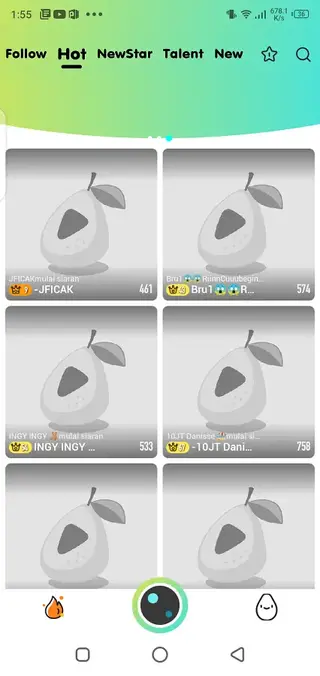
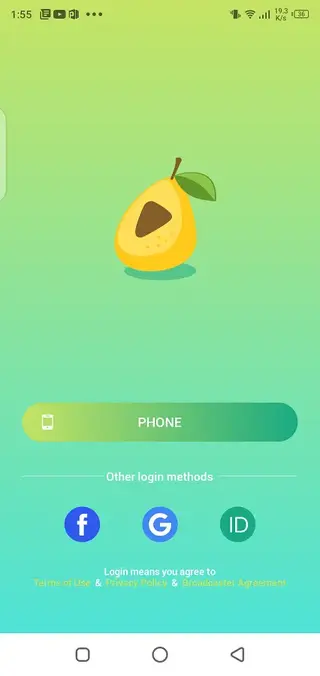
Account Creation and Sign-in Options
After installing Pear Live, you need to create an account before using any core feature. The app typically supports sign-up through phone number or common social login methods, depending on your region and the current version.
Once you complete the short registration process, you can set a profile picture, choose a nickname, and start following broadcasters. A proper profile helps other users recognize you in chat rooms and during live sessions.
Streaming and Interaction Experience
As a viewer, you can enter live rooms, type messages in chat, send reactions, and support hosts with virtual gifts. Many broadcasters respond directly to messages, which makes each show more interactive and personal.
As a streamer, you can start a live broadcast with a single tap, adjust basic settings like camera and mic, and interact with everyone who joins your room. The more consistent and engaging your broadcasts, the more followers and gifts you are likely to receive.
Safety and Content Awareness
Pear Live is designed for adults and includes live user-generated content. You should follow the app’s community guidelines, avoid sharing private information, and use built-in reporting or blocking tools if you encounter behavior that makes you uncomfortable.
Parents and guardians should be aware that live streaming platforms often are not suitable for children. It is a good idea to review the terms of use and content policies before spending long periods inside the app.
FAQs
Pros
- Easy to join and start watching live streams
- Supports both viewers and creators with separate features
- Virtual gifts and follow system create strong interaction
- Category-based layout helps discover new broadcasters quickly
- APK can be downloaded directly from our website
Cons
- Requires a stable internet connection for smooth streaming
- May include in-app purchases for gifts and premium features
- Contains live content that may not suit every user
- Uses significant data during long high-quality streams
Conclusion
Pear Live offers a straightforward way to watch live broadcasts, chat with streamers, and host your own shows from an Android device. If you enjoy real-time interaction and casual entertainment, downloading the APK from our website gives you quick access to its global live community.




Comments
No approved comments yet.