

Petal Maps
Petal Maps is Huawei’s official navigation app that brings detailed maps, real time traffic, and turn by turn guidance to Android phones and tablets. It is designed especially for Huawei and Honor devices but also works on many other Android models.
With interactive 2D and 3D views, lane level guidance, and smart route planning, the app helps you move confidently in cities and on highways worldwide. You can download the official Petal Maps APK directly from our website and start navigating in minutes.
Whether you drive, walk, or use public transport, Petal Maps offers clear directions, traffic-aware rerouting, and convenient search for nearby places like restaurants, fuel stations, and parking so you can focus on your journey instead of the map.
Rate this app
App details
- App name
- Petal Maps
- Category
- Maps & Navigation
- Version
- v4.7.0.312
- Size
- 82.11 MB
- Requirements
- 4.4 and Up
- Package name
- com.huawei.appmarket
- Publisher
- Huawei
- Price
- Free
- Mod
- No
- Downloads
- 53,000
- Rating
- 4.7 / 5
- Rating count
- 26,000
- Play Store
- Yes
- Requires root
- No
- Offline support
- No
- Contains ads
- No
- In-app purchases
- Yes
- Updated
- May 13, 2026
- Age rating
- Rated for 3+
Table of contents
What is Petal Maps APK?
Petal Maps is a maps and navigation app developed by Huawei for Android devices. It provides worldwide map coverage, GPS navigation, and smart route planning similar to other major map services, but with Huawei’s own data sources and interface.
The APK version lets you install Petal Maps manually on supported Android phones and tablets. Once installed, you can view your current location, explore nearby places, and get voice guided directions for driving, cycling, and walking. The app supports 2D and 3D map modes, interactive gestures, and a clean, modern layout.
Petal Maps integrates traffic information, lane guidance on many major roads, and handy shortcuts for common destinations like Home and Work. On compatible Huawei devices, it can also work with the system navigation bar and floating cards to show directions even when other apps are open.
Why download Petal Maps for Android?
Downloading Petal Maps APK on your Android device gives you access to Huawei’s mapping ecosystem without waiting for preinstalled updates. You can get the latest interface changes, expanded coverage, and navigation improvements as soon as new versions are released.
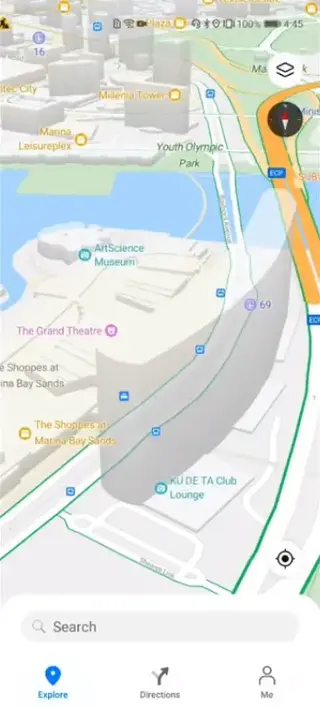
The app focuses on a smooth navigation experience with clear visuals and minimal clutter. Real time traffic, incident reports, and dynamic rerouting help you avoid congestion and reach your destination more efficiently. Detailed directions, 3D landmarks in many cities, and support for multiple languages make it practical for both local trips and international travel.
You can download the official Petal Maps APK file directly from our website, install it, sign in with your account if you wish, and immediately start using all standard features on supported Android devices.
How Petal Maps is useful in everyday travel
Petal Maps is built to support your daily commuting and occasional long trips. You can save frequent locations like home, workplace, or school and quickly start navigation with a single tap. The app calculates multiple route options based on distance, estimated time, and current traffic conditions.
The search function helps you find points of interest such as restaurants, cafes, ATMs, fuel stations, malls, and parking. Each place usually includes useful details like opening hours, ratings where available, and contact information, which makes planning much easier.
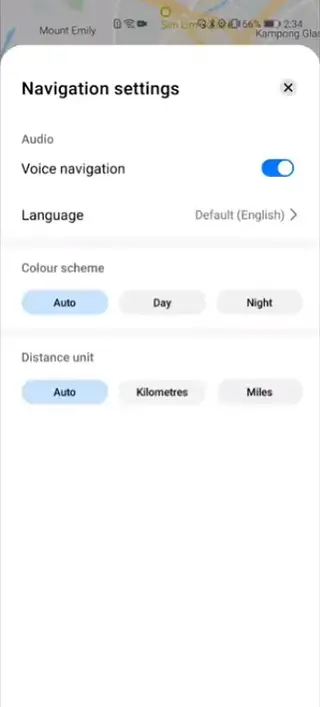
During navigation, clear voice prompts and lane level guidance on many major roads reduce confusion at complex junctions. Day and night themes, along with dark and light modes, improve visibility in different lighting conditions so you can focus on driving safely.
How to download and install Petal Maps APK
You can get the official Petal Maps APK file directly from our website and install it on your Android device. Follow these steps to start navigating with the latest available version:
Download the Petal Maps APK file from the download section on this page to your Android phone or tablet.
Open your device settings and allow installation from your browser or file manager if this is your first APK install.
Locate the downloaded APK in your Downloads folder and tap it to start the installation process.
Read the on screen permissions and confirm to install Petal Maps.
Once installed, open the app, grant location access, and set your preferred language and units.
Optionally sign in with your Huawei or other supported account to sync favorites and settings across devices.
After this one time setup, you can simply open Petal Maps from your app drawer whenever you need navigation or local place search.
Features
Worldwide maps and navigation
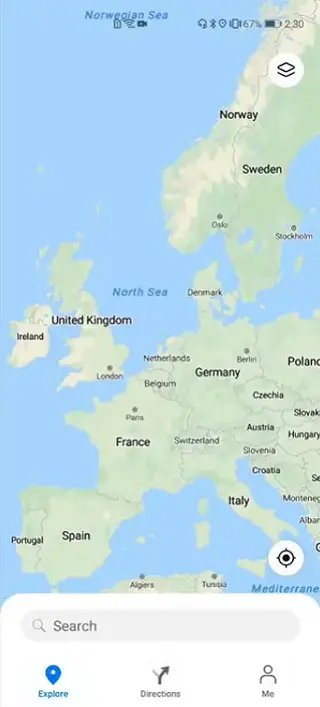
Access detailed maps for many countries and regions, with support for driving, walking, and cycling routes on compatible roads.
Turn by turn voice guidance
Follow spoken directions, distance countdowns, and timely prompts so you do not need to constantly look at the screen.
Real time traffic information
View live traffic flow, congestion levels, and some incident data to choose faster or less crowded routes where available.
Smart route planning
Compare multiple route options based on distance and estimated arrival time, and let the app reroute you when conditions change.
3D and 360 degree map views
Switch between standard 2D view and immersive 3D buildings in supported cities, with smooth rotation and tilt controls.
Saved places and favorites
Mark home, work, and favorite spots for quick access so you can start navigation in a few taps.
POI search and categories
Find restaurants, cafes, gas stations, supermarkets, hotels, and more using search or ready made category filters.
Multiple map themes
Use day and night themes or automatic switching based on time and environment for better visibility and reduced eye strain.
Screenshots
Privacy and location controls
Location data is central to any navigation app. In Petal Maps you remain in control of how your information is used. You can manage permissions in the Android system settings at any time, choosing whether the app may access your location only while in use or at all times.
You can also clear search history, manage saved places, and adjust personalization options inside the app settings to match your privacy comfort level.
Tips for better accuracy
For the best experience, enable high accuracy location mode in your Android settings and keep GPS turned on. When starting a trip, give the app a few seconds outdoors or near a window so it can lock onto satellites and calibrate.
Keeping mobile data active improves live traffic quality and helps Petal Maps recalculate routes quickly when you miss a turn or when road conditions change suddenly.
FAQs
Pros
- Official navigation app developed by Huawei
- Supports detailed maps, 3D view, and lane guidance in many areas
- Real time traffic data and dynamic rerouting where available
- Clean interface with day and night themes
- Search and categories for nearby points of interest
- Can save favorite locations like home and work for quick access
Cons
- Coverage quality and POI depth can vary by region
- Requires constant GPS and data for full functionality
- Some advanced features are optimized for Huawei devices
Conclusion
Petal Maps is a capable navigation app that combines clear maps, real time traffic, and smart route planning in a modern interface. If you use a Huawei or other compatible Android device and want an alternative or companion to other map apps, you can download the official Petal Maps APK from our website and start exploring with step by step guidance.




Comments
No approved comments yet.