

PLDT WiFi Hacker
PLDT WiFi Hacker is an Android tool that tries to generate default passwords for specific PLDT WiFi routers. It targets common factory credentials used on some routers in the Philippines.
The app scans for nearby wireless networks and attempts to create possible keys for supported PLDT SSIDs. Many people use it to test how weak default router passwords can be in real life.
Using any hacking tool on networks that you do not own or control can be illegal and unethical. Only install and use this app if you fully understand the risks and stay within the laws of your country.
Rate this app
App details
- App name
- PLDT WiFi Hacker
- Category
- Tools
- Version
- v1.0
- Size
- 48.46 MB
- Requirements
- 5.0 and Above
- Package name
- com.bloodsecurity.wifi
- Publisher
- Bloodsecurity
- Price
- Free
- Mod
- No
- Downloads
- 80,960
- Rating
- 4.6 / 5
- Rating count
- 33,691
- Play Store
- No
- Requires root
- No
- Offline support
- No
- Contains ads
- No
- In-app purchases
- No
- Updated
- Jun 2, 2026
- Age rating
- Rated for 12+
Table of contents
What is PLDT WiFi Hacker?
PLDT WiFi Hacker is a small Android application created by Bloodsecurity that focuses on PLDT-based WiFi networks. It tries to calculate or guess default keys used by certain PLDT routers, mainly by scanning the area and generating passwords for supported networks.
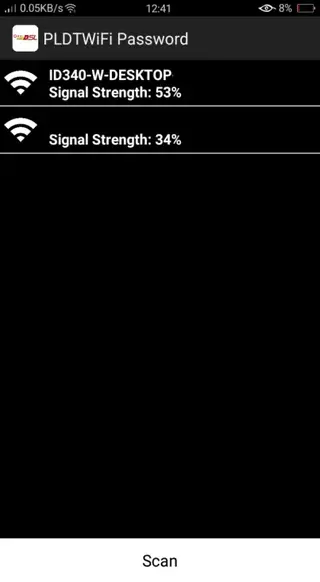
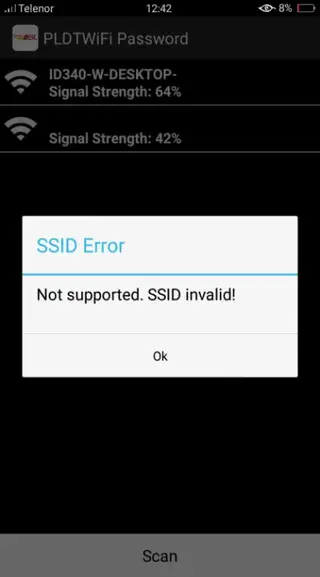
When you open the app, you see a scan button. After you tap it, the tool lists nearby WiFi networks. You can then select a PLDT SSID, and the app attempts to create a possible password for that router based on known default patterns.
The tool is designed specifically for the Philippines Long Distance Telephone company routers, so it does not claim to work on all internet providers or all types of modems. It is a niche password-guessing utility meant only for PLDT-style networks that still use weak default credentials.
Because the app deals with unauthorized access, using it on any network that does not belong to you may break local laws and service agreements. It is important to understand that PLDT WiFi Hacker is not an official PLDT product and is not available on Google Play.
Why do people download PLDT WiFi Hacker?
Most users look for PLDT WiFi Hacker to see how vulnerable old or unprotected PLDT routers can be. The app offers a quick way to check whether a router still uses a default password and highlights the need to secure home WiFi properly.
Some users are simply curious about WiFi security and want to experiment with how password generators work. Others may want to test their own PLDT network to confirm that changing the default password really protects their connection.
However, trying to connect to a network that you do not own or manage without clear permission is usually illegal. The only responsible reason to download this tool is to audit or test your own router security and then update your password to something stronger.
How can PLDT WiFi Hacker be useful?
When used only on your own equipment, PLDT WiFi Hacker can help you understand how unsafe default router credentials are. If the app easily generates a working key for your PLDT WiFi, it is a clear sign that you need to change the password immediately.
The tool also shows why WiFi encryption and password management matter. It can be a basic educational example of how attackers try to exploit weak or unchanged factory settings on consumer routers.
For everyday users, the main benefit is awareness. By seeing how quickly a simple app can guess default passwords, you are more likely to adopt safer habits, such as using long, unique passphrases and updating your router firmware when possible.
How to download and install PLDT WiFi Hacker APK
You can download the original PLDT WiFi Hacker APK file directly from our website. Follow these steps to get it on your Android phone or tablet:
Scroll to the download section on this page and tap the APK download button.
Confirm the download in your browser and wait until the APK file is saved on your device.
Open your phone settings, go to security or privacy, and allow app installs from unknown sources if needed.
Use a file manager to find the downloaded PLDT WiFi Hacker APK in your Downloads folder.
Tap the APK file and choose Install when the installation screen appears.
Wait for the process to finish, then tap Open or find the app icon in your app drawer.
Once installed, launch PLDT WiFi Hacker, run a scan, and remember to use it only on networks that you own or have explicit permission to test.
Features
Focus on PLDT networks
The app targets specific PLDT-based WiFi SSIDs and tries to work only with compatible routers from that provider.
Simple scanning process
A single scan button lets you search for nearby WiFi networks and pick one from a straightforward list.
Automatic password generation
After you choose a PLDT network, the app attempts to create a possible default password for that router.
Small and lightweight
The APK size is very small, so it runs on older Android versions and low-end devices without heavy resource usage.
Designed for older Android versions
Supports Android 2.2 and above, allowing use on legacy smartphones and tablets.
No account registration
You can open the tool and start scanning without creating an account or logging in.
Basic interface
The interface is minimal, which makes it easy for beginners to navigate the main options quickly.
Single-purpose utility
It is built for one primary task, testing and attempting to access PLDT WiFi networks using default-style passwords.
Screenshots

Legality and ethical considerations
PLDT WiFi Hacker is described as an illegal tool when used to break into networks that you do not own. Telecommunication companies and local authorities can act against apps or behavior that violates network security laws, and users may face consequences if they attempt unauthorized access.
Only test routers and WiFi connections that belong to you or that you administer. If you want to explore WiFi security further, consider legal penetration-testing labs, official training programs, or controlled test networks instead of connecting to random hotspots.
Safety and risk awareness
The app is not created or endorsed by PLDT or Google, and there is no guarantee of ongoing updates or official support. You install and use it at your own risk. Always review permissions requested during installation and avoid granting extra access that seems unrelated to its core function.
For long-term security, focus on strong WiFi passwords, modern encryption (such as WPA2 or WPA3 where available), and regular router firmware updates. These steps protect your network far more reliably than any hacking tool.
FAQs
Pros
- Very small APK that works on older Android devices
- Simple interface that is easy to understand and operate
- Focuses on PLDT routers, which makes usage straightforward for that provider
- Can highlight the risks of leaving default passwords on home routers
- No registration or complex setup required before scanning
Cons
- Using it on networks you do not own can be illegal and unethical
- Limited to certain PLDT-based networks and may not work on updated routers
- Not available on Google Play and offers no official support
- Effectiveness depends on whether routers still use weak default credentials
- May create a false sense of security or capability for inexperienced users
Conclusion
PLDT WiFi Hacker is a niche Android tool that attempts to generate default passwords for certain PLDT routers. It can raise awareness of WiFi security weaknesses, but using it on networks without permission is risky and may be illegal. If you install it from our website, keep its use strictly limited to testing and improving the security of your own equipment. If you like this app on Android devices and want more WiFi Hacking apps, then visit our Website.




Comments
No approved comments yet.