

Premoment
Premoment is an AI-powered video and photo editor for Android that helps you turn everyday moments into polished, shareable stories. You can create reels, slideshows, and stylish edits without needing advanced editing skills.
With ready-made templates, music beats, glitch effects, and background removal tools, the app simplifies complex editing into a few taps. You can download the official Premoment APK directly from our website and start editing on your phone or tablet.
Whether you want to post on Instagram, TikTok, YouTube, or keep memories for yourself, Premoment offers creative tools, premium effects, and a simple interface suitable for beginners and casual creators.
Rate this app
App details
- App name
- Premoment
- Category
- Video Players & Editors
- Version
- v1.7.1
- Size
- 96.74 MB
- Requirements
- 6.0 and Above
- Package name
- com.wintersweet.premoment
- Publisher
- Premium Moment
- Price
- Free
- Mod
- No
- Downloads
- 376,451
- Rating
- 4.4 / 5
- Rating count
- 2,530
- Play Store
- No
- Requires root
- No
- Offline support
- Yes
- Contains ads
- Yes
- In-app purchases
- Yes
- Updated
- May 20, 2026
- Age rating
- Rated for 3+
Table of contents
What is Premoment App?
Premoment is an Android video player and editor that focuses on fast, template-based editing combined with AI-powered photo and video tools. It allows you to import clips or photos, apply stylish transitions, sync visuals with music beats, and export high-quality videos ready for social media.
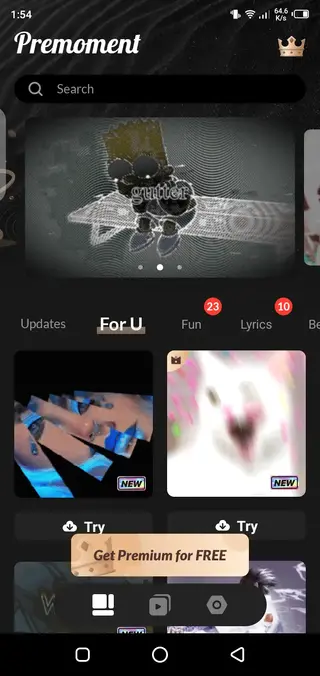
The app includes a large collection of filters, effects, and pre-made templates, so you can create professional-looking edits even if you have no editing background. You can also design slideshows from photos, adjust aspect ratios for different platforms, and customize details like timing, speed, and overlays.
Premoment runs on Android 6.0 and above and works well on most modern smartphones and tablets. The core version is free to use, while some advanced assets and tools are available through in-app purchases. A free tier with ads lets you try the main features before deciding if you want to upgrade.
To make any normal picture attractive and creative, then you just need to get this video editor. There are different types of features available for the users, through which you can make any picture attractive and creative, just like SloPro.
Why download Premoment APK from our website
Downloading the Premoment APK from our website lets you install the app directly on your Android device without searching around. You get the version that matches the information listed on this page, so you can start editing as soon as the download and installation finish.
Once installed, you can immediately access AI-powered photo tools, slideshow maker options, built-in music, and social export settings. This makes it easy to turn raw footage into finished content that fits platforms like Instagram Reels, YouTube Shorts, and TikTok.
Because the APK file is provided here, you can also keep a backup copy for future installs on your other compatible Android phones or tablets.
How Premoment is useful for creators
Premoment is useful for anyone who wants to upgrade their social media content without learning complex desktop editors. Templates and transitions save time by giving you ready-made structures for intros, outros, and full-length edits. You only need to insert your clips and photos.
AI-powered background removal and special effects help you create eye-catching visuals with minimal effort. You can quickly replace backgrounds, add glitch effects, or sync visual changes to music beats, which is helpful for reels, promotional content, or short vlogs.
The built-in slideshow maker is valuable for events, travel recaps, or product showcases. You can combine multiple photos, control duration, apply filters, and overlay music, then export a ready-to-share video in just a few minutes.
How to download and install Premoment APK
You can download the official Premoment APK file directly from our website and install it on any compatible Android device. Follow these steps to complete the process smoothly.
Scroll to the download section on this page.
Tap the APK download button for Premoment.
Wait for the APK file to finish downloading on your device.
Open your phone’s Settings and enable installation from unknown sources if prompted.
Locate the downloaded APK in your Downloads folder and tap it.
Confirm the installation and wait until the process completes.
Launch Premoment from your app drawer and start editing your photos and videos.
Once installed, you can update the app later by downloading the newer APK version from our website and installing it over the existing one.
Features
AI-powered photo and video editing
Use AI-assisted tools to enhance photos, apply effects, and style videos with minimal manual work.
Rich effects and filter library
Access a wide range of filters, glitch effects, overlays, and color styles for creative edits.
Slideshow maker from photos
Combine multiple images into a slideshow, control timing, transitions, and aspect ratio for different platforms.
Background remover
Automatically separate the subject from the background and replace it with built-in or custom backgrounds.
Built-in music collection
Browse a collection of music tracks and sound effects or import audio from your device for your edits.
Beat-synced editing
Align transitions and visual changes with music beats to create dynamic, rhythmic videos.
Pre-made templates and transitions
Start with ready-made templates and transition packs to build stylish edits quickly.
Video player and preview tools
Preview your edits smoothly inside the app and adjust details before exporting.
Screenshots
Editing tools and workflow
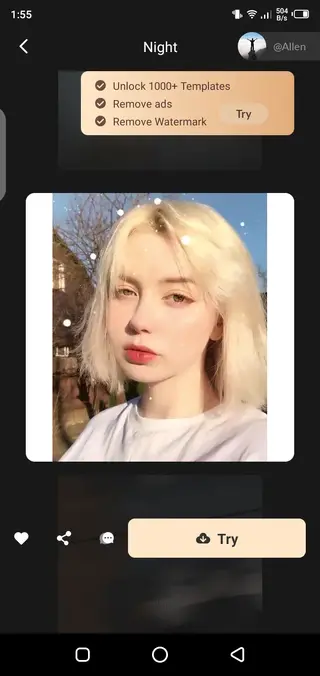
Premoment focuses on a simple workflow that starts with importing media from your gallery. You can add multiple clips and photos to the timeline, then apply filters, transitions, and music in a few taps. The interface is designed to be intuitive, so you can preview changes instantly and undo or adjust any step.
For photos, you can apply AI enhancements, adjust brightness and color, crop for specific platforms, or place them inside animated templates. For videos, you can trim, split, and reorder clips, then use transitions and effects to build a smooth story.
FAQs
Pros
- AI-powered tools simplify complex edits for beginners
- Large collection of filters, effects, and templates
- Built-in slideshow maker for photo-based videos
- Background removal and glitch effects for creative content
- Optimized for social media formats and quick sharing
Cons
- Advanced assets and premium tools require in-app purchases
- Contains ads in the free version
- Exports can be demanding on low-end devices
- Requires Android 6.0 or higher, so very old devices are not supported
Conclusion
Premoment is a practical video and photo editor for Android users who want fast, stylish results without complex software. With AI tools, templates, music beats, and slideshow features, it covers most needs for social content and personal projects. You can download the official Premoment APK directly from our website and start creating polished edits in minutes.




Comments
No approved comments yet.